Chrome 扩展权限:危险的那几项到底能让扩展做什么
最後更新:
扩展权限是扩展在 manifest.json 里声明的浏览器能力——cookies、历史等 API 访问权,以及对你访问的页面的主机访问权——Chrome 在安装时授予,以换取扩展承诺的功能。安装对话框用一两行概括它们,而计算领域里后果最重的一行,可能正是人们点得最快的一行:“读取和更改你在所有网站上的所有数据。”本指南点名把浏览器交出去的那几项权限,讲清扩展到底能用每一项做什么,说明为什么 Manifest V3 的方向更安全,并带你用浏览器扩展(CRX)权限检查器在两分钟内自己检查一个 .crx。
把浏览器交出去的那几项
Four asks matter above all others. cookies lets an extension read and modify the cookies of the sites you visit — and a session cookie is the token that proves to a site that you are signed in, so reading cookies can mean reading your signed-in sessions. history reads (and can delete) the list of everywhere you have been. webRequest lets an extension observe your network requests as they happen; its MV2 blocking form, webRequestBlocking, goes further and can block or redirect them, sitting directly in the path of your traffic. And the host pattern
Each one has honest uses: a session manager needs cookies, a research tool may need history, a privacy tool watches requests, and a page-customising tool touches every page. The permission is not the verdict — the match between the permission and the job is. A password manager asking for broad access is doing its stated job; a unit converter asking for the same four permissions is asking for your browsing life in exchange for arithmetic. Read the install prompt as a question: does THIS job need THIS access?
扩展到底能用每一项做什么
With cookies plus
Host breadth is a multiplier on all of it. The same cookies permission scoped to one site is a tool; scoped to 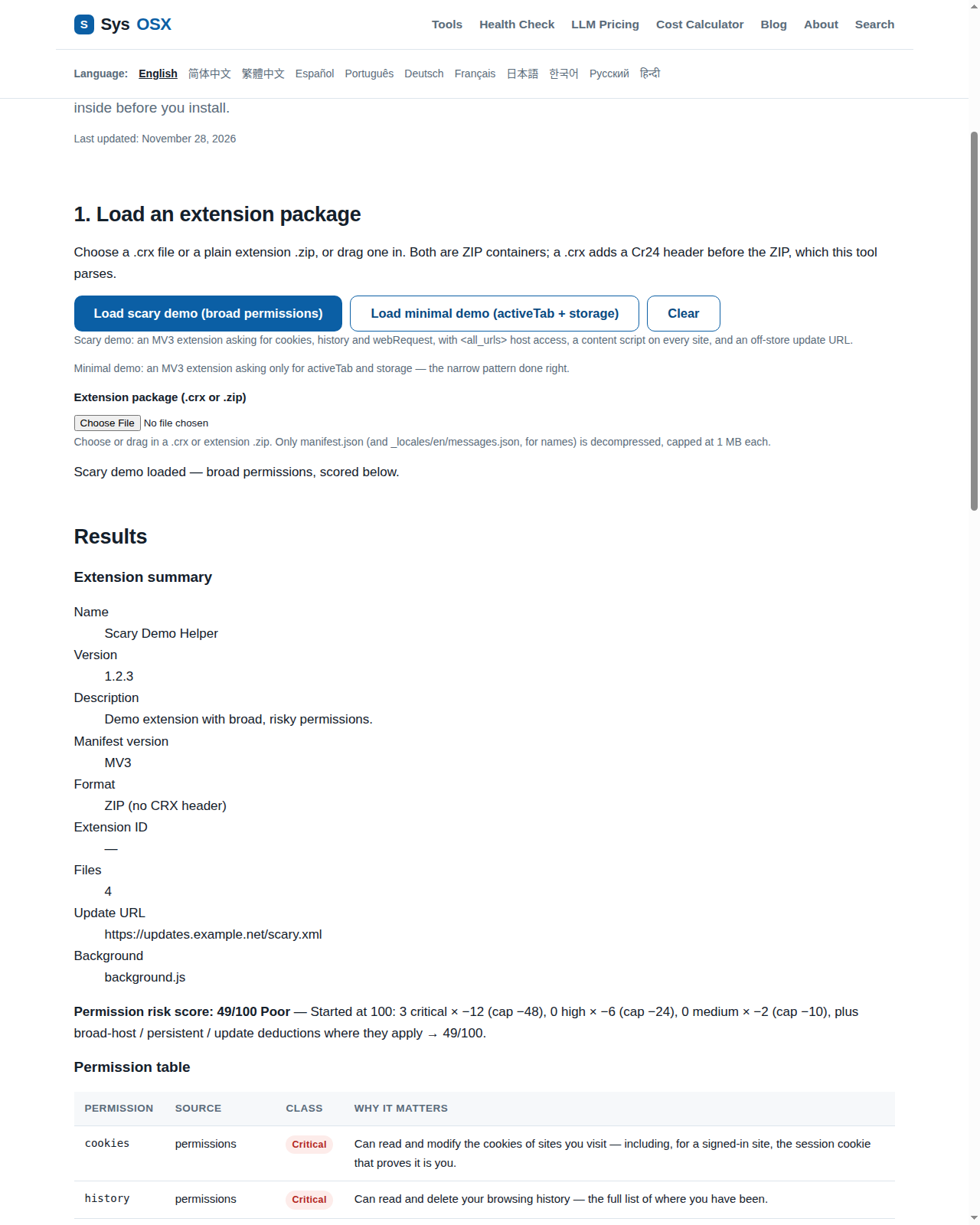
MV3 更安全的方向:declarativeNetRequest、activeTab、服务工作线程
Manifest V3 changed the shape of the dangerous asks. webRequestBlocking — the extension sitting in your traffic, reading and rewriting it — is replaced for most uses by declarativeNetRequest: the extension hands Chrome a list of rules (block this, redirect that), Chrome enforces them, and the extension never sees the requests themselves. Same feature for an ad blocker, radically less exposure for you. Where a tool genuinely needs to react to a page, activeTab offers the narrow path: no standing host access at all, just the one tab you clicked the extension on, until you navigate away.
MV3 also replaced the always-running background page with a service worker that wakes for events and sleeps when idle — less code running all the time, and no persistent page quietly holding state. None of this makes an MV3 extension automatically safe: MV3 extensions can still ask for cookies, history and
为什么“读取所有网站上的数据”值得在安装时停一下
Chrome's warning "This extension can read and change your data on sites you visit" (and its strongest form, on all sites) is generated from the manifest: host permissions and content-script matches. It is worth pausing on because it is the one moment the browser shows you the contract before you sign it. After install, the same access is silent — content scripts run on every page, and nothing in normal browsing shows you which extensions touched the page you are reading.
The pause takes ten seconds. Ask what the extension does, and whether doing it requires every site. A screenshot tool needs the current page (activeTab would do); a grammar checker plausibly needs the pages you type in; a theme or a coupon finder needs almost nothing. If the stated job and the requested reach do not match, the store page's privacy section and the permission list in this guide are a better guide than the star rating — popularity measures how many people clicked through the same prompt, not whether they should have.
可选权限与必需权限——以及检查器告诉不了你的事
Required permissions are granted at install: say no, and there is no extension. Optional permissions are declared too, but granted later, one at a time, when a feature needs them — Chrome prompts you at that moment, in context. Well-built extensions put their scariest access behind optional permissions: a history-cleaning tool that asks for history only when you press 'clean' is respecting the boundary, and an inspector should list optional permissions without scoring them like granted ones. When you review a manifest, read the split: what is taken up front, and what is only ever requested in context?
Then the honest limit, for this guide and for the inspector alike: a manifest states what an extension MAY do, never what it DOES do. It cannot tell you whether the code exfiltrates what it reads, whether the publisher sells data, or whether next month's update changes either — updates arrive with the permissions already granted, which is why the update source (store vs a private update_url) is itself a finding. Judging behaviour needs code review or store review. Judging declared access — proportionate or not — takes two minutes and a manifest, and it is the check anyone can run.
两分钟检查一个 .crx
Get the package: from the store, use a CRX-downloader extension or service to fetch the .crx; for a package you were sent, keep the file as-is — both .crx and plain extension .zip work. Open the Browser Extension (CRX) Permission Inspector, load the scary demo first to see a bad report (cookies, history, webRequest,
Read the report in this order: the score and its arithmetic (100 minus 12 per critical permission, capped at 48; minus 6 per high, capped at 24; minus 2 per medium, capped at 10; minus 10 for broad host access; minus 3 for a persistent background page; minus 5 for a non-store update URL), then the permission table row by row — each row says what the permission lets the extension do — then the findings. If the access matches the job, install with a clear head. If it does not, the two minutes just bought you the only cheap answer in extension safety: no.
自己试试:一个最小的 MV3 清单
{
  "manifest_version": 3,
  "name": "Minimal Demo Extension",
  "version": "0.1.0",
  "permissions": ["activeTab", "storage"],
  "background": { "service_worker": "sw.js" }
}