Introduction
Have you ever wondered if unused or orphaned resources are silently consuming credits in your Azure subscription? These stray resources, like unattached disks or unused IPs, can rack up costs over time. Fortunately, Azure Orphaned Resources v3.0 is here to help! This powerful tool enables you to identify, manage, and delete orphaned resources, ensuring a clean and cost-efficient subscription.
In this article, we’ll explore the features, benefits, and setup process of Azure Orphaned Resources v3.0 to help you take control of your Azure environment.
What Are Orphaned Resources?
Orphaned resources are unused or unattached Azure resources, such as managed disks, public IPs, or network interfaces, that remain active in your subscription. While they no longer serve a purpose, they continue to incur charges, making it essential to identify and remove them.
Key Features of Azure Orphaned Resources v3.0
Azure Orphaned Resources v3.0 offers a range of features that simplify resource management:
1. Resource Deletion
- Direct Deletion: Delete orphaned resources directly from the workbook interface.
- Enable Deletion: By default, this feature is disabled. Enable it for secure and controlled deletion.
2. Resource Group Filtering
- Filter resources by specific resource groups, making it easier to locate and manage orphaned resources within your subscription.
3. Comprehensive Overview
The workbook provides detailed insights into various orphaned resources, including:
- Availability Sets: Lists sets not associated with any VMs or VM Scale Sets.
- Managed Disks: Highlights unattached managed disks.
- Public IPs: Displays unused public IPs.
- Network Interfaces: Identifies unattached network interfaces.
- Network Security Groups (NSGs): Shows NSGs not linked to any subnet or interface.
- Route Tables: Highlights route tables not attached to subnets.
- Load Balancers: Lists load balancers with empty backend pools.
- Application Gateways: Identifies gateways without backend targets.
- Virtual Networks (VNETs): Displays VNETs without subnets.
4. Visualization and Reporting
- Tiles and Charts: Visualize orphaned resources by location, SKU, and more using tiles and pie charts.
- Detailed Tables: Export detailed tables for further analysis and reporting.
How to Set Up Azure Orphaned Resources v3.0
Follow these steps to install and use the workbook:
Step 1: Access the Workbook
- Log in to the Azure Portal.
- Navigate to Azure Workbooks.
Step 2: Create a New Workbook
- Click + Create > + New.
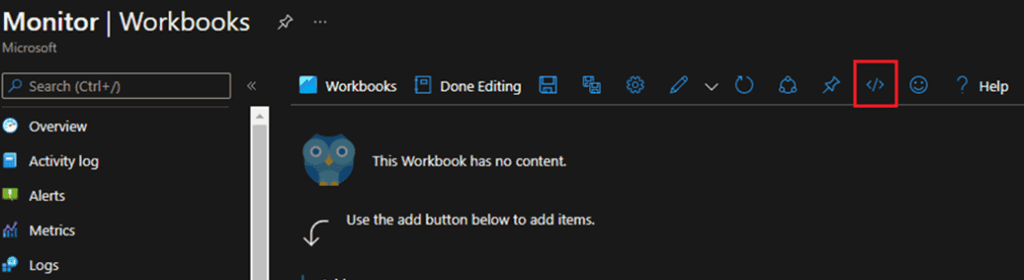
- Open the Advanced Editor using the
</>button. - Replace the JSON code with the provided code for Azure Orphaned Resources v3.0. orphaned resources JSON
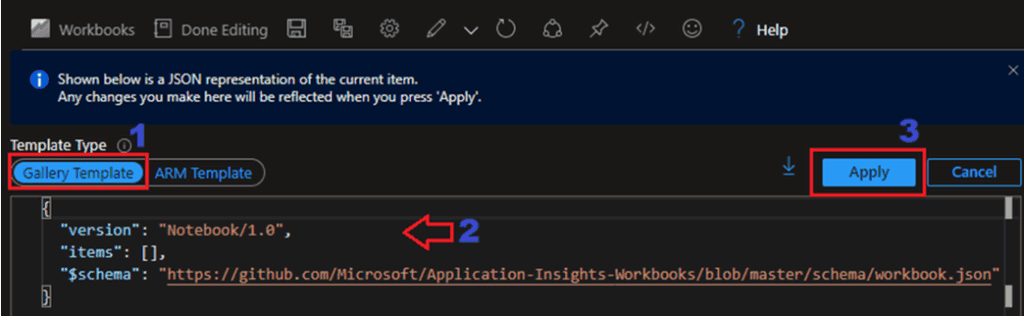
Step 3: Save the Workbook
- Click Apply and then Save.
- Provide a name and save it under your desired subscription, resource group, and location.

Step 4: Start Using the Workbook
- Go to Workbooks in the Azure portal.
- Open the Azure Orphaned Resources workbook.
- Filter resources by subscription or resource group for targeted cleanup.
Why Use Azure Orphaned Resources v3.0?
Here’s why this tool is a must-have for Azure users:
- Cost Optimization: Eliminate unnecessary charges by removing unused resources.
- Streamlined Management: Access a centralized view of orphaned resources.
- Improved Efficiency: Save time with direct deletion and detailed filtering options.
- Data-Driven Decisions: Use visualizations and reports to analyze resource usage.
Conclusion
Azure Orphaned Resources v3.0 is the ultimate solution for identifying and managing unused resources in your Azure subscription. By leveraging its powerful features, you can save money, optimize your environment, and maintain a clean subscription.
Ready to take control of your Azure resources? Start using Azure Orphaned Resources v3.0 today and experience the difference!
Call-to-Action (CTA)
Try Azure Orphaned Resources v3.0 now! Visit the Azure Portal or download the workbook from the GitHub repository.