Introduction
Provide a brief overview of the Netsh utility and its importance in network management. Highlight its key features, such as scripting support, remote execution, and troubleshooting capabilities.
Table of Contents
Content Optimization
1. What is Netsh Utility?
Netsh (Network Shell) is a powerful Windows command-line tool for configuring and troubleshooting network settings. It interacts with system components via dynamic-link libraries (DLLs) and supports various contexts like advfirewall, wlan, and winhttp.
2. General Syntax of Netsh Commands
netsh [-a AliasFile] [-c Context] [-r RemoteMachine] [-u [Domain\]UserName] [-p Password|*] [Command | -f ScriptFile]
Explain the syntax parameters briefly, highlighting their use cases.
3. Deep-Dive into Netsh Tracing
Collecting Traces:
Use the netsh trace context to capture network events and packets for diagnostics.
- Command to show scenarios:
netsh trace show scenarios
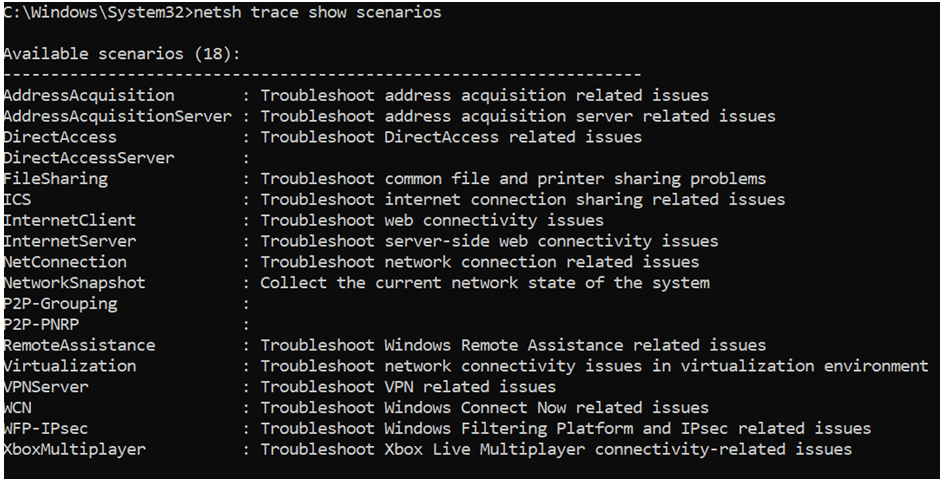
- To display providers for a specific scenario:
netsh trace show scenario <Scenario name>
Important Parameters:
Detail the key parameters like scenario, capture, report, persistent, traceFile, etc., with examples.
Common Trace Commands:
- Start tracing:
netsh trace start scenario=InternetClient capture=yes tracefile=C:\temp\trace.etl
- Stop tracing:
netsh trace stop
Advanced Options:
Provide advanced tracing examples with options like maxsize, filemode, and overwrite.
Convert ETL to CAP:
Explain how to convert ETL files for use in tools like Wireshark:
netsh trace convert input=trace.etl output=trace.cap
4. Filtering Network Captures with Netsh
Basic Filters:
Highlight commonly used filters, such as:
- Capture traffic to/from a specific IPv4 address:
IPv4.Address == x.x.x.x
Protocol-Specific Filters:
- Capture DNS traffic:
DNS
Advanced Filters:
Provide examples like capturing TCP handshake packets:
TCP.Flags.SYN == 1 AND TCP.Flags.ACK == 0
5. Key Netsh Contexts and Use Cases
IP Configuration:
- Set a static IP:
netsh interface ip set address "Ethernet" static 10.0.0.5 255.255.255.0 10.0.0.1
Reset Winsock and TCP/IP Stack:
- Reset TCP/IP stack:
netsh int ip reset
Operating Firewall:
- Add a firewall rule:
netsh advfirewall firewall add rule name="Allow Ping" dir=in action=allow protocol=icmpv4
Configuring WinHTTP Proxy:
- Set proxy:
netsh winhttp set proxy "proxy:8080" "<local>"
Commonly used netmon filters to analyze network capture:
Basic Filters
| Filter | Purpose |
| IPv4.Address == x.x.x.x | Captures traffic to/from a specific IPv4 address. |
| IPv4.SourceAddress == x.x.x.x | Filters traffic from a specific source IP. |
| IPv4.DestinationAddress == x.x.x.x | Filters traffic to a specific destination IP. |
| IPv6.Address == xxxx::xxxx | Filters IPv6 traffic to/from a specific address. |
| TCP.Port == 80 | Captures traffic on a specific TCP port (e.g., 80 for HTTP). |
| UDP.Port == 53 | Captures traffic on a specific UDP port (e.g., 53 for DNS). |
Protocol-Specific Filters
| Filter | Protocol | Description |
| DNS | DNS | Captures DNS queries and responses. |
| HTTP | HTTP | Captures HTTP traffic (can be further filtered with methods). |
| TCP | TCP | Captures all TCP traffic. |
| UDP | UDP | Captures all UDP traffic. |
| SMB2 | SMB | Captures SMBv2 file-sharing traffic. |
| Kerberos | Kerberos | Captures Kerberos authentication packets. |
| LDAP | LDAP | Captures LDAP queries/responses. |
Conversation Filters
| Filter | Purpose |
| IPv4.SourceAddress == x.x.x.x AND IPv4.DestinationAddress == y.y.y.y | Filters traffic between two specific hosts. |
| TCP.SourcePort == 12345 AND TCP.DestinationPort == 80 | Filters a specific client-server session. |
Application Layer Filters
| Filter | Example |
| HTTP.Request.Method == “GET” | Captures only GET requests. |
| HTTP.Host == “example.com” | Filters HTTP traffic to a specific domain. |
| DNS.QryName == “example.com” | Filters DNS queries for a specific domain. |
| SMB2.CreateRequest.FileName == “filename.txt” | Captures file access in SMB traffic. |
Advanced Filters
| Filter | Purpose |
| TCP.Flags.SYN == 1 AND TCP.Flags.ACK == 0 | Captures SYN packets (start of TCP handshake). |
| TCP.Flags.FIN == 1 | Captures FIN packets (end of TCP session). |
| TCP.Flags.Reset == 1 | Captures TCP RST packets (connection resets). |
| Frame.Length > 1000 | Captures only packets larger than 1000 bytes. |
Key Netsh Contexts and Use-Case
netsh interface ip set address “Ethernet” static 10.0.0.5 255.255.255.0 10.0.0.1
netsh interface ip set dns “Ethernet” static 1.1.1.1
netsh interface ip set address “Ethernet” dhcp
Reset Winsock and TCP/IP Stack
netsh int ip reset
netsh winsock reset
netsh advfirewall firewall add rule name=”Allow Ping” dir=in action=allow protocol=icmpv4
netsh advfirewall firewall add rule name=”Allow RDP” dir=in action=allow protocol=TCP localport=3389
netsh advfirewall set allprofiles state on
netsh advfirewall export “C:\\backup\\fwconfig.wfw”
netsh winhttp show proxy
netsh winhttp set proxy “proxy:8080” “<local>”
netsh winhttp reset proxy
6. Conclusion
Summarize the versatility of Netsh as a tool for network management and troubleshooting. Encourage readers to explore more contexts and commands using official Microsoft documentation.