存取 Azure 檔案共用有時會導致錯誤,尤其是在使用從 Azure 入口網站複製的掛載指令碼時。一個常見問題是 “Access Denied” 錯誤,在將 Azure Files 設定為 Azure Virtual Desktop (AVD) 環境的一部分時可能會發生。本指南探討該問題的根本原因並提供解決方法,比較了 Net Use command 方法與 Azure 入口網站指令碼 方法。
關鍵使用案例
此疑難排解場景通常出現在以下環境中:
- FSLogix Profile Containers 與 Azure Files 結合使用。
- Azure 儲存體帳戶 已加入 本機 Active Directory (AD)。
- 群組原則物件 (GPO) 限制認證儲存,導致驗證失敗。
問題概覽
當嘗試使用 Azure 入口網站提供的指令碼掛載 Azure 檔案共用時,使用者可能會遇到 “Access Denied” 錯誤。即使在以下情況下,此問題仍然存在:
- 使用新的 AVD 主機。
- 使用不同的使用者帳戶進行測試。
觀察結果
- 記錄中的錯誤
- 後端記錄(透過 DGrep 和 Log Collector 收集)顯示 Access Denied 錯誤。
- 該錯誤包括 “KerberosClientOtherError”,這表示正在使用 Kerberos 驗證,而不是 儲存體帳戶金鑰 認證。
- 有效方法與無效方法比較
- Net Use Command:使用儲存體帳戶金鑰成功掛載 Azure 檔案共用。
- Azure 入口網站指令碼:失敗,原因是使用了 Kerberos 驗證,而不是提供的儲存體帳戶金鑰。
根本原因
該問題由以下因素造成:
- 認證管理員行為
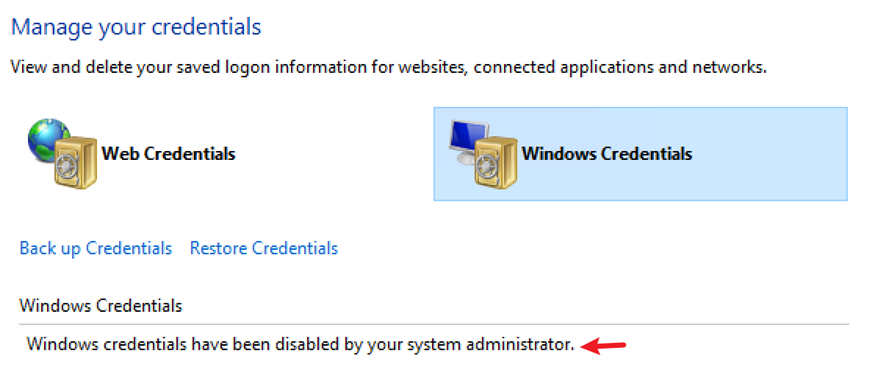
- Azure 入口網站指令碼將儲存體帳戶認證儲存到 Windows 認證管理員。
- 如果認證無法快取(由於 GPO 限制或快取失敗),指令碼將預設使用目前使用者的認證進行驗證。
- 群組原則限制
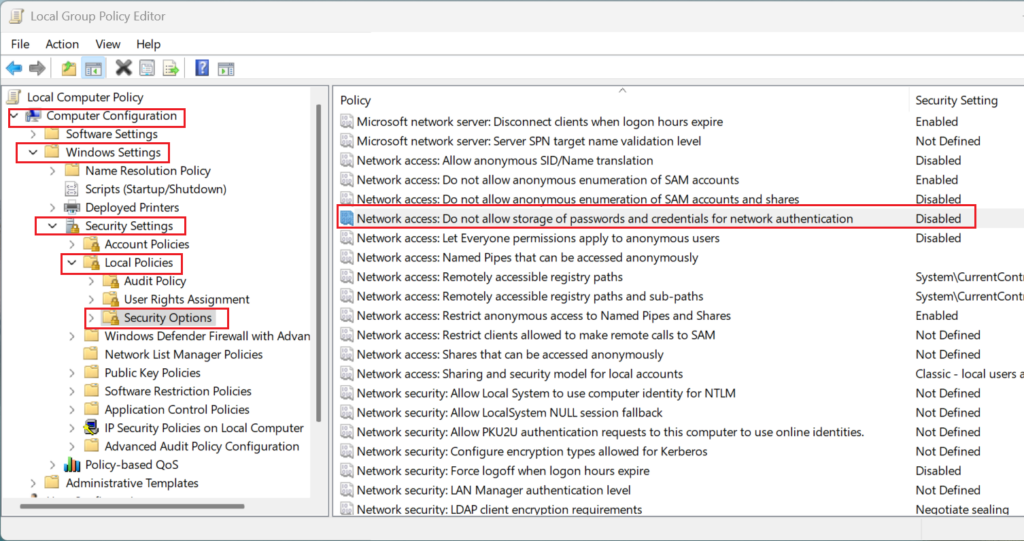
- GPO 設定 “Network access: Do not allow storage of passwords and credentials for network authentication” 會阻止認證管理員儲存認證。
- 因此,系統會嘗試 Kerberos 驗證,但由於 NTFS 權限不足而失敗。
疑難排解步驟
步驟 1:驗證錯誤
對兩種方法執行網路追蹤分析:
- Net Use Command:使用儲存體帳戶金鑰成功建立 SMB 連線。
- Azure 入口網站指令碼:嘗試 Kerberos 驗證,導致 Access Denied 錯誤。
步驟 2:使用 Net Use 命令測試
以下 Net Use command 會繞過認證管理員,並直接提供儲存體帳戶金鑰進行驗證:
net use <desired-drive-letter>: \\<storage-account-name>.file.core.windows.net\<share-name> <storage-account-key> /user:Azure\<storage-account-name>
為什麼這樣有效:
- 認證在命令中明確提供。
- 不依賴認證管理員或 Kerberos 驗證。
步驟 3:分析群組原則設定
執行以下命令以檢查群組原則設定:
gpresult /h c:\temp\computer.html
檢查產生的 HTML 檔案,尋找 GPO 設定:
“Network access: Do not allow storage of passwords and credentials for network authentication”
如果啟用了此設定,Azure 入口網站指令碼就無法在認證管理員中儲存認證,從而導致驗證失敗。
步驟 4:解決方法
停用限制性 GPO
- 開啟 群組原則管理 在網域控制站上。
- 找到該原則:
Computer Configuration\Windows Settings\Security Settings\Local Policies\Security Options
- Network access: Do not allow storage of passwords and credentials for network authentication。
- 將該原則設定為 Disabled。
停用此原則後,Azure 入口網站指令碼就可以在認證管理員中儲存認證,從而實現成功的驗證。
比較:Net Use 命令與 Azure 入口網站指令碼
| 方法 | 驗證機制 | 相依性 | 結果 |
|---|---|---|---|
| Net Use Command | 儲存體帳戶金鑰 | 無認證管理員 | 成功 |
| Azure 入口網站指令碼 | Kerberos(如果快取失敗則退回) | 認證管理員 | 如果 GPO 限制快取,則失敗 |
其他提示
- 在實驗室環境中測試
透過啟用 GPO 設定來模擬此問題:
Network access: Do not allow storage of passwords and credentials for network authentication。 - 文件參考
遵循官方指南: 使用 Azure Files 和 AD DS 或 Microsoft Entra 網域服務設定 FSLogix 設定檔容器。 - 網路設定
確保連接埠 445 已為 SMB 流量開放。如果遭到封鎖,請使用 Azure VPN 或 ExpressRoute 來通道傳輸 SMB 流量。
結論
使用 Azure 入口網站指令碼掛載 Azure 檔案共用時出現的 Access Denied 錯誤通常是由於阻止認證快取的限制性 GPO 設定造成的。使用 Net Use command 提供了一種可靠的解決方法,它繞過認證管理員並直接提供儲存體帳戶金鑰。停用限制性 GPO 可以解決 Azure 入口網站指令碼方法的問題。