Inspecting a ZIP Archive Before You Extract It
Last updated:
Archive inspection is the practice of reading a ZIP file’s central directory — the index of entry names, sizes, compression ratios and flags stored at the end of the file — to judge the archive before anything extracts it. Extraction is the dangerous moment: it is when a traversal name writes outside your folder and when a bomb expands onto your disk. The central directory lets you look first, because everything an extractor will do is already described there. This article explains what that index is, how much it reveals, the two attacks that live in it — zip slip and zip bombs — why encrypted and nested entries worry the gateways that scan your mail, and how to inspect a suspicious ZIP in two minutes with the ZIP Archive Inspector, which reads the directory in your browser and never decompresses a byte.
What archive inspection is, in one sentence
A ZIP file is two things: a sequence of entries, each with a local header and (usually compressed) data, and — at the very end — a central directory that indexes all of them, closed by an End Of Central Directory record. The format is defined by PKWARE’s APPNOTE specification, first published in 1989 and still maintained today. Archive inspection means working from that index alone: for each entry you get its name, its compression method, its compressed and uncompressed sizes, its CRC-32 checksum, its modification time and its general-purpose flags — without touching the entry data at all.
That restraint is the point. Decompressing an archive you do not trust means running the exact operation the archive was designed to trigger, on a machine you care about. Reading its directory is a purely structural act: the bytes are interpreted as records, never expanded, never written to disk, never executed. A browser can do it with the File API — the page reads the file you drop in, parses the records locally, and nothing is uploaded. Inspection is therefore the safe first step for any archive that arrived from somewhere you did not choose: a supplier’s “updated driver pack”, a forum download, an attachment that almost looks right.
What the central directory tells you
More than most people expect. The names alone sketch the archive’s intent: a document bundle reads differently from a dropper carrying run.sh and an .exe at its root. Sizes tell a second story — an entry that is 1 KB compressed and 1 GB uncompressed is not a document, it is a statement. Ratios make that precise: ordinary text and code compress between 2:1 and 10:1, already-compressed media barely compresses at all, so a four-figure ratio means the content is something like zeros, spaces or repeated patterns — sometimes legitimate (disk images, logs), often a bomb. Flags add the rest: bit 0 marks encryption, bit 11 marks UTF-8 names, and the method field separates plain stored and deflated entries from bzip2, LZMA and other methods many tools cannot read.
The directory also exposes the quiet anomalies. Duplicate names — two entries claiming the same path — make extraction ambiguous, because tools disagree about which copy wins; that ambiguity is a classic place to hide a swapped file. Zero-byte entries are usually placeholders, but in a release archive they can mark a failed write. An archive comment and per-entry comments sometimes carry the sender’s own notes. And the total counts matter: an archive with 50,000 entries will choke some gateways and extractors outright. None of this requires opening a single entry — it is all in the index, waiting to be read before you commit to extraction. 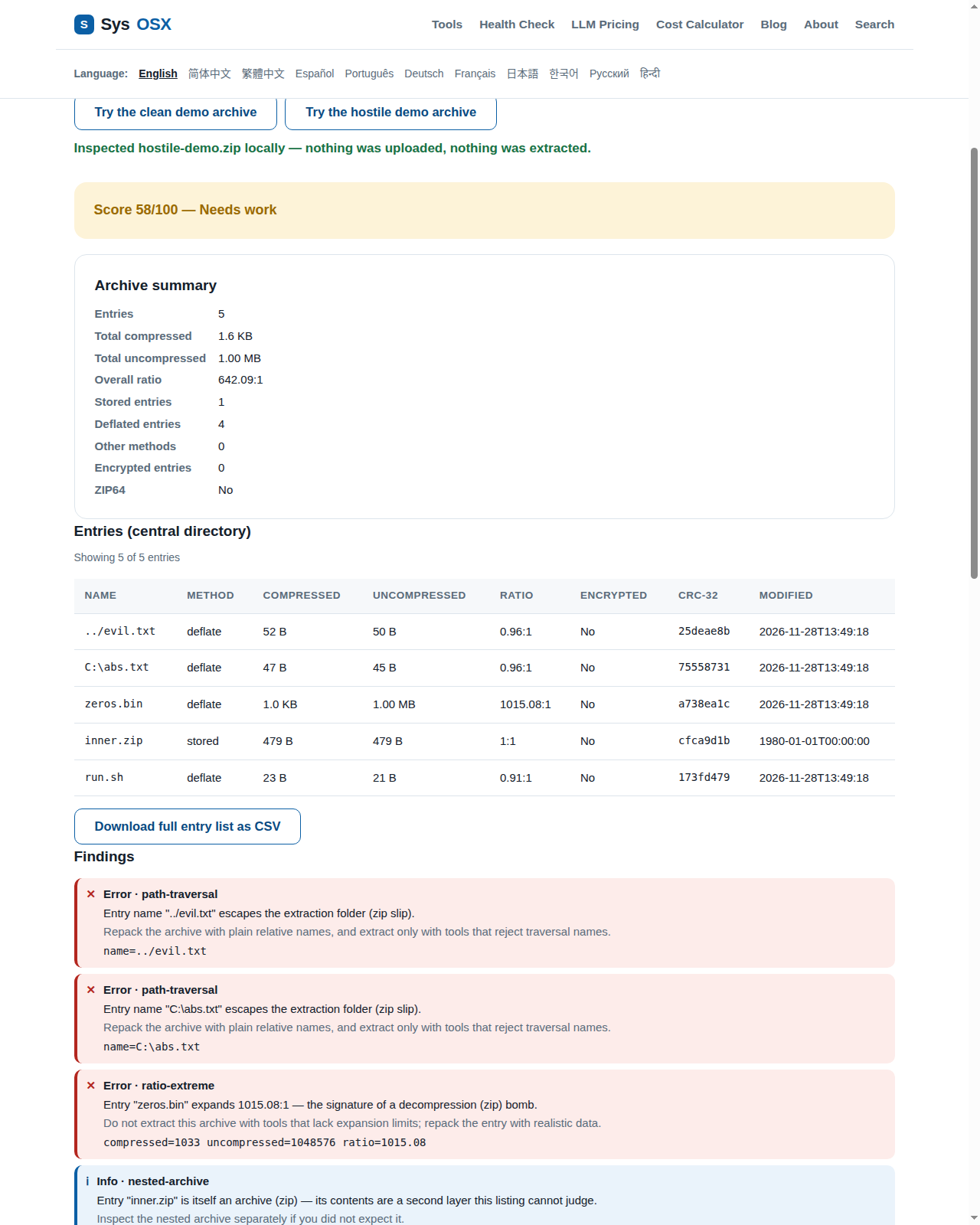
Zip slip: the attack that lives in a name
Zip slip is a path-traversal vulnerability in extraction code, documented across ecosystems by Snyk’s security research team in 2018 after they found it in thousands of projects and in libraries from major vendors. The archive carries an entry whose name is not a plain file name at all: ../../evil.sh, an absolute path like /etc/cron.d/x, or a Windows drive path. A vulnerable extractor joins the destination folder and the entry name and writes — landing outside the folder it was supposed to stay inside, overwriting configuration files, startup scripts or executables. The victim does nothing exotic; they just extract an archive with a library that never validated names.
Two things follow for defenders. First, the vulnerability is in the extractor, but the evidence is in the archive: every traversal name is visible in the central directory before extraction, so inspection catches the attempt whether or not your extractor is patched. Second, defence in depth still matters — extract with maintained tools, extract into a fresh empty folder, and treat archives from untrusted sources as code, because once extracted, that is what they become. An inspector flags three name shapes as errors: any name containing a .. segment (with either slash), any name starting with a slash or backslash, and any name beginning with a drive letter.
Zip bombs: the attack that lives in a ratio
A zip bomb is an archive engineered to expand far beyond its size — exhausting disk, memory or scanner time when something tries to extract or scan it. The classic construction is a large block of highly compressible data: zeros deflate at better than 1000:1, so a megabyte on the wire becomes a gigabyte-class payload in a few layers. Nesting multiplies it: an archive inside an archive inside an archive, each layer multiplying the expansion, which is how the famous 42.zip turns 42 KB into petabytes across five levels. Quota-style bombs instead use overlapping entries that reference the same compressed data many times.
Ratios are the tell, and they are right there in the directory. A single entry expanding more than 100:1 deserves a look; more than 1000:1 is an error in this tool’s scoring, because almost nothing legitimate compresses that far except sparse images and zero-filled logs — and those you can explain. The whole-archive ratio matters too: past 100:1 overall with more than a gigabyte uncompressed, an archive is scored as a likely bomb. Legitimate archives essentially never look like that; office documents, code and media sit in single digits. When a scanner or gateway refuses a file “for size”, this arithmetic is usually why.
Encrypted entries, nested archives, and the gateways that worry about both
An encrypted entry sets bit 0 of its general-purpose flag, and from that moment its contents are opaque to everyone without the password — including the mail gateway and antivirus that were supposed to scan the attachment. That is why so many corporate gateways block encrypted archives outright: not because encryption is malicious, but because it defeats the one control standing between the attachment and the inbox. Attackers know this, and “the password is in the email body” became a standard delivery trick: the gateway sees a harmless encrypted blob, the victim types the password, and the payload opens past every scanner. Inspection cannot open the entry either — but it can flag the flag, which is the fact the gateway policy actually turns on.
Nested archives create the same blind spot one layer down. A .zip inside a .zip, a .jar inside a .war: scanners have recursion limits, and each layer costs time, so depth is a dial attackers turn. The formats multiply the surface, because ZIP is not just .zip — it is the container under .docx, .xlsx and .pptx, under Java’s .jar and .war, under Android’s .apk and iOS’s .ipa (the IPA Analyzer reads one of those from the inside), under .odt, .epub and browser-extension .crx files. Anything that inspects archives has to treat “an entry that is itself an archive” as a finding in its own right: not damning, but a promise that the first listing is not the whole story.
What inspection cannot prove — and the two-minute routine
Metadata has a hard limit: it describes the archive, not the contents. Inspection cannot tell you whether the spreadsheet inside is malicious, whether an executable is signed by who it claims, or whether the entries even decompress to what their CRCs promise — this tool never decompresses, so it cannot check. A clean score means the listing shows no traversal names, no bomb-like ratios, no encryption, no duplicates and nothing unexpected — it is a statement about the directory, not a safety certificate for the payload. Deciding about contents needs an antivirus verdict or a sandbox detonation, on a machine that is not yours.
The routine itself takes two minutes. Drop the archive into the ZIP Archive Inspector — in the browser, nothing uploaded, nothing extracted. Read the score (100 minus 12 per error capped at 60, 4 per warning capped at 24, 1 per info capped at 8; 90+ Excellent, 70–89 Good, 50–69 Needs work, below 50 Poor) and then the findings behind it. Scan the entry table for names you did not expect, executables at the root, and any nested archive worth inspecting separately. Export the entry list as CSV if the archive will be kept or forwarded — the listing is the evidence. The tool’s hostile demo, built from a traversal name, a drive-letter path, a megabyte of zeros, a nested archive and a shell script, scores 58: a fair picture of an archive you should not extract on a machine you care about.
The hostile demo, as the inspector reports it
hostile-demo.zip — central directory inspection (metadata only, nothing extracted)
entries: 5 - compressed 1,634 B - uncompressed 1,049,171 B - overall ratio 642.09:1
ERROR   path-traversal      ../evil.txt
ERROR   path-traversal      C:\abs.txt
ERROR   ratio-extreme       zeros.bin (expands 1015.08:1)
WARNING overall-ratio-high  the whole archive expands 642.09:1
INFO    nested-archive      inner.zip
INFO    executable-entry    run.sh
score: 58/100 - Needs work