What Is Inside a .mobileconfig File
Last updated:
A .mobileconfig file is an Apple configuration profile: a property list (plist) that tells an iPhone, iPad or Mac what to do — join a Wi-Fi network, connect a VPN, trust a root certificate, enrol in device management, or lock features down. It arrives by email, from a web page, or from an MDM server, and installing it hands those settings to the device with no further questions. This article opens a real profile and reads it key by key, so you can tell a routine corporate setup from a profile that takes over the device. If you want to check a profile of your own, the .mobileconfig Inspector parses it in your browser — nothing is uploaded — and scores its risk.
A profile is a plist with a job to do
Strip away the extension and a .mobileconfig file is an XML property list whose top-level PayloadType is "Configuration". Inside it, PayloadContent holds an array of payload dictionaries, and each payload does one job. The profile itself carries the bookkeeping: PayloadIdentifier, a reverse-DNS string such as com.example.corp.profile that decides whether a new copy replaces an old one or sits alongside it; PayloadUUID, a unique id; PayloadDisplayName, the name you see on screen; PayloadOrganization, who it claims to be from; and PayloadRemovalDisallowed, which on a supervised device stops the user removing the profile at all.
Each payload repeats the same bookkeeping — its own PayloadType, PayloadVersion, PayloadIdentifier, PayloadUUID and PayloadDisplayName — and then adds the keys for its job. The type names are the giveaway: com.apple.wifi.managed is a Wi-Fi network, com.apple.vpn.managed is a VPN, com.apple.security.root is a root certificate, com.apple.mdm is device-management enrolment, com.apple.proxy.http.global is a global HTTP proxy, and com.apple.applicationaccess is the restrictions payload — note that name, because the tempting guess com.apple.restrictions does not exist. Apple documents all of this in the Configuration Profile Reference, a 123-page PDF dated 2019-05-03, which is still the primary source for the key tables.
Reading a real profile: the demo, payload by payload
The demo profile in the inspector is called "Corp Standard Profile", identifier com.example.corp.profile, UUID f151431d-0441-4b2e-a3a6-241449504be8, organisation "Example Corp", and it allows removal (PayloadRemovalDisallowed is false). It has three payloads. The first is Wi-Fi: SSID CorpWiFi, encryption WPA2, password stored in the profile as plain text — CorrectHorseBatteryStaple — with HIDDEN_NETWORK false and AutoJoin true. That password-in-plain-text is normal for profiles and exactly why the inspector masks secrets by default: a profile is a text file, and anyone who can read it can read the password. The code sample below is that Wi-Fi payload, verbatim. 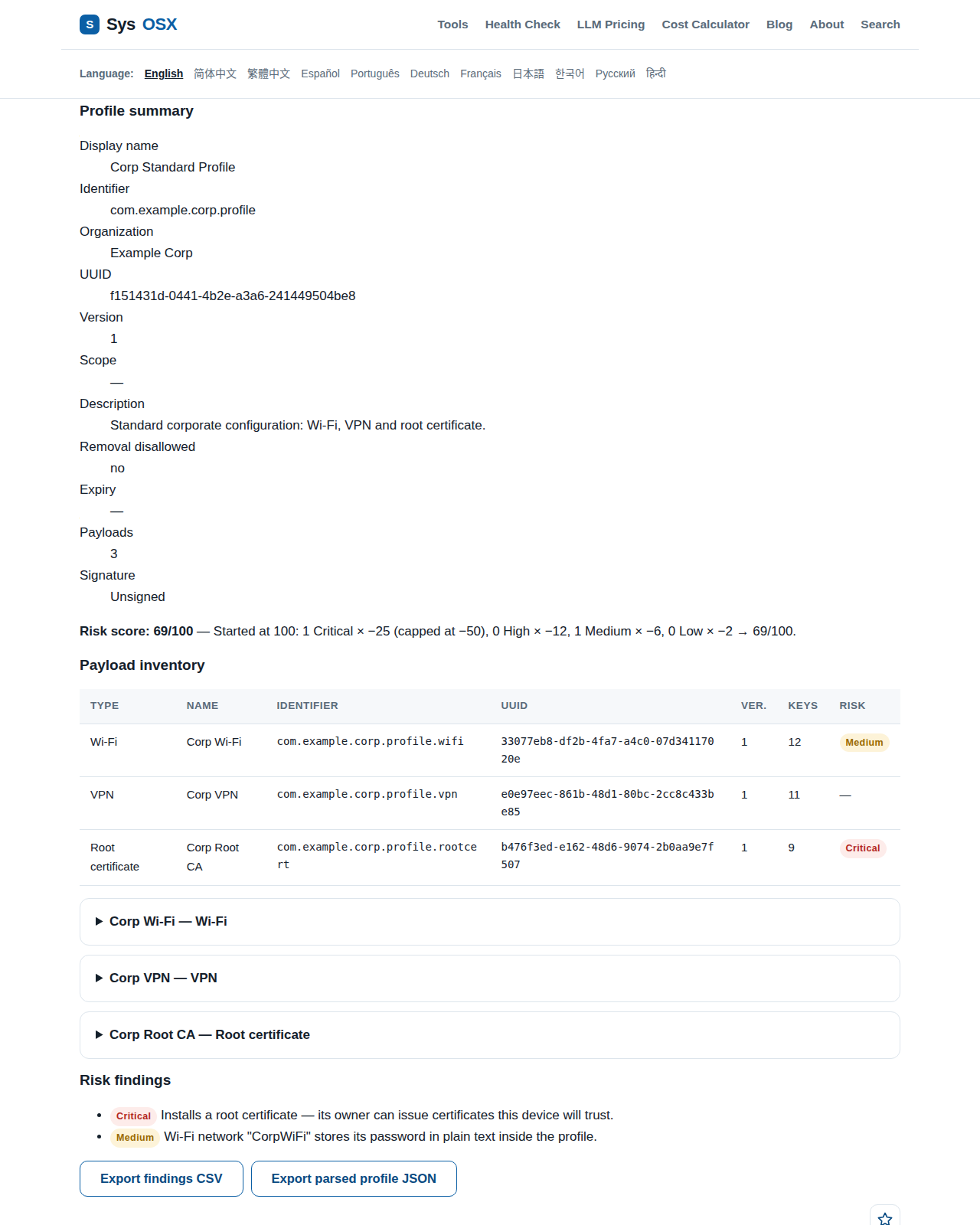
The second payload is a VPN: type com.apple.vpn.managed, IKEv2, and the server address lives under IKEv2.RemoteAddress — vpn.example.com — because VPN payloads have no ServerAddress key at all. LocalIdentifier is [email protected], RemoteIdentifier is vpn.example.com, AuthenticationMethod is SharedSecret, and the shared secret is again plain text in the file. OnDemandEnabled is the integer 0, not a boolean — Apple stores it as an integer, and a boolean true there would be malformed rather than enabled. The third payload is a root certificate: file CorpRootCA.cer, 752 bytes of DER, subject and issuer both "Corp Root CA", serial 4096, valid 2025-01-01 to 2035-01-01, self-signed, RSA 2048, SHA-256 fingerprint FC:70:A5:0E:B6:AC:C2:AD:31:FD:6F:25:E2:13:3F:EB:38:0F:CE:20:F8:13:90:2C:99:56:6D:F1:94:DA:41:47.
The payloads that should make you pause
The inspector ships a second demo on purpose: a "Suspicious Profile" that shows what a hostile or careless profile looks like. It names no organisation at all, it forbids removal, and it carries three payloads that are individually the most powerful things a profile can do. The first is MDM enrolment: ServerURL https://mdm.example.net/profile, CheckInURL https://mdm.example.net/checkin, and AccessRights 8191 — every one of the 13 bits set, which means the server may inspect and install or remove profiles, lock the device and remove its passcode, erase the device, query device and network information, inspect and install or remove provisioning profiles, inspect apps, run restriction and security queries, manipulate settings, and manage apps.
The same MDM payload has a second tell: its Topic is com.example.mdm.push, but a valid MDM push topic must begin with com.apple.mgmt. — so this one would not even work as a real enrolment, which is the kind of sloppiness that marks a fake. The second payload is a global HTTP proxy, type com.apple.proxy.http.global, Manual, proxy.example.net:8080 — every HTTP request through a server you did not choose. The third is another root certificate, Example Root CA, serial 4097, valid 2024-06-01 to 2034-06-01, SHA-256 fingerprint 12:A6:6A:C9:6A:40:6A:DC:86:1C:C9:1E:EB:8C:7D:F5:41:EB:42:61:DD:DF:EE:36:2E:66:E1:3A:11:FF:DE:86. Root certificate plus MDM plus global proxy, from an unnamed source, that you cannot remove: that combination is the whole reason to read a profile before installing it. The inspector scores this demo 2 out of 100.
Signed vs unsigned: what a signature actually proves
A profile can be signed: the XML plist is wrapped in a DER-encoded CMS SignedData envelope (RFC 5652), which carries the signer certificate and the digest algorithm — sha256 in the signed demo. The inspector detects the envelope, extracts the plist inside, and reports the signer. In the signed demo the signer is Corp Root CA, the same self-signed certificate the profile itself installs, serial 4096. A signature proves two things: the bytes have not changed since signing, and which certificate signed them. It proves nothing about whether the signer is trustworthy, whether the payloads are safe, or whether Apple has anything to do with it. A self-signed certificate proves even less: anyone can make one with any name on it.
Just as important is what the inspector does not claim. There is no WebCrypto API that verifies a CMS/PKCS#7 signature, and the browser does not hand out Apple's root store or revocation data, so chain trust cannot be verified in the browser at all. The tool says so plainly — "signature present, chain not verified" — instead of showing a reassuring verified badge that would be a lie. On the other side, an unsigned profile is not automatically malicious: plenty of legitimate profiles are unsigned, because signing requires a certificate and a build step many small deployments skip. What matters is the combination: an unsigned profile from an unknown organisation, with a root certificate and removal forbidden, is a very different thing from an unsigned profile from your employer that only joins the office Wi-Fi.
What the inspector checks — and what it cannot
The inspector parses the profile locally and walks every payload with type-aware labels, so a VPN shows its IKEv2 remote address and authentication method while a certificate shows subject, issuer, serial, validity, SHA-256 fingerprint, self-signed status and CA flag. It decodes MDM AccessRights into the 13 named bits and flags the dependency rules — install/remove profiles (bit 2) requires inspect profiles (bit 1), and install/remove provisioning profiles (bit 128) requires inspect provisioning profiles (bit 64). It flags weak Wi-Fi (WEP or no encryption), always-on and on-demand VPN, removal disallowed, an unsigned profile with no organisation, a full-rights MDM enrolment, an invalid MDM topic, proxy credentials stored in the profile, expired or soon-to-expire certificates, and unknown payload types. The score starts at 100 and subtracts by severity — Critical −25 each capped at −50 for the band, High −12, Medium −6, Low −2 — with the arithmetic shown next to the score, so the number is auditable rather than asserted.
The limits are honest ones. The tool cannot verify a signature chain in the browser, it cannot decrypt an encrypted profile — one with EncryptedPayloadContent and no PayloadContent is reported as opaque rather than crashing or guessing — and it cannot tell you whether a profile is safe to install, only what is in it. A clean score means "nothing in this file looks risky", not "this file is safe to install". A profile from your employer that installs a root certificate may be entirely legitimate and still score low, because the inspector scores what the profile can do, not who sent it. That judgement — do I trust this sender with this power — is the part no tool can make for you.
How to handle a profile safely
Before installing any profile, check three things in the inspector: the organisation is one you recognise, removal is allowed (PayloadRemovalDisallowed is false), and every payload is one you expected — no root certificate, no MDM enrolment, no global proxy unless you were told to expect them. If anything surprises you, that surprise is the finding: do not install it. If a profile is already installed, remove it from Settings > General > VPN & Device Management, tap the profile, then Remove Profile. Apple's own support note on removing a profile is linked in the sources below.
Two details worth knowing for the future. First, WPA3 is real but missing from the 2019 reference, which predates it — the current Apple developer documentation covers it, with iOS 16 and later semantics: WPA means WPA or WPA2, WPA2 means WPA2 or WPA3, and WPA3 means WPA3 only. Second, profiles are not the only place Apple puts settings: the same keys appear in MDM-delivered payloads that never arrive as a file at all, which is why the MDM Protocol Reference — not the Configuration Profile Reference — is the source for the MDM payload keys, including the mandatory IdentityCertificateUUID and the com.apple.mgmt. topic rule. Read the file first, and a .mobileconfig stops being a black box.
Try it yourself: the demo profile’s Wi-Fi payload, verbatim
<dict>
    <key>PayloadType</key>
    <string>com.apple.wifi.managed</string>
    <key>PayloadVersion</key>
    <integer>1</integer>
    <key>PayloadIdentifier</key>
    <string>com.example.corp.profile.wifi</string>
    <key>PayloadUUID</key>
    <string>33077eb8-df2b-4fa7-a4c0-07d34117020e</string>
    <key>PayloadDisplayName</key>
    <string>Corp Wi-Fi</string>
    <key>SSID_STR</key>
    <string>CorpWiFi</string>
    <key>EncryptionType</key>
    <string>WPA2</string>
    <key>Password</key>
    <string>CorrectHorseBatteryStaple</string>
    <key>HIDDEN_NETWORK</key>
    <false/>
    <key>AutoJoin</key>
    <true/>
</dict>