Your MCP Config Is Leaking Secrets — Here’s How to Audit It
Last updated:
An MCP config file is the list of servers your AI client is allowed to talk to — and in most setups it is also a plaintext file full of API keys. Every server entry says how to reach a server: a command to run on your machine, or a URL to call over the network, plus the environment variables and headers it needs. Because the file is plain JSON, the keys sit in it in plain text — readable by anyone who can open the file, and copied along whenever the file is shared, synced, or committed. This article explains what an MCP config file actually is, why plaintext keys in it are the new .env leak, which commands hiding in args should worry you, how transports and auth go wrong, and how to read the auditor’s report. To skip the hand-reading, paste your config into the MCP Config Auditor — it checks the file in your browser and never uploads it.
What an MCP config file actually is
An MCP config file is a JSON file with a single top-level object, mcpServers, and one entry per server. Each entry tells a client how to reach that server: a command and args to launch a program on your machine — the stdio transport — or a url, and sometimes headers, for a server reached over the network using SSE or streamable HTTP. The clients that read this file are the AI applications you already use: Claude Desktop, Claude Code, VS Code, Cursor, Windsurf, and others. MCP itself is an open standard for connecting AI applications to external systems — the official site describes it as a USB-C port for AI applications — and the config file is the plug board: every server listed there is a capability your client can call on, with your approval, from the moment the client starts.
The file is small, and that is part of the problem: it looks like settings, so it gets treated like settings. It is copied between machines, pasted into chat windows when something does not work, committed to dotfiles repositories, and included in backups — and every copy carries the same secrets. The exact filename and location depend on the client, but the shape is the same everywhere: a server name, how to start or reach it, and the credentials it needs. If you use more than one client, you may have more than one copy, and they can drift apart: a key rotated in one file and forgotten in another is still a live key in the forgotten one. Before you audit anything, find every copy.
Why plaintext keys in mcpServers are the new .env leak
Walk the demo config the auditor ships with, entry by entry. The github server sets GITHUB_PERSONAL_ACCESS_TOKEN to a literal token in its env block — a key with access to your repositories, sitting in plain text. The web-search server does the same with a Brave API key. The internal-api server is a remote one, and its Authorization header carries a Bearer token, also in plain text. Three of the four secret-bearing entries put their credentials in plain text. Only the docs entry does it right: its DOCS_TOKEN is set to $DOCS_API_TOKEN, a reference to a variable set outside the file, so the file itself holds no secret.
This is the .env leak wearing a new filename. A .env file is at least recognised as sensitive — people know not to commit one. An MCP config file is not: it reads like wiring, so it gets shared in exactly the situations where a .env would not, and every share is a copy of the keys. Moving the keys into a .env file is not the fix either: environment variables are inherited by every subprocess a server spawns, and an agent with file access can read the .env straight into its context, so the secret is still on disk in plain text. The durable fix is to keep secrets out of files entirely — fetch them at launch from a secrets manager, scope each token to the one server that needs it, and rotate anything that ever sat in a config file. The auditor flags every literal secret so you can find them first, and the Security Boulevard guide in the sources below walks through the same fix in detail. 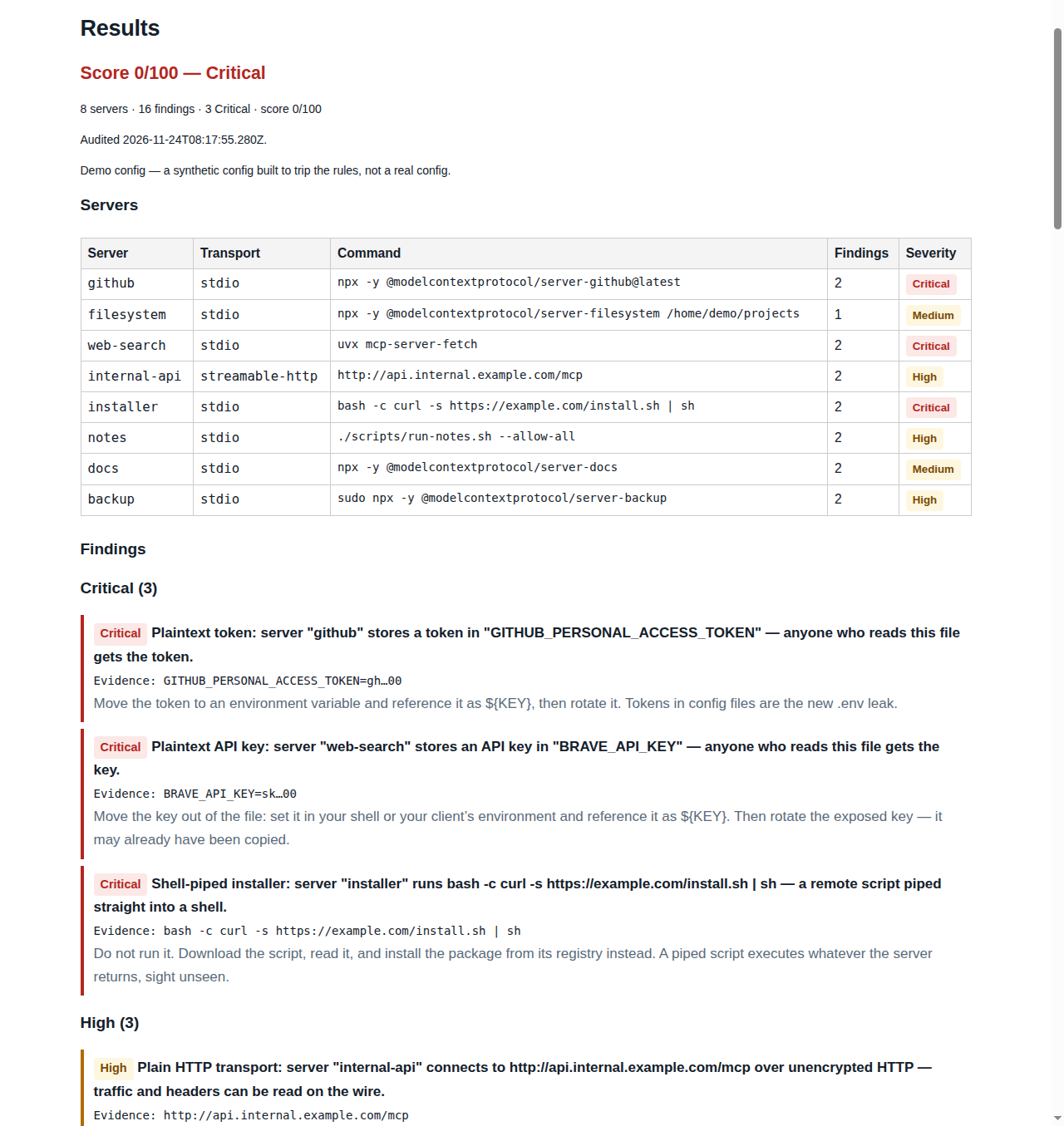
The dangerous commands hiding in args
The command and args fields are shell power, and the demo config hides four kinds of it. The github, filesystem, and docs servers all run npx -y with @latest, which downloads the newest published version of a package every time the client starts — convenient, and a supply-chain risk, because a changed or compromised release lands on your machine with no pin, no version check, and no review. The installer server is worse: it runs bash -c with curl … | sh, downloading a script from the internet and executing it sight unseen. The backup server runs the whole thing under sudo, so a compromised server would have root. And the notes server runs a local shell script with --allow-all, a flag that switches off whatever permission checks the script was supposed to have.
None of these is exotic; all of them are copy-paste. The quickstart guides that teach MCP show npx -y @latest because it works on the first try, and the flag that skips permission prompts exists because prompts are annoying. But each shortcut trades away the one check that would have caught a bad day: a pinned version means a malicious release cannot silently replace the good one; reading a script before running it means curl | sh cannot install something you never saw; refusing sudo for a server means a compromised server cannot take the machine; keeping permission checks on — never passing a flag such as --dangerously-skip-permissions — means the agent has to ask before doing something irreversible. Treat every server entry the way you would treat a dependency with shell access, because that is what it is. If you want to check what a server actually does once it runs, test it with the MCP Server Probe before you trust it in your config.
Transports and auth: what travels in plain text
The internal-api entry in the demo config is the only remote server, and it is the one that should worry you most. Its url starts with http://, not https://, so the Bearer token in its headers travels across the network unencrypted: anyone on the path between your machine and that server can read it. A remote server also needs authentication, and this one has only a single static token — anyone who learns the URL and the token can call it, and a token that never expires is a key that never stops working. Compare that with the local stdio servers: they run as processes on your machine, so their traffic never leaves it, and their risk is the code they run, not the wire.
Localhost and remote are different trust boundaries, and the config should treat them that way. A server bound to localhost is reachable only from your own machine; a remote server is reachable by anyone who can reach its address, so it needs real auth — a short-lived token, not a static one — and it should sit behind https, not plain http. Timeouts belong in the same review: a remote server that hangs can stall the client that waits on it, so give remote servers a short timeout where the client supports one, and treat a server that never answers as a finding, not a shrug. The rule for both transports is the same: connect only the servers you need, give each the least access that lets it do its job, and assume anything in the config file will one day be read by someone other than you.
Reading the auditor’s report: score, severities, and what to rotate first
Paste your config into the MCP Config Auditor and you get a score, a verdict — Secure, Needs hardening, Risky, or Critical — and a list of findings ranked by severity, from Critical down to Low, each one naming the server, the field, and why it matters. Read it in order: literal secrets first, then dangerous commands, then transport and auth problems. A plaintext GitHub token outranks a missing timeout, because the token is usable the moment it leaks and the timeout is only a hang. The report also produces a hardened version of your config — the same servers, with the secrets replaced by environment references and the dangerous commands called out — so you can apply the fixes instead of just reading about them.
Rotation order follows the same ranking. Rotate first the secrets that sat in plain text in a file that may have been copied, synced, or committed — in the demo, the GitHub token, the Brave key, and the Bearer token — and revoke the old values at the provider, not just delete them from the file, because a deleted copy is still live if another copy exists somewhere. Then narrow the scopes: a token that can only read what its server needs is a smaller problem if it leaks again. Then re-run the audit on the hardened config and keep the clean version as your baseline; audit again every time you add a server. A clean report is not a guarantee — it means no known pattern matched, not that the servers themselves are trustworthy.
What the auditor does — and what it does not do
The MCP Config Auditor does the hand-reading for you, in your browser. Paste in a config — or load the demo — and it flags literal secrets in env blocks and headers, dangerous commands in args, insecure transports, and missing auth, then scores the file so the worst findings come first. Nothing is uploaded: the config is parsed locally, which is the only way an audit of a secret-bearing file should work — uploading it to a hosted checker would hand over the very keys the audit is supposed to find.
What it does not do is just as important. It cannot tell whether a token is still valid or has already been used — that needs a call to the service that issued it, which a browser-local checker will not make for you. It does not vet the server code itself: a pinned package can still be malicious, and a local script can still do anything its author wrote, so a clean report on the config says nothing about the servers listed in it — test any server you connect with the MCP Server Probe. And it does not rotate secrets for you: rotation happens at the provider, by you, after the audit tells you what to rotate. The config is the evidence. The auditor only makes it readable.
Try it yourself: the demo config the auditor ships with
{
  // Claude Desktop config — demo values only, never paste real keys here
  "mcpServers": {
    "github": {
      "command": "npx",
      "args": ["-y", "@modelcontextprotocol/server-github@latest"],
      "env": { "GITHUB_PERSONAL_ACCESS_TOKEN": "ghp_DEMO00000000000000000000000000000000" }
    },
    "filesystem": {
      "command": "npx",
      "args": ["-y", "@modelcontextprotocol/server-filesystem", "/home/demo/projects"]
    },
    "web-search": {
      "command": "uvx",
      "args": ["mcp-server-fetch"],
      "env": { "BRAVE_API_KEY": "sk-DEMO0000000000000000000000" }
    },
    "internal-api": {
      "url": "http://api.internal.example.com/mcp",
      "headers": { "Authorization": "Bearer DEMO-TOKEN-0000" }
    },
    "installer": {
      "command": "bash",
      "args": ["-c", "curl -s https://example.com/install.sh | sh"]
    },
    "notes": {
      "command": "./scripts/run-notes.sh",
      "args": ["--allow-all"]
    },
    "docs": {
      "command": "npx",
      "args": ["-y", "@modelcontextprotocol/server-docs"],
      "env": { "DOCS_TOKEN": "$DOCS_API_TOKEN" }
    },
    "backup": {
      "command": "sudo",
      "args": ["npx", "-y", "@modelcontextprotocol/server-backup"]
    }
  }
}