What Is MCP and How to Test an MCP Server
Last updated:
MCP — the Model Context Protocol — is the open standard that lets an AI assistant call tools on a server. Before MCP, every data source needed its own custom integration: one connector for the calendar, another for the database, another for the file store, each wired by hand. MCP replaces that N-by-N wiring with one shared language — the client asks, the server answers, and both sides speak JSON-RPC 2.0. It is the same problem llms.txt solves for content, applied to tools: a human reads a web page, but an agent needs a manifest of what it may call. You can paste any server into the MCP Server Probe and watch it handshake, list its tools and run one test call — but this article teaches you to read the protocol yourself, so the next time a server fails the probe, you can see why in the messages.
What MCP is — and why AI assistants need it
MCP is an open standard, open-sourced by Anthropic in November 2024, for connecting AI applications to external systems. The official introduction puts it plainly: think of MCP like a USB-C port for AI applications — just as USB-C gives every device one standard way to connect, MCP gives every AI application one standard way to reach data sources, tools and workflows. The architecture has three roles: the host is the AI application itself, the client is the connector inside it, and the server is the program that offers context and capabilities. Every message between client and server is a JSON-RPC 2.0 object, UTF-8 encoded, and the meaning of those messages is identical on every transport.
The need is the same one that produced every standard before it: without a shared protocol, each assistant needs a separate integration for each system it touches, and each system needs a separate integration for each assistant — work that grows with the square of the participants and never finishes. With MCP, both sides implement once: a server exposes its tools, resources and prompts in the standard shape, and any client that speaks MCP can use them. The model itself never runs the tools; it reads the list, decides which tool fits the user’s request, and asks the client to call it. That is why testing a server means handshaking it and reading its list — the list is the whole contract, and a server that cannot present one cleanly cannot be used safely by any model.
The initialize handshake, step by step
In protocol versions 2025-11-25 and earlier — the versions nearly every deployed server speaks today — the first interaction between client and server must be the initialize handshake, and it has exactly three moves. First the client sends one JSON-RPC request, method initialize, with three parameters: protocolVersion, the latest version the client supports; capabilities, the optional features it offers; and clientInfo, its name and version. Second, the server answers with a result carrying the negotiated protocolVersion, its own capabilities, and serverInfo — its name and version. Third, the client sends notifications/initialized, a notification with no id and therefore no reply, and the operation phase begins: tools/list, resources/list, prompts/list, then calls.
Version negotiation is the point of the whole exchange. If the server supports the version the client offered, it must answer with that same version; if not, it must answer with another version it does support — which should be its latest. If the client cannot speak the version in the reply, it should disconnect rather than guess. The probe reports the negotiated version for exactly this reason: it tells you which era the server lives in. And the current revision changes the picture — 2026-07-28 removes the handshake entirely. There is no session and no initialize: every request carries its protocol version and client capabilities in its _meta field, servers answer a version they do not speak with an UnsupportedProtocolVersionError, and servers must implement server/discover so a client can learn the supported versions up front. A server that answers initialize is therefore a legacy-era server; a modern-only server rejects it, and that rejection is informative, not a failure. When a handshake does fail, the error is a standard JSON-RPC one — -32700 parse error, -32600 invalid request, -32601 method not found, -32602 invalid params, -32603 internal error — and the probe shows the server’s real code and message verbatim, because the code is the diagnosis.
Transports: Streamable HTTP vs legacy SSE
MCP defines two standard transports, plus one legacy one. For a server running on your own machine there is stdio: the client launches the server as a subprocess and the two exchange newline-delimited JSON-RPC messages over standard input and output. For a server reached over a network there is Streamable HTTP, the current remote transport: one MCP endpoint that accepts POST, every client message a new POST to that endpoint, with an Accept header listing both application/json and text/event-stream. The server answers each POST with either a single JSON object or a server-sent-events stream, and the client must handle both. In the 2025-11-25 revision the server may also assign a session id, returned in an Mcp-Session-Id response header at initialization and sent back by the client on later requests, and the client must send the negotiated version in an MCP-Protocol-Version header. The older remote transport, HTTP+SSE from protocol version 2024-11-05, split the conversation across two endpoints — a GET that opened an SSE stream and a separate POST for client messages — and it has been deprecated since 2025-03-26; the 2026-07-28 revision formally lists it as Deprecated and says to migrate to Streamable HTTP.
In practice the probe tries Streamable HTTP first, exactly as the specification’s own backwards-compatibility recipe prescribes: POST an initialize request, and if that fails with 400, 404 or 405, issue a GET and expect an endpoint event as the first event — the signature of the old transport. The 2026-07-28 revision also removes the session machinery: no Mcp-Session-Id, no Last-Event-ID resumability, no server-initiated GET stream — a broken response stream means re-issuing the request with a new id. One more transport detail matters for anyone running a server: the specification requires Streamable HTTP servers to validate the Origin header on every connection, to block DNS-rebinding attacks, and says local servers should bind to localhost rather than every interface. A server that skips that check is not merely old-fashioned; it is exposed.
Tools vs resources vs prompts
A tool is a function the model may call, and it is model-controlled: the language model discovers it and invokes it on its own judgement. Each tool has a unique name — case-sensitive, and the specification recommends 1 to 128 characters of letters, digits, underscore, hyphen or dot — a human-readable description, and an inputSchema, a JSON Schema (2020-12 by default) describing the parameters it accepts. A tool may also carry an outputSchema for its structured results, and annotations that describe its behaviour: readOnlyHint, destructiveHint, idempotentHint, openWorldHint. Clients discover tools with tools/list and invoke one with tools/call, passing name and arguments. The result comes back as content blocks — text, image, audio, resource links, embedded resources — and optionally structuredContent. Note the two kinds of failure: a malformed call is a protocol error (-32602 invalid params, for example), but a tool that runs and fails reports isError: true inside its own result — the tool’s failure is data, not a protocol failure, and the model is expected to read it and self-correct.
A resource is data the model may read, and it is application-driven: the host application decides how to show it, often as a picker the user browses. Each resource has a unique uri — file://, https://, git://, or a custom scheme such as the reference server’s demo:// — plus a name and optional mimeType, size and description. Clients list them with resources/list and read one with resources/read; resource templates expose parameterized URIs, and subscribe and listChanged are optional capabilities. A prompt is a template the user may run, and it is user-controlled: the user picks it explicitly, often as a slash command, and supplies its arguments. Each prompt has a name, an optional description, and optional arguments, each with a name, a description and a required flag; clients list them with prompts/list and fetch one with prompts/get. The one-line distinction is worth memorizing: tools do things, resources are things to read, prompts are words to start with — and a server may offer any combination of the three, including none of one kind.
Reading a real tools/list by hand
The worked example is the official reference server, run locally over Streamable HTTP and captured on 23 November 2026. The client offered protocol version 2025-11-25; the server answered with that same version, serverInfo name mcp-servers/everything, version 2.3.1, and capabilities covering prompts, resources, logging, tools and completions — and it issued a session id, with the answer arriving as an SSE stream, exactly as the transport allows. Then tools/list returned sixteen tools, resources/list eight resources, and prompts/list four prompts. Nothing here is hypothetical: every name and value below is copied from that captured transcript. 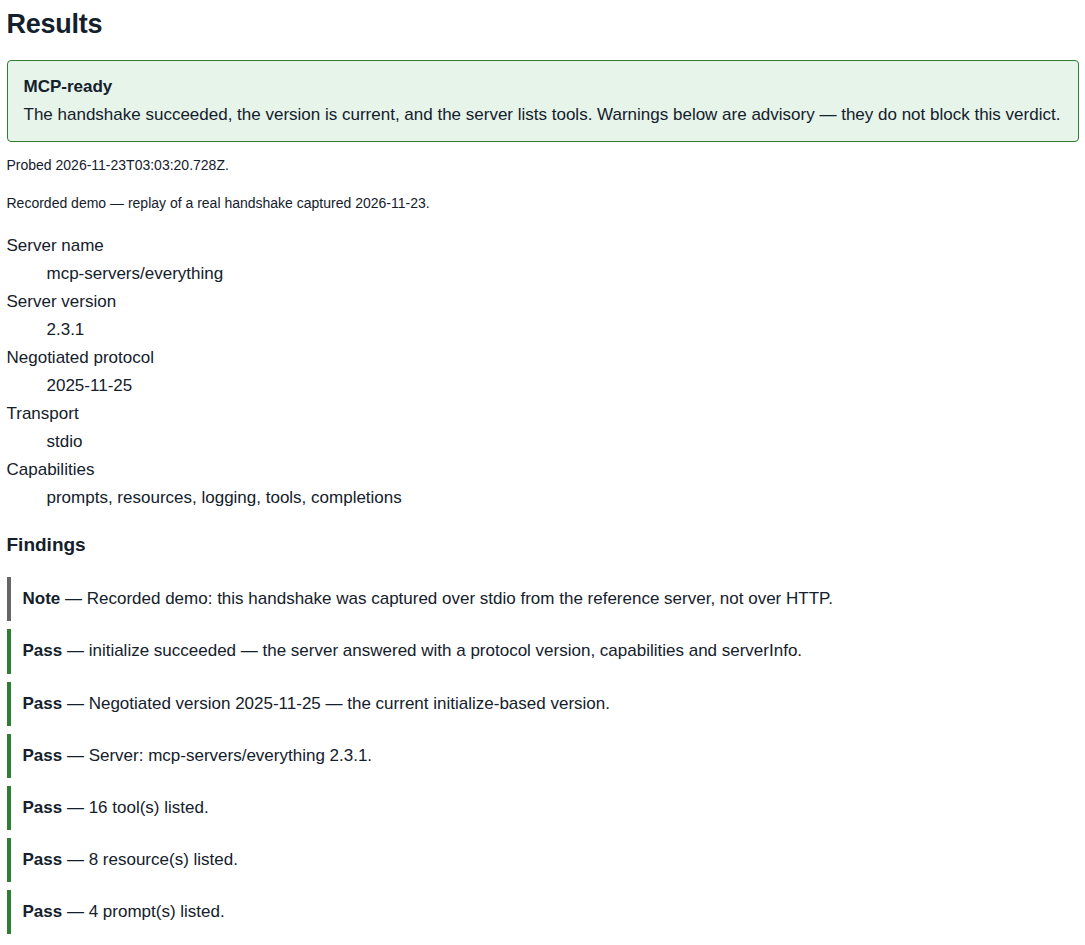
Start with echo: description “Echoes back the input string”, inputSchema with one property, message of type string, and required: ["message"] — so a valid call is {"message": "..."} and nothing else is required, and its annotations (readOnlyHint: true, destructiveHint: false) mark it safe to try. Then get-sum: it requires a and b, both numbers — the schema tells you the types before you spend a call, and a call with a string where a number belongs is a -32602 waiting to happen. Then get-structured-content: it requires location and returns structuredContent against an outputSchema the client can validate, which is how a model can trust the shape of an answer rather than parsing prose. The test call proves the reading: tools/call on echo with {"message": "hello from sysosx probe"} returned one text block, “Echo: hello from sysosx probe”. The resources are all demo://resource/static/document/….md URIs — architecture, extension, features, how-it-works and four more, all text/markdown — and the prompts include args-prompt, with city required and state optional, which is exactly how a template declares what it needs from the user. Read this way, a tools/list tells you what a server can do before any model ever calls it.
Testing a server safely — and what the probe does and does not do
Only probe servers you run or are allowed to test, and test them the way you would test any unfamiliar API: with the weakest credential and the most harmless call first. If the server needs a token, mint a scoped, read-only one for the probe — never paste a production secret into any third-party tool, including this one. The probe’s token field is sent to the checker service over HTTPS, used transiently for the upstream call, never stored, and redacted from every transcript and stored report — but a token that has been pasted anywhere is a token that can leak, so scope it before you paste it. Then call a harmless tool first — echo, or a read-only lookup — with harmless arguments, and only then consider a call that writes anything. Read the annotations before you call: destructiveHint and openWorldHint are the server telling you, in its own words, what a tool can do to the world. And remember the specification’s own warning: descriptions of tool behaviour, including annotations, should be considered untrusted unless they come from a trusted server, and hosts must obtain explicit user consent before invoking a tool.
The probe performs the handshake server-side — your browser never fetches the target directly, because cross-origin rules would block most servers — then lists the server’s tools, resources and prompts, and runs exactly one test call, the one you choose, with the arguments you write. It does not execute tools with side effects beyond that single call, it does not store your token, it does not probe non-HTTPS endpoints, and it does not check ACP, UCP, AP2 or x402 discovery documents — that is the Agent Readiness Checker’s job. A clean “MCP-ready” verdict means the server speaks the protocol correctly; it is not a safety certificate. A well-formed server can still expose a destructive tool, a tool that returns isError: true is reporting its own failure rather than a protocol failure, and whether a file write, a database change or any other side effect actually happens is the server’s job, not the protocol’s. Treat the verdict as “speaks MCP correctly”, and judge the tools themselves on their names, schemas and annotations.
Try it yourself: a real handshake with the reference server, trimmed
--> POST /mcp  (initialize)
{
  "jsonrpc": "2.0",
  "id": 1,
  "method": "initialize",
  "params": {
    "protocolVersion": "2025-11-25",
    "capabilities": {},
    "clientInfo": { "name": "sysosx-mcp-probe", "version": "1.0" }
  }
}

<-- 200, Content-Type: text/event-stream (SSE data: frame)
{
  "result": {
    "protocolVersion": "2025-11-25",
    "capabilities": {
      "prompts": { "listChanged": true },
      "resources": { "subscribe": true, "listChanged": true },
      "logging": {},
      "tools": { "listChanged": true },
      "completions": {}
    },
    "serverInfo": { "name": "mcp-servers/everything", "version": "2.3.1" }
  },
  "jsonrpc": "2.0",
  "id": 1
}

--> POST /mcp  (tools/list, two of sixteen tools shown)
{
  "name": "echo",
  "description": "Echoes back the input string",
  "inputSchema": {
    "type": "object",
    "properties": {
      "message": { "type": "string", "description": "Message to echo" }
    },
    "required": ["message"]
  },
  "annotations": { "readOnlyHint": true, "destructiveHint": false }
}
{
  "name": "get-sum",
  "description": "Returns the sum of two numbers",
  "inputSchema": {
    "type": "object",
    "properties": {
      "a": { "type": "number" },
      "b": { "type": "number" }
    },
    "required": ["a", "b"]
  }
}

--> POST /mcp  (tools/call echo, arguments {"message": "hello from sysosx probe"})
<-- {"result": {"content": [{"type": "text", "text": "Echo: hello from sysosx probe"}]}, "jsonrpc": "2.0", "id": 5}