What Is Dangling DNS and Subdomain Takeover?
Last updated:
Dangling DNS is a DNS record that still points a subdomain at a cloud resource that no longer exists — or no longer belongs to you — so anyone who re-creates that resource can take over the subdomain. The record itself looks harmless: the subdomain still resolves, the browser still connects, and nothing in your monitoring turns red. But the destination is unclaimed, and on the services that allow it, the first person to claim the freed name inherits your subdomain, your reputation and your visitors. This article explains how a takeover works, why records get left behind, which services are affected, how to check a subdomain by hand, and how to fix it. To check a subdomain of your own, paste it into the Dangling DNS Checker — it runs the same steps server-side, no sign-up, nothing to install.
What dangling DNS is — and how a subdomain takeover works
A DNS record is dangling when the name it points to is gone. The usual shape is a CNAME: blog.example.com points at a GitHub Pages address, or files.example.com points at a bucket called files-example-com.s3.amazonaws.com. When the GitHub Pages site or the S3 bucket is deleted, the CNAME stays in the zone file — DNS has no idea the destination is gone, and it keeps answering. The subdomain still resolves, the browser still connects, and the cloud provider answers with an "unclaimed" error page, because nothing is attached to that name any more. That is the dangling record. The takeover is the second step: an attacker creates a resource with the same name on the same platform — a new GitHub Pages site, a new bucket with the same name — and adds your subdomain as its custom domain. The provider has no way to know the attacker is not you, because the DNS record pointing at the resource is still there, looking like proof of ownership. From that moment, your subdomain serves the attacker’s content: a phishing page, a malware download, or a lookalike of your own site that harvests logins and cookies.
The damage is not theoretical. A subdomain inherits the trust of the parent domain: browsers, email filters and users all treat app.example.com as part of example.com, and cookies set on the parent domain are sent to every subdomain, so a taken-over subdomain can be used to steal session cookies and run phishing under a trusted name. The same record can also be used to obtain a TLS certificate for the subdomain, since domain-validation checks only ask the requester to prove control of the name — and the dangling CNAME is exactly that proof. The takeover touches none of your servers, your registrar account or your DNS provider. Nothing is breached; the attacker simply picks up a name you left lying on the ground, and the DNS record you forgot to delete does the rest.
Why it happens: forgotten records and cloud churn
It happens because DNS and the services it points to are managed in different places, by different people, on different schedules. A team deletes a Heroku app after a migration, cancels a Shopify store after a rebrand, or tears down a staging environment after a launch — and the DNS record that pointed at it is never touched, because deleting a resource in a cloud console does not delete the DNS record, and nothing reminds anyone to do it. Staff turn over, the person who created the record leaves, and the zone file becomes a museum of every service the company has ever tried. Cloud resources churn fast — buckets, apps and sites are created for a campaign, a test or a quarter and then abandoned — while DNS records are effectively permanent unless someone deliberately removes them. The record outlives the service by years.
Nobody notices because a dangling subdomain fails quietly. It does not return a DNS error, so uptime monitors that check whether the name resolves stay green; it returns the provider’s error page — "There isn’t a GitHub Pages site here", "No such app", "The specified bucket does not exist" — which looks like a broken page, not a security event, and most teams never visit their own forgotten subdomains. The subdomain may not even be linked from anywhere any more, so no human ever sees the error page either. The record sits there, harmless-looking, until someone enumerates the subdomains, finds it, and claims the resource. The fix is cheap and the exposure is silent, which is why the combination is so common: the cost of forgetting is zero until the day it is not.
Which services are commonly affected
The reference list is can-i-take-over-xyz, a community-maintained catalogue of services and the error pages that betray an unclaimed resource. Three services are listed as straightforwardly vulnerable: Amazon S3, where a deleted bucket answers "The specified bucket does not exist"; Microsoft Azure, where a deleted resource leaves the name resolving to NXDOMAIN; and Pantheon, where an unclaimed site answers "404 error unknown site!". Five more are listed as edge cases — claimable, but only under certain conditions, because the provider has added checks since the original reports: GitHub Pages ("There isn’t a GitHub Pages site here."), Heroku ("No such app"), Netlify ("Not Found - Request ID:"), Shopify ("Sorry, this shop is currently unavailable.") and Vercel ("DEPLOYMENT_NOT_FOUND."). Fastly, by contrast, is listed as not vulnerable, and is deliberately left out of this list.
The list matters less than the pattern behind it. Any service that lets a user claim a name and then attach an arbitrary custom domain to it is a candidate: the vulnerability is the gap between "anyone can claim this name" and "DNS still points the subdomain at it". Providers close that gap over time — several now require a verification record before a custom domain is served — which is why entries move between "vulnerable" and "edge case" and why a snapshot in an article goes stale. Check the live can-i-take-over-xyz list rather than memorising this one. And remember the shape is not limited to CNAMEs: an A record pointing at a deleted virtual server’s IP can dangle the same way if the address is reassigned to someone else, and a delegated NS record pointing at a deleted DNS zone hands the whole subdomain to whoever recreates it.
How to check by hand: dig, curl, and the error page
Start with the CNAME chain. Ask for it directly — dig +short blog.example.com CNAME, or the equivalent query in your DNS tool — and read the answer: a live subdomain returns the platform name it points at, such as a GitHub Pages address or a bucket endpoint. Then resolve that target: if the target itself returns NXDOMAIN, the record is dangling at the DNS layer and the resource is gone. If the target resolves, fetch the subdomain in a browser or with curl and read what comes back. A healthy subdomain serves your content; a dangling one serves the provider’s unclaimed error page. Match the body against the fingerprints in can-i-take-over-xyz — "There isn’t a GitHub Pages site here." for GitHub Pages, "No such app" for Heroku, "The specified bucket does not exist" for S3, "Not Found - Request ID:" for Netlify, "DEPLOYMENT_NOT_FOUND." for Vercel — and a match is a positive result. Do not stop at the status code: an unclaimed page often returns 404, but so do plenty of healthy pages, and the fingerprint is in the body, not the code.
A healthy chain shows what the check should look like. On 23 November 2026, status.heroku.com answered its CNAME query with d1axfzoyfogs41.cloudfront.net., that name resolved to live addresses, and curl -I returned HTTP 200 — three green lights, each confirming the one before it. When a record dangles, one of those lights goes out: the target is NXDOMAIN, or the fetch returns the provider’s unclaimed page instead of your content. DNS answers can also be spoofed on an untrusted network, so if you want to verify the signatures on the chain itself rather than just the answers, run the same name through the DNSSEC Checker. Paste a subdomain into the Dangling DNS Checker and it runs the same three steps — CNAME chain, target resolution, endpoint fetch — from the server, so you do not have to run dig and curl yourself. 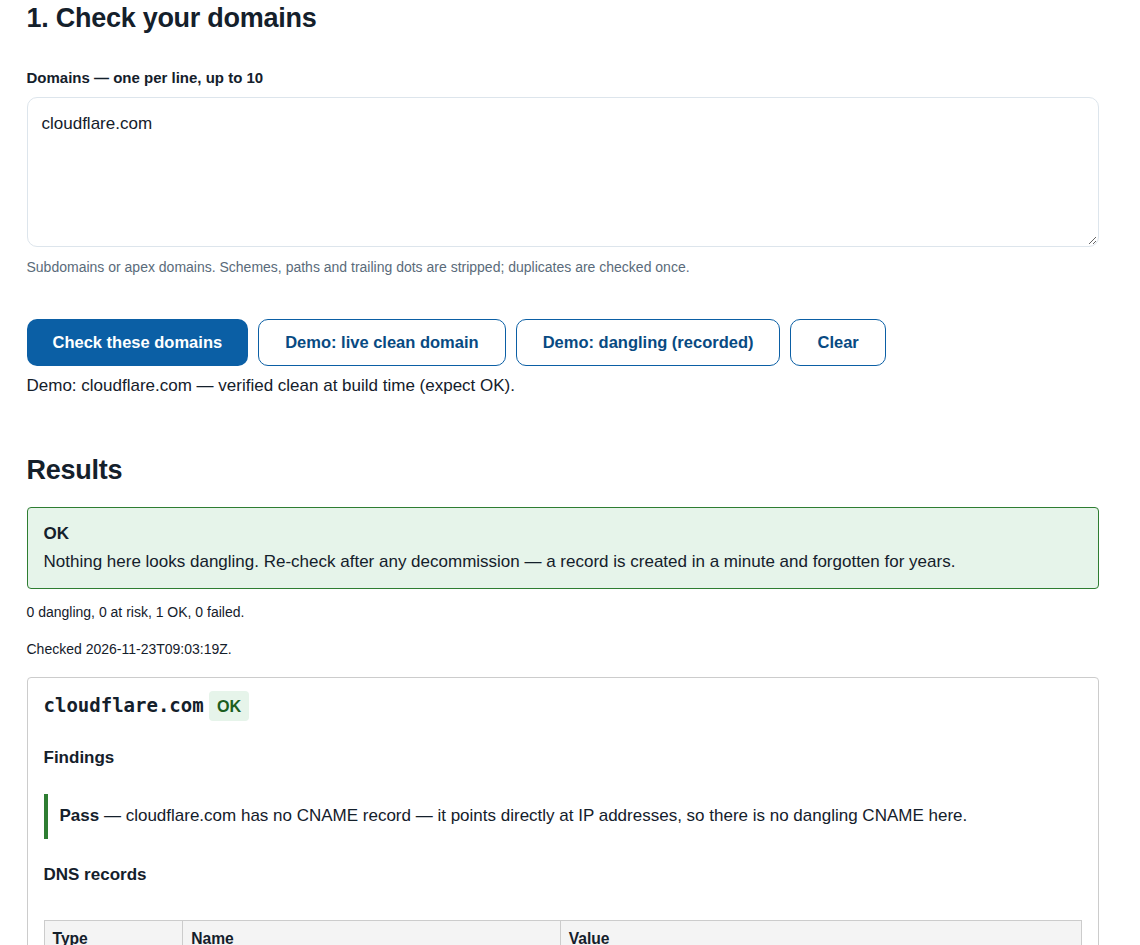
How to fix it
The fastest fix is also the simplest: delete the dangling record. If the service is gone for good, the record has no purpose and removing it closes the hole immediately — there is nothing left for an attacker to claim, because the subdomain no longer points anywhere. If the service is still needed, reclaim the resource instead: recreate the bucket, site or app with the same name on the same platform, attach the subdomain as its custom domain, and confirm it serves your content again. Reclaiming is the right call when the subdomain is still in use — a docs site, a status page, a store — but it must be done by you, before someone else does it for you. If you are not sure which of the two applies, delete first and recreate later: a missing subdomain is an inconvenience, a taken-over one is an incident.
Then verify the fix the same way you found the problem: re-run the CNAME query and the fetch, and confirm the record is gone or the right content is served. Then make it hard to happen again. Tie DNS cleanup to the decommission checklist, so deleting a cloud resource always ends with removing its records — the two actions belong in the same ticket, not in two teams’ backlogs. Inventory your subdomains regularly: enumerate the zone, resolve every name, and flag any record whose target is NXDOMAIN or serves an unclaimed page. Re-check after every migration, rebrand or vendor change, when records are most often orphaned. And where a platform offers domain-ownership verification before serving a custom domain, turn it on: it does not fix your DNS, but it makes the takeover step fail even if a record is forgotten.
What the checker does — and what it does not do
The Dangling DNS Checker runs the manual check for you, server-side. Give it a subdomain and it resolves the live DNS, walks the CNAME chain to the end, checks whether the target exists, fetches the endpoint over HTTPS, and matches the response against the known unclaimed-service fingerprints. It reports one of four verdicts: OK, dangling, at-risk, or check failed — at-risk when the target resolves and the response matches no known fingerprint, which means the check cannot tell you either way and you should verify by hand. Your browser never fetches the target directly, because cross-origin rules would block most endpoints; the check runs on the checker service, and nothing you enter is stored.
What it does not do matters just as much. It does not fix anything: it cannot delete a DNS record, reclaim a resource, or touch your registrar or DNS provider — those steps are yours, and the article above tells you how. It does not prove exploitability beyond the unclaimed signal: a matching error page is strong evidence the resource is unclaimed, not proof that an attacker can claim it, because some platforms now require domain verification before a custom domain goes live. And it does not check subdomains you do not enter: a clean result for www.example.com says nothing about blog.example.com or staging.example.com. Check every subdomain in the zone, not just the ones you remember — the forgotten ones are the point.
Try it yourself: a real CNAME chain, trimmed
--> GET https://cloudflare-dns.com/dns-query?name=status.heroku.com&type=CNAME
{"Status":0,"Question":[{"name":"status.heroku.com","type":5}],"Answer":[{"name":"status.heroku.com","type":5,"TTL":30,"data":"d1axfzoyfogs41.cloudfront.net."}]}
--> GET https://cloudflare-dns.com/dns-query?name=d1axfzoyfogs41.cloudfront.net&type=A
{"Status":0,"Question":[{"name":"d1axfzoyfogs41.cloudfront.net","type":1}],"Answer":[{"name":"d1axfzoyfogs41.cloudfront.net","type":1,"TTL":60,"data":"99.84.118.4"},{"name":"d1axfzoyfogs41.cloudfront.net","type":1,"TTL":60,"data":"99.84.118.49"}]}
--> curl -I https://status.heroku.com/
HTTP/1.1 200 OK