Typosquatting and Lookalike Domains: How Attackers Register Your Name with One Letter Wrong
Last updated:
Typosquatting is the practice of registering a domain that differs from a known brand’s domain by a typo, a lookalike character or a different ending, so the brand’s own visitors — mistyping, or not looking closely — arrive at the wrong site. It is one of the oldest tricks on the internet and still one of the most effective, because it needs no exploit: the visitor supplies the mistake. This article explains the generation techniques attackers use to enumerate your name’s lookalikes, the related trick that typo lists miss, why brands register defensively and monitor certificate logs, what to do when a lookalike is already registered, and how to check your own domain in five minutes with the Typosquat & Lookalike Domain Checker.
One letter wrong is a business model
Start with the mechanics. A domain costs a few dollars a year and takes minutes to register. A brand’s visitors, meanwhile, type its name millions of times — into browser bars, mail clients, search boxes — and a small, steady fraction of those keystrokes land wrong: a dropped letter, two letters swapped, a finger on the neighbouring key. Register the domains those mistakes produce and the traffic arrives on its own, no advertising required. What the registrant does with it ranges from the merely parasitic (ad pages, affiliate redirects) to the criminal: a pixel-perfect copy of the brand’s login page harvests credentials from exactly the visitors least likely to check the address bar, because they believe they already arrived.
The second audience never types anything: it reads. A lookalike domain in a phishing email — rnicrosoft-style homoglyphs, a brand on a swapped ending — passes the casual glance that most recipients give a sender address. CISA’s phishing guidance makes the same point from the defender’s side: check the sender’s address character by character, because the whole attack is that you will not. That is why typosquatting sits next to spoofing in every phishing taxonomy, and why the defence starts with knowing which of your lookalikes exist and who holds them.
The techniques: fat fingers first
Attackers enumerate a name the same way a generator does, class by class. The fat-finger classes come from the keyboard itself: omission (a letter dropped — the single most common typo), duplication (a letter doubled), transposition (adjacent letters swapped), substitution (the neighbouring key instead — on QWERTY, every letter has up to six wrong neighbours that a fast typist plausibly hits) and insertion (that neighbour added rather than substituted). Vowel swaps exploit the other human weakness: vowels are the letters people are least sure of when spelling an unfamiliar name, so each vowel becomes the plausible wrong vowel. None of this requires creativity — for a seven-letter name the fat-finger classes alone produce a few dozen candidates, and registering the lot costs less than a team lunch.
Then come the classes that target the eye instead of the finger. Homoglyph swaps replace characters with lookalikes — rn for m, 1 for l, 0 for O, cl for d — producing names that survive a visual check. Hyphen edits add or remove the separator a brand’s customers half-remember. Plural edits add or drop the trailing s. And TLD swaps put the exact name on a different ending: .co and .cm are the classic traps for a mistyped .com (one letter dropped or swapped at the very end of the address), with .net, .org and .io close behind. A thorough sweep checks all of these, because the attacker only needs the one you skipped. 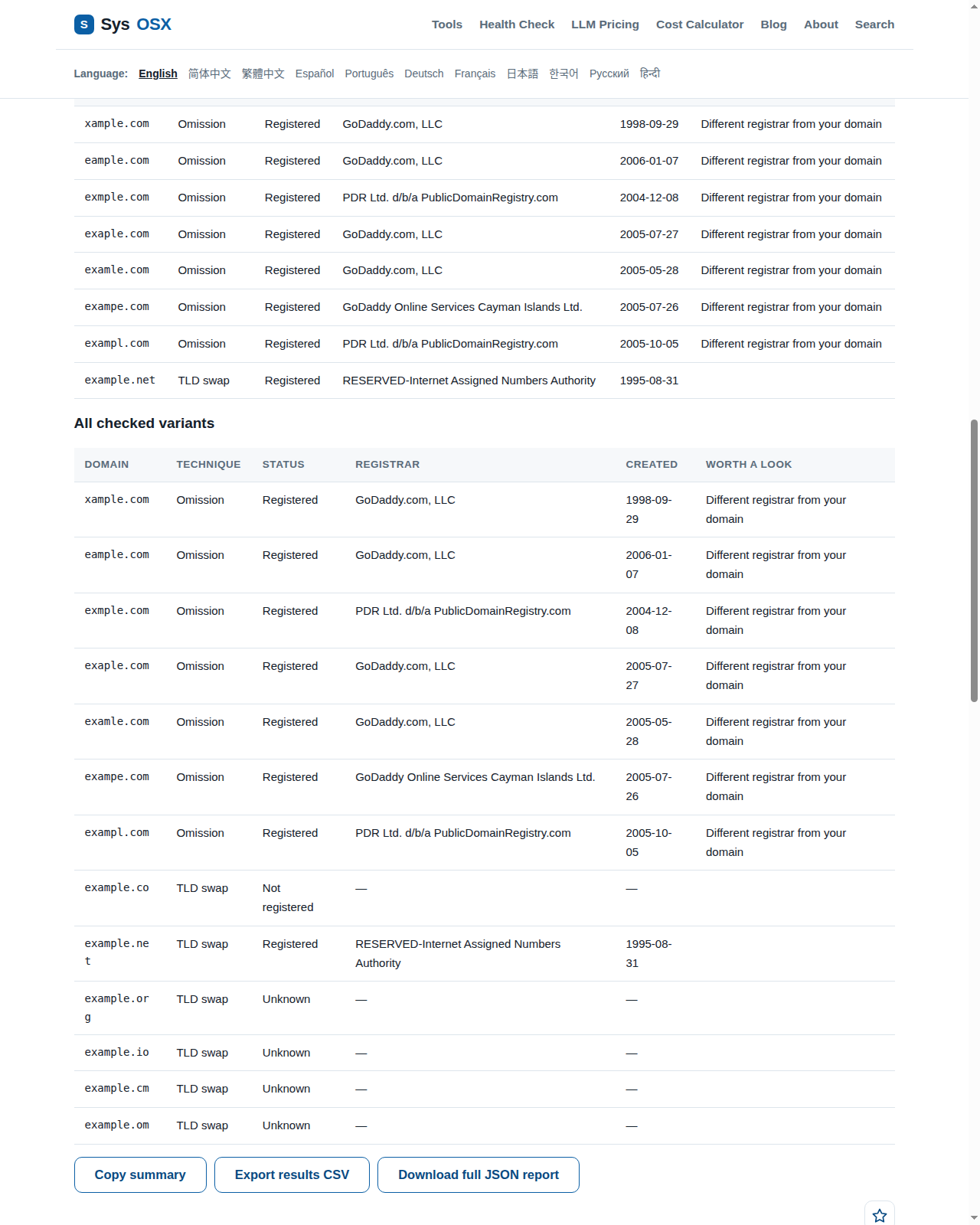
Combosquatting: the class typo lists miss
There is a neighbouring class that no typo generator produces, and honesty requires naming it: combosquatting. Instead of mistyping the brand, the attacker appends a word the brand’s own communications have trained people to expect — login, secure, support, verify, account, update. brand-login.example reads plausibly in an email precisely because legitimate services taught users that such names exist. No letter is wrong, so omission sweeps and homoglyph lists never surface it; the space of possible combinations is also open-ended in a way typo classes are not.
The checker that accompanies this article covers the typo classes — that is its stated scope, and this article will not pretend otherwise. Combos are a manual addition: write down the five or six words your own emails and login flows use, join them to your brand both ways (brand-word and word-brand), and check those names too, at a registrar if nowhere else. The monitoring advice below covers combos as well — a combosquat that gets a certificate and starts sending mail shows up in the same logs as a typosquat does.
Why brands register defensively — and monitor the rest
The arithmetic of defence is asymmetric in the other direction: you cannot register everything. Every technique at every position on every TLD is a combinatorial list, and renewals compound. What brands actually do is tiered. Tier one is defensive registration of the core set — the one-letter typos of a short name, the .co and .cm swaps, the homoglyph forms of names that have them — pointed at the real site, so the commonest mistakes land somewhere safe and the names are simply off the market. Tier two is monitoring for everything else, because a registration you did not make is only dangerous when it is used.
Use leaves evidence, and the best public evidence is certificate transparency. A lookalike that will serve a convincing HTTPS page needs a certificate, and every publicly trusted certificate is written to the CT logs the moment it is issued — usually before the phishing page goes live. Watching those logs for your brand’s name and its variants (the CT Subdomain Finder shows what the logs already hold for a domain) turns an open-ended registration space into a short alert list. Periodic re-runs of the registration sweep catch the rest: a variant that was free in January and is registered in March, at a different registrar, is a fact worth knowing in March.
When a lookalike is already registered
First, separate the squatters from the neighbours. A variant registered years before your brand existed, hosting an unrelated business, is a naming collision, not an attack — and treating it as one wastes money and goodwill. The facts that sort them: the registration date against your brand’s history, what the domain hosts (a parked page, an unrelated shop, or a copy of your login screen are three different situations), whether it sends mail or holds certificates, and the registrar, whose abuse desk is the first practical lever for the genuinely malicious cases. Registrars act on evidence — screenshots, timestamps, the phishing URL itself — so collect it before you write, and before the page comes down.
For a domain that trades on your trademark, the formal route is the UDRP, ICANN’s Uniform Domain-Name Dispute-Resolution Policy, administered by providers such as WIPO. Its shape, in facts rather than legal advice: you must show the domain is identical or confusingly similar to a trademark you hold, that the registrant has no rights or legitimate interests in it, and that it was registered and is being used in bad faith. A successful complaint transfers or cancels the domain; it does not award damages, and it is not fast. Many cases never get there — a registrar abuse report handles the live phishing, and a polite purchase enquiry handles the parked name held by someone who registered it speculatively and would rather sell than fight. Which route fits is a judgement call about evidence and stakes, and for a valuable mark it is worth a lawyer’s hour before it is worth a filing.
Check your domain in five minutes
Open the Typosquat & Lookalike Domain Checker and try the demo first: example.com with its omission and TLD-swap groups (13 variants). The registries’ own answers, recorded when this article was written, are a small education by themselves — all seven omission variants of example.com are registered, most at registrars other than the domain’s own, plus example.net and example.cm; example.co, example.io and example.om are free; example.org returns no usable RDAP answer and is honestly labelled unknown. Then enter your own domain, leave the groups ticked that match your name’s shape, and check.
Read the result as a worklist, not a verdict — the checker deliberately gives no score, because a count of registered lookalikes measures your brand’s fame as much as its risk. Work the registered table top-down: note the creation dates (anything registered in the last year is flagged for you), compare registrars with your own (a mismatch is flagged too), and decide per name — buy the free core variants, monitor the parked ones, escalate the one that is copying you. Then set the two habits that make a five-minute check into a defence: re-run the sweep on a schedule, and watch the certificate logs for the names you did not buy.
The variant classes for one domain
; The variant classes generated for example.com
; (52 variants in total — the checker caps the list at 120)

omission        xample.com  eample.com  exmple.com  exaple.com …
duplication     eexample.com  exxample.com  exaample.com …
transposition   xeample.com  eaxmple.com  exmaple.com …
substitution    rxample.com  ecample.com  exsmple.com …
insertion       erxample.com  excample.com  exasmple.com …
vowel swap      ixample.com  exemple.com  exampli.com
homoglyph       exarnple.com  examp1e.com
hyphen          e-xample.com  ex-ample.com  exa-mple.com …
plural          examples.com
TLD swap        example.co  example.net  example.org
                example.io  example.cm  example.om