SQLite Database Inspection: What Is Actually Inside a .db File?
Last updated:
A SQLite database is a single self-contained file — no server, no separate data directory — whose first 100 bytes are a header describing the whole database, and whose tables, indexes, views and triggers are catalogued in a built-in table called sqlite_master. That means you can learn a great deal about a .db file — how many tables it has, how many rows each holds, how big it claims to be, how much of it is empty space — by reading its structure alone, without opening it in an application and without running a single query. This guide walks through what is actually inside the file, and the free SQLite Database Inspector reads any .db file this way, locally in your browser.
What a SQLite file actually contains, in one sentence
Strip away the tooling and a SQLite file is three things: a 100-byte header that describes the file, a set of fixed-size pages, and b-trees drawn on those pages that hold the schema and the data. There is no separate index file, no log baked into the main file, and no metadata service — if the file is intact, everything SQLite needs is between the first byte and the last, which is exactly why a structural read can say so much about it.
The pages are the atoms. Every page is the same size — 512 bytes to 64 KB, chosen when the database is created and recorded in the header — and every structure in the file is built from numbered pages: page 1 begins with the header and the schema, other pages hold table rows, index entries, overflow data for oversized records, or nothing at all because they sit on the freelist. Counting and classifying pages is most of what inspecting a SQLite file means.
The 100-byte header, decoded in plain words
The header opens with 16 bytes of magic text — “SQLite format 3” followed by a zero byte. That is the whole identification test: a file that does not start with those bytes is not a SQLite database, whatever its extension says. After the magic come the page size, the file-format write and read versions (which together tell you whether the database uses a rollback journal or write-ahead logging), and the database size counted in pages. Multiply pages by page size and you know how long the file is supposed to be — if the actual file is shorter, it is truncated or still being copied, and any tool that trusts it is reading a partial database.
The rest of the header is bookkeeping that turns out to be surprisingly revealing. The schema cookie increments every time the schema changes, so two copies of a file with different cookies have different tables. The schema format number dates the file’s dialect. The text encoding says whether strings are UTF-8 or UTF-16. The freelist count says how many pages are empty but still inside the file. The application ID is a number the owning app stamps on its databases, and the version-valid-for and SQLite version numbers record which library last wrote the file. None of this requires opening a single table.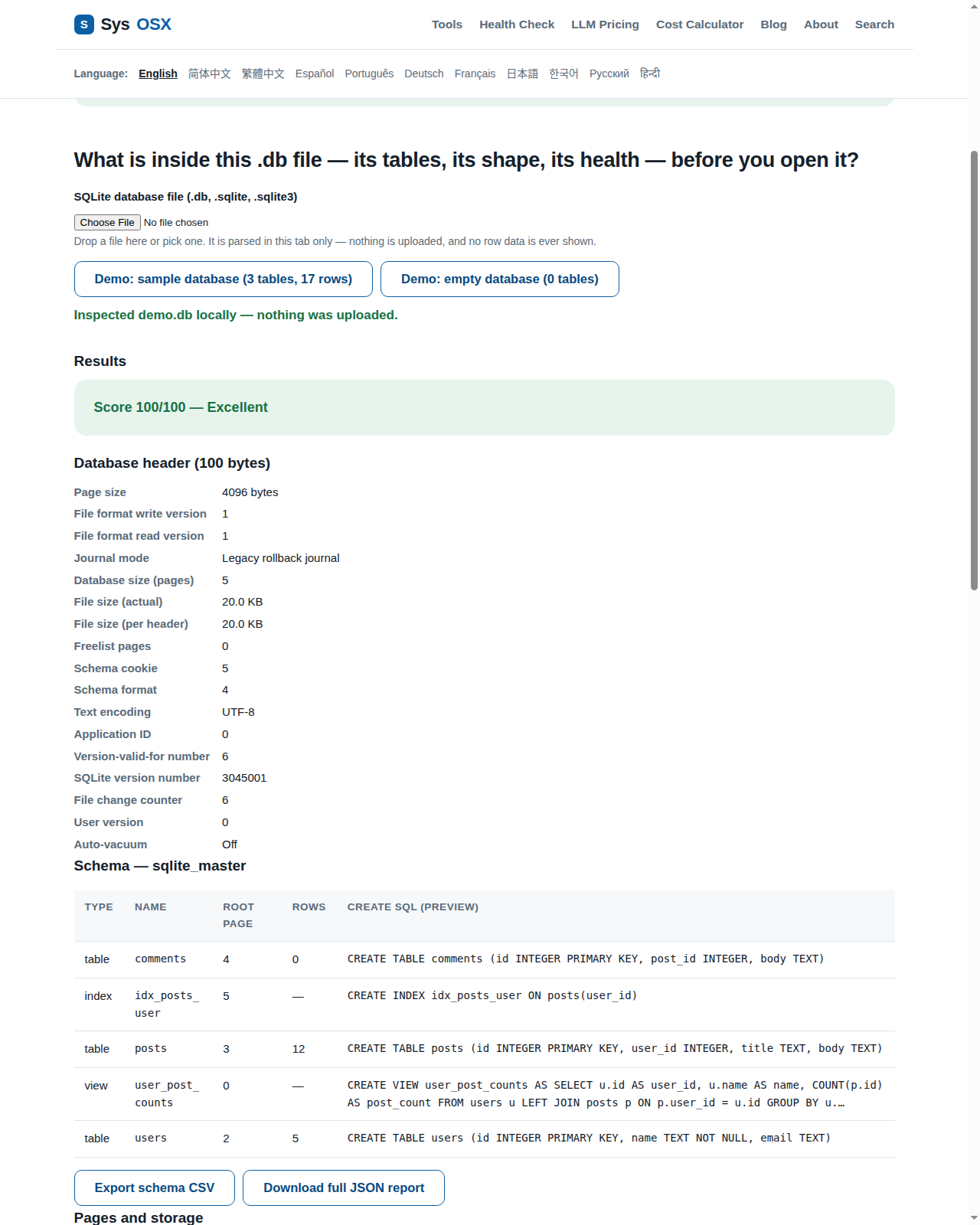
The schema lives in sqlite_master — and pages are b-trees
SQLite catalogues itself. Page 1 holds a table called sqlite_master (also answerable as sqlite_schema) with one row per table, index, view and trigger: the object’s name, the table it belongs to for indexes, the root page where its data begins, and the full CREATE statement that defined it. Reading that one table — which is stored exactly like any other table — gives you the complete schema of the database without touching user data at all.
Tables and indexes are stored as b-trees over the pages. Interior pages hold signposts — key ranges and child page numbers — and leaf pages hold the records themselves, each encoded as a header of column types (varints called serial types) followed by the values. Walking a table’s b-tree and counting leaf cells counts its rows exactly, the same structures SQLite itself maintains; a record too large for one page spills onto a chain of overflow pages, which a careful reader reassembles. This is slower than asking SQLite, but it works on a file you do not want to open — a backup, a leftover, a database from an app you do not run.
Why inspect a .db file before opening it
Because .db files turn up in places where opening them is the risky or slow option. An unknown app leaves a database in its data folder and you want to know what it tracks before granting it trust. A backup file needs a sanity check — right tables, plausible row counts, not truncated mid-copy — before you rely on it in a restore. A support bundle or a phone image contains databases you may look at structurally for forensics-lite purposes: what tables exist, how large they grew, when the schema last changed — without reading anyone’s messages.
Inspection is also the cheap first question for files you do open eventually. A database that has doubled in size while its row counts stayed flat is mostly freelist and wants a VACUUM. A file whose header claims 5,000 pages but weighs in at 3,000 is not a database you have, it is a database you are missing a third of. And a file that fails the magic test was never a database at all — it just has a .db name, which happens more often than anyone admits.
VACUUM and the freelist, in plain words
When SQLite deletes rows or drops a table, the pages they occupied are not immediately returned to the filesystem. They go on the freelist — a list, kept in the file, of empty pages to reuse before the file is allowed to grow. This is fast and it is why a SQLite file rarely shrinks on its own: delete half the data and the file stays the same size, half full of reusable emptiness. The header’s freelist count tells you exactly how much of the file is that emptiness.
VACUUM is the tidy-up. It rebuilds the database from scratch into a new file — copying every live table and index, leaving the freelist behind — and swaps it in, so the file on disk shrinks to the size of the data actually in it. The trade-offs are that VACUUM needs temporary space for the second copy and locks the database while it runs, which is why apps do not do it constantly; databases created with auto-vacuum enabled instead return pages as they empty, at a small cost on every write. An inspector cannot run VACUUM for you — but the freelist share it reports is precisely the number that tells you whether one is worth running.
What this inspector deliberately does not do — and the two-minute check
The SQLite Database Inspector reads structure and counts, and stops there on purpose. It does not run queries, because a query engine pointed at an untrusted file is an attack surface and because you often inspect a file precisely to decide whether it deserves to be opened. It does not display row data, because the rows are the private part — the schema and the counts answer the inspection questions without exposing anyone’s content. It does not repair, recover or VACUUM: a truncated file gets an honest report (and a health score that reflects the damage), not a confident fiction. Its score is a file-health score with a published formula — start at 100; truncated −40; size mismatch −20; UTF-16 encoding −5; freelist over half the file −10 — and it says nothing about whether the data inside is correct or safe.
Checking your own file takes about two minutes. Open the inspector, pick or drop the .db file — it is parsed in your browser and never uploaded — and read three things: the header table (does the page count match the file size, and is the encoding UTF-8?), the schema table (are these the tables and row counts you expected?), and the findings (a large freelist share means a VACUUM would pay off; a truncated warning means the copy is incomplete). Export the schema as CSV if you want the inventory on record. That is the whole check — no install, no query, and the file never leaves your machine.
The demo database’s schema, as the inspector lists it
CREATE TABLE users (id INTEGER PRIMARY KEY, name TEXT NOT NULL, email TEXT); CREATE TABLE posts (id INTEGER PRIMARY KEY, user_id INTEGER, title TEXT, body TEXT); CREATE TABLE comments (id INTEGER PRIMARY KEY, post_id INTEGER, body TEXT); CREATE INDEX idx_posts_user ON posts(user_id); CREATE VIEW user_post_counts AS SELECT u.id AS user_id, u.name AS name, COUNT(p.id) AS post_count FROM users u LEFT JOIN posts p ON p.user_id = u.id GROUP BY u.id, u.name;