security.txt and the Well-Known Drawer: The Files Your Site Publishes About Itself
Last updated:
A well-known URI is a standard path under /.well-known/ where a site publishes a machine-readable file about itself, so that tools can find it without being told where it is. It is the web’s standard drawer: one predictable place for the files that describe how to talk to a site — who to tell about a vulnerability, where its password-change page lives, which apps may open its links, how its identity server is configured. This article opens the drawer. It covers security.txt, the RFC 9116 file that exists so a researcher who finds a vulnerability can find a human; what a good one contains and why its expiry date is a discipline, not a detail; the supporting cast and what each file is for; the famous files that are not well-known at all; and how to publish and check yours in five minutes with the security.txt & Well-Known URI Prober.
The standard drawer: what .well-known is
The problem .well-known solves is discovery. Plenty of files only work if strangers can find them at a predictable address: a disclosure contact is useless if every site hides it on a different page, and an identity metadata document cannot configure a client that cannot locate it. RFC 8615 reserves the /.well-known/ prefix for exactly this: paths registered in an IANA registry, each with a specification saying what the file is, what format it takes and who consumes it. A tool that wants the file does not crawl, guess or ask — it requests the standard path.
Two properties make the drawer work. First, the files are boring by design: small, static, machine-readable, served from the origin they describe, so the thing vouching for the file is the site itself. Second, absence is a valid answer: a 404 at a well-known path means “this site does not publish that”, cleanly, and consumers are built to accept it. That is why a prober can inventory a site’s drawer in a dozen requests — and why the inventory means something: each 200 is a deliberate publication, each 404 a deliberate (or at least factual) absence.
security.txt: the file that answers “who do I tell?”
security.txt exists because vulnerability disclosure used to fail at the first step. A researcher — often a stranger, often unpaid, always doing the site a favour — would find a vulnerability and then discover there was no way to report it: no security contact on the website, a support inbox that replied with a ticket number, a legal page that read as a threat. Reports were abandoned, sold, or published. RFC 9116, standardised in 2022 from a community draft that began in 2017, fixes the first step with a file: a few lines of plain text at /.well-known/security.txt naming the contact, so the finding has somewhere to go.
The file’s adoption is the quiet success of a small standard: major platforms publish one, security scanners check for one, and several compliance regimes now ask for one. Its value is asymmetric in the site’s favour — it costs five minutes and a calendar reminder, and it buys the difference between a private email and a public disclosure on the worst possible day. The prober that accompanies this article validates the format; the rest of this section is about what the format demands. 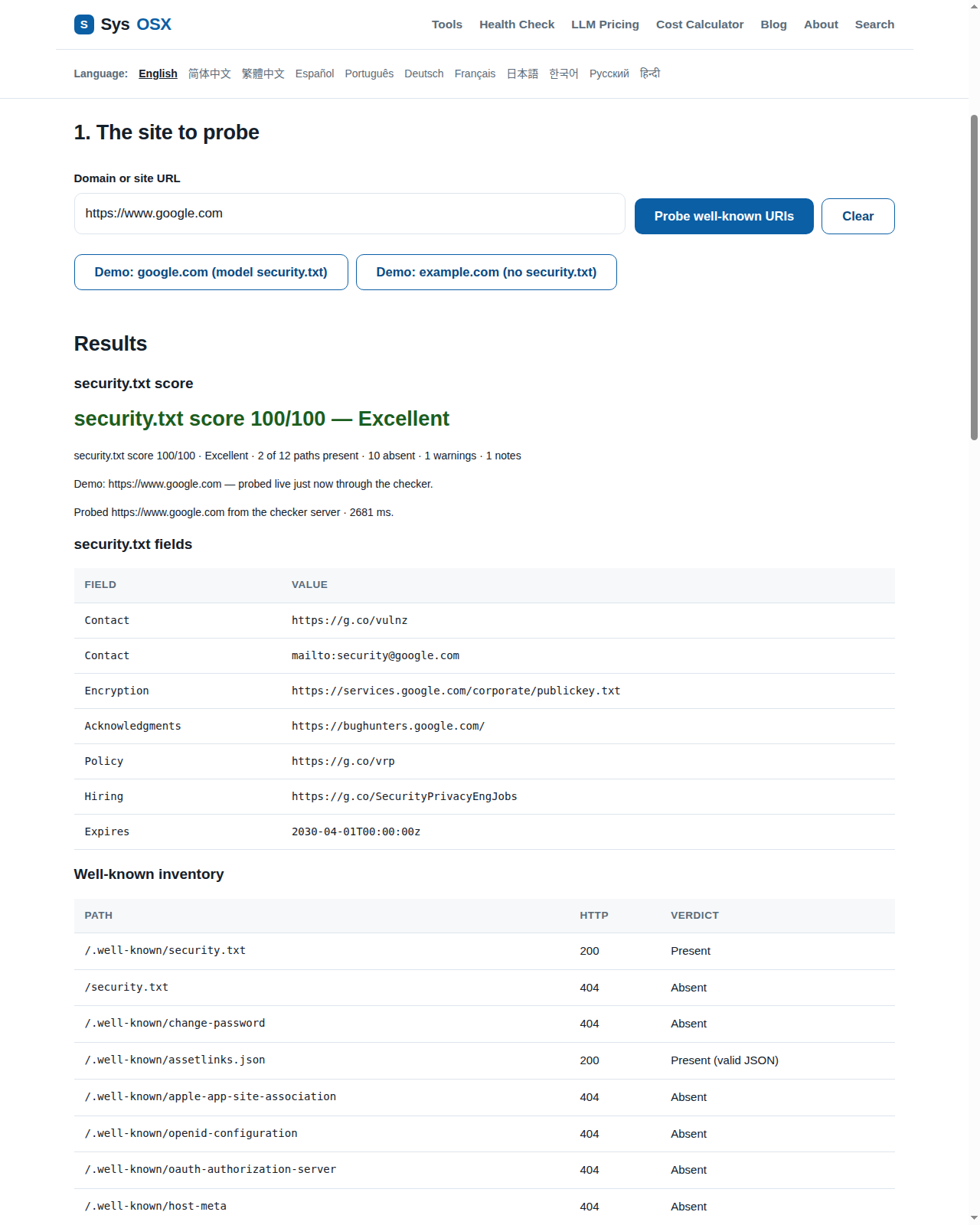
What a good security.txt contains — and the Expires discipline
Two fields are required. Contact is the point of the file: at least one way to reach a human who can act — a mailto: monitored by the security team, or the URL of a disclosure or bug-bounty page. It may repeat, and should, if there are two real routes. Expires is the file’s freshness date, an ISO 8601 timestamp in the future. Everything else is optional and situational: Encryption points at a PGP key for private reports; Policy links the disclosure terms; Acknowledgments credits past reporters (a hall of fame is a genuine incentive); Hiring recruits; Preferred-Languages says which languages the team reads; Canonical pins the file’s own URL when it is mirrored.
Expires deserves its own paragraph because it is where real files fail. The RFC requires the date to be less than a year in the future — not as bureaucracy, but as a forcing function: a security.txt that must be renewed annually cannot silently outlive the team that wrote it, the mailbox it names, or the bounty programme it points at. An expired file is worse than a missing one in one respect: it proves the channel was once real and has been abandoned, and strict readers must treat its contents as out of date. The most common finding on real sites is not a missing file but an expired one. Publish with a renewal reminder attached, or do not be surprised.
The supporting cast: what the other files are for
change-password is the smallest useful file on the web: its body is the URL of the password-change page, so that when a password manager warns “this password appeared in a breach”, it can offer a button that lands exactly on the right page instead of the account-settings maze. assetlinks.json and apple-app-site-association are the app-link declarations for Android and iOS: they bind a domain to an app by signing certificate, which is what lets a tapped link open the app instead of the browser — and what stops any other app from claiming those links. When they break, deep links break, quietly and completely.
The identity files serve machines configuring themselves. openid-configuration and oauth-authorization-server publish an identity server’s endpoints — where to authorize, where to exchange tokens, which algorithms are signed — so clients and libraries configure from the document instead of from constants that rot. host-meta and nodeinfo belong to the federated web: host-meta points to a host’s XRD metadata, and nodeinfo describes a fediverse server to its peers. WebFinger, the lookup protocol behind federated addresses, completes the set: it answers only with a resource parameter, which is why a bare probe returning 400 is a healthy endpoint, not a broken one. A commerce profile at /.well-known/ucp is inventoried by the prober and validated in depth by the UCP Checker.
Not in the drawer: the files people confuse with well-known
robots.txt is the famous near-miss. It predates the well-known registry, lives at the root, and stays there: moving it under /.well-known/ would break three decades of crawlers, so the standard leaves it alone. The same applies to humans.txt, the credits file some sites keep beside it, and to ads.txt and app-ads.txt, the advertising transparency files, which are also root files with their own specifications. “Well-known” is a term of art — a path is well-known because it is registered under the prefix, not because it is widely known.
The other confusion is depth. A well-known file’s presence says a site publishes that interface; it says nothing about whether the contents are right. An OpenID configuration can be present and wrong, an assetlinks file can name a retired certificate, a security.txt can list a mailbox nobody reads. Presence inventories — including this article’s companion tool — are the first pass: they tell you which drawers to open. Validating the contents belongs to the dedicated checkers and test suites of each ecosystem, and a tool that pretends otherwise is grading on confidence, not evidence.
Publish and check yours in five minutes
Publishing takes five minutes. Write the file — the model below is a complete template — serve it as text/plain over https at /.well-known/security.txt, and set a calendar reminder a month before its Expires date. Keep a copy at the legacy /security.txt if your platform makes it easy, but treat the well-known location as the real one. Then check it the way a stranger’s tooling would: the security.txt & Well-Known URI Prober fetches your drawer from an outside network, validates the file field by field, and shows the inventory of everything else you publish.
The prober scores only the security.txt, from 100: Contact missing −25, Expires missing −15, Expires in the past −20, not served as text/plain −5, served over http −10, content that does not parse −10. No file anywhere scores 60 — a missing contact channel is a gap, not a breach — and a file found only at the legacy location caps at 60. The other paths are never scored, because a site should not be graded for declining to run services it does not offer. What the score cannot say, no score can: whether the mailbox is read. Write to your own contact once, before a stranger needs it, and confirm a human answers. That reply is the real check; the file is just how the stranger finds the address.
A model security.txt
# /.well-known/security.txt — served as text/plain over https
Contact: mailto:[email protected]
Contact: https://example.com/security/disclosure
Encryption: https://example.com/pgp-key.txt
Policy: https://example.com/security/policy
Acknowledgments: https://example.com/security/thanks
Preferred-Languages: en
Expires: 2027-06-01T00:00:00Z