Password Vault Audit: Why Reuse, Not Length, Is What Gets People Hacked
Last updated:
A password vault audit is a health check of a whole password-manager vault at once: it reads a CSV export of the vault and flags reused passwords, weak passwords, duplicates and empty entries, then scores the vault from 0 to 100. Most people who use a password manager assume the vault is healthy by definition — the manager generates the passwords, after all. But vaults accumulate history: the passwords you typed by hand before the manager, the one you reused “just this once” on a new account, the forum login from 2016 that shares a password with your email. An audit finds those, in minutes, and this article explains what it checks, why reuse outranks every other finding, and how to run one without ever uploading your vault — using the Password Vault Auditor, which works fully offline.
What a vault audit is — and why the whole-vault view matters
A vault audit starts from the export file every major password manager can produce: a CSV listing each saved login — site, username, password. Read as a whole, that file answers questions no single-login view can: Is any password used on more than one site? How many entries are weak, empty or duplicated? Which accounts would fall together if one site leaked? The audit checks each entry, groups the shared passwords, and rolls everything into one score so you can see whether the vault is healthy or quietly fragile.
The whole-vault view matters because password risk is relational. A strong password used on nine sites is, in practice, nine accounts protected by the security of the weakest of those sites. A weak password on a throwaway forum is a minor problem — until you notice the same password guards your email, and email is the master key that resets everything else. Per-site checks cannot see those relationships; an audit of the whole export can, which is why it is the right unit of analysis for vault hygiene.
Why reuse — not length — is the risk that actually gets people hacked
When a site is breached, its password database eventually becomes a list that anyone can download. Attackers feed those lists into tools that try each username/password pair against hundreds of other sites automatically — credential stuffing. The attack does not care how long or clever your password was: it only cares whether the same pair opens another door. One reused password converts a breach at a site you barely remember into access to every other site where you reused it, and the sites that matter — email, banking, cloud storage — are usually in the blast radius.
This is why auditors rank reuse above weakness. A weak-but-unique password exposes exactly one account, and only if that site is attacked directly or its database leaks and gets cracked. A strong-but-reused password exposes every account that shares it, through the weakest site in the group — a site whose security you do not control and whose breach you may never hear about. Length and complexity still matter, and the audit checks them; but uniqueness is the property that contains a breach, and it is the first thing to fix.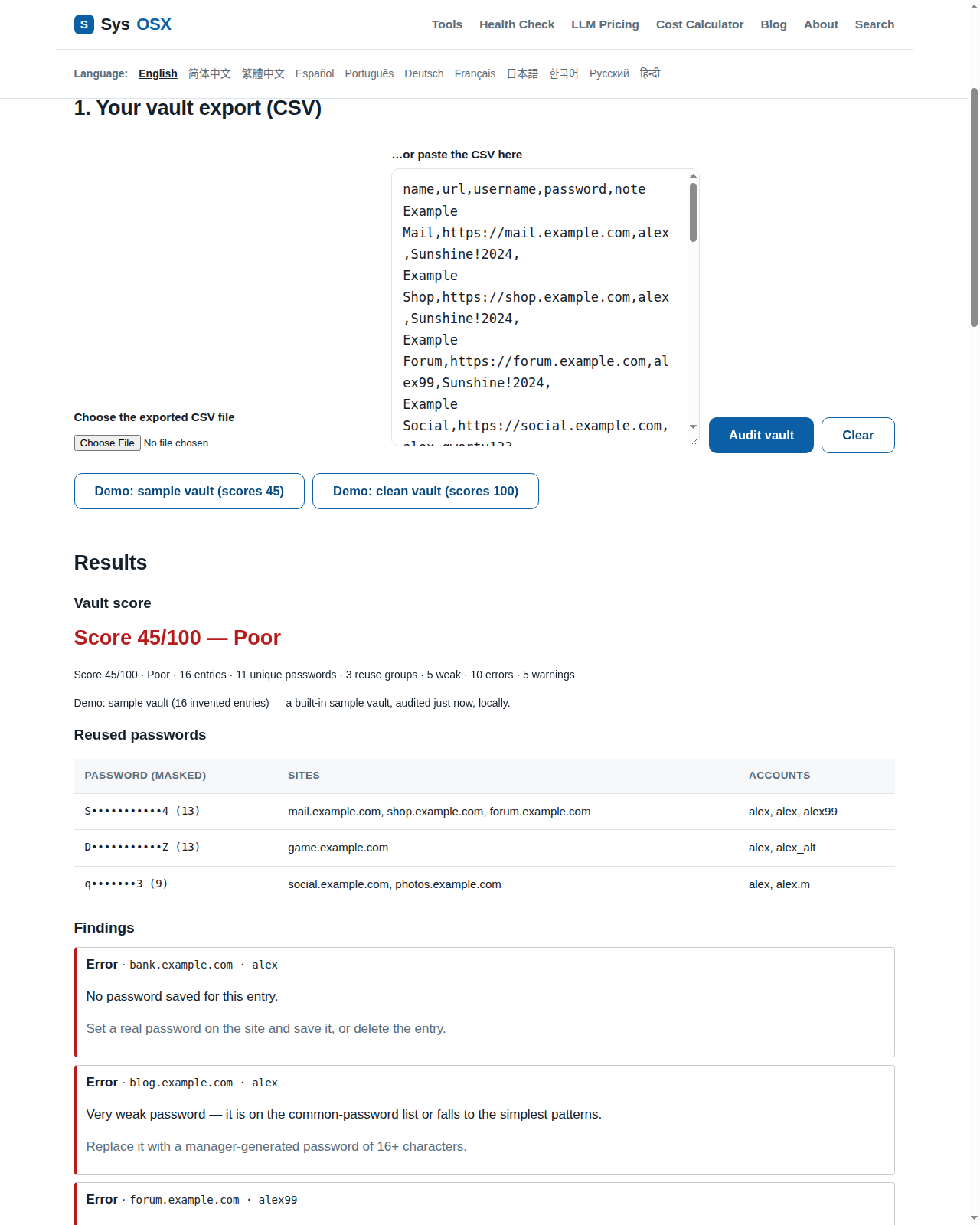
How to export your vault CSV from the major managers
Every major manager exports CSV, though most hide it in the desktop app or the web vault rather than the mobile app. In Chrome, open Settings → Autofill and passwords → Google Password Manager → Settings, and choose Download file. In Bitwarden, the web vault and desktop app offer Tools → Export vault, choosing .csv. LastPass offers Advanced Options → Export from the vault. 1Password’s desktop apps export via File → Export, choosing CSV. KeePass offers File → Export → KeePass CSV. The exact menu names drift between versions, but the shape is constant: authenticate, choose CSV, save the file.
Treat the file you just created with the seriousness it deserves: it is every password you own, in plaintext. Export onto a machine you trust, run the audit immediately, and delete the file when you are done — emptying the trash, not just moving it. Do not email it to yourself, do not park it in a synced folder, and do not leave it in Downloads “for later”. If your manager offers an encrypted export format, that is a safer thing to keep; the plaintext CSV is a working file, not an archive.
What the audit checks — and its strength rubric in plain words
The audit checks five things. Reuse: the same password on more than one site is an error, shared between accounts on one site a warning. Strength: each password is graded very weak, weak, fair, strong or excellent. Empties and duplicates: entries with no password at all, and the same site-and-username saved twice. Hygiene: missing usernames or URLs, logins whose address is http:// rather than https://, and hosts that are bare IP addresses. Everything rolls into a vault score: start at 100, each error deducts 6 (capped at 48), each warning deducts 2 (capped at 24), and the deduction is scaled mildly by vault size — full weight up to 10 entries, easing to 0.7× at 50 entries and beyond. 90+ is Excellent, 70–89 Good, 50–69 Needs work, below 50 Poor.
The strength rubric is deliberately simple and published, not a black box: length earns up to 4 points (under 8 characters earns none; 20 or more earns all four), character variety earns up to 3 (using lowercase, uppercase, digits and symbols), and points come off for the patterns attackers exploit — sequences like abcd or 9876, keyboard walks like qwerty, repeated units, all-digit passwords, repeated characters, embedded years, and passwords from a single character class. Anything on a built-in list of a few hundred common passwords is very weak outright. It is a local rubric, not zxcvbn — its job is to rank your vault’s entries against each other honestly, not to model a specific attacker.
Why this audit runs fully offline — by design
A vault export should never be uploaded anywhere. Not to a checker site, not to a cloud converter, not “just the hashes” to a service you found an hour ago. The file is the master copy of your digital life in plaintext, and every upload is a copy you no longer control — on a server whose retention, logging and breach history you cannot audit. So the Password Vault Auditor is built the other way: the page parses the file in your browser, makes no network calls at all, and sends nothing anywhere — not even a hash. You can load the page, disconnect from the network, and audit offline; closing the tab destroys the data.
This is also the honest dividing line with the Password Breach Check. That tool answers “has THIS password appeared in a known breach?” — a question that inherently needs breach data held elsewhere, so it uses a k-anonymity lookup in which part of a hash leaves the browser, disclosed on its page. The vault audit answers “is my whole vault healthy?” — a question that needs nothing from any server, so it takes nothing from any server. Match the tool to the question, and be suspicious of any vault-wide service that asks for the file itself.
The five findings people see most — and what to do about each
First, reuse across sites: fix it by giving every site in the group its own manager-generated password, starting with your email account — whoever controls your email can reset everything else. Second, very weak passwords, usually hand-typed ones from before the manager: replace them with generated passwords of 16 or more characters. Third, empty entries and duplicates, the archaeology of years of saving logins: set the real password or delete the stale row. Fourth, http:// addresses on old entries: update them to the https:// address where the site offers one. Fifth, missing usernames and URLs: fill them in so future-you can tell accounts apart.
Two habits keep a vault healthy after the cleanup. Let the manager generate every new password — 16 or more random characters, unique per site, no exceptions for “unimportant” accounts, because unimportant accounts are exactly the ones whose breaches feed credential stuffing. And add a second factor wherever it is offered — a passkey or an authenticator app — so that even a leaked password is not enough on its own. Then re-export and re-audit once in a while: a healthy vault scores 90 or above, and keeping it there is a five-minute job, not a project.
What a vault export looks like
name,url,username,password,note
Example Mail,https://mail.example.com,alex,Sunshine!2024,
Example Shop,https://shop.example.com,alex,Sunshine!2024,
Example Social,https://social.example.com,alex,qwerty123,
Example Bank,https://bank.example.com,alex,,