OIDC Discovery and SAML Metadata: How to Tell a Healthy Identity Provider from a Broken One
Last updated:
An OpenID Connect discovery document is the machine-readable way an identity provider introduces itself: its issuer, its endpoints, its signing keys and its supported flows, all published at one well-known URL. SAML metadata plays the same role for the older federation world: one XML document describing an identity provider or a service provider — its entityID, its SSO endpoints, its signing certificate. Both documents are public by design, and both are trusted by the software that reads them. This article explains what a healthy discovery document contains, the issuer-match rule that stops mix-up attacks, the SAML metadata failures that actually happen in practice, and how to check your own IdP in five minutes with the OIDC Discovery & SAML Metadata Validator.
What an OIDC discovery document is
Every OpenID Connect provider publishes a JSON document at /.well-known/openid-configuration under its issuer URL. A client that has never seen the provider before fetches that one document and learns everything it needs: the issuer identifier, the authorization and token endpoints, the userinfo endpoint, the JWKS URI where the signing keys live, the response types and grant types it supports, the scopes and claims it will return, and the signing algorithms its ID tokens use. The document is the provider’s self-description, and the client trusts it — which is why its contents deserve the same scrutiny as any other configuration that decides where tokens go.
SAML metadata is the same idea in XML, standardised a decade earlier. An identity provider publishes an EntityDescriptor carrying its entityID, its SingleSignOnService endpoints with their bindings, its signing certificate, and the NameID formats it supports; a service provider publishes the mirror image, including whether it wants its authentication requests signed. Federation software consumes the file without a human in the loop, so a stale certificate or a plain-HTTP endpoint inside it is not a cosmetic flaw — it is the configuration that the next login will actually use.
What a wrong discovery document hands an attacker
The most dangerous field in a discovery document is the issuer itself. The client asked for one issuer and must check that the document answers with exactly that string — character for character, including the scheme and any trailing slash. The rule exists because of the mix-up attack: a client that confuses one provider for another can be tricked into sending an authorization code to the wrong token endpoint, or into accepting an ID token issued by a different provider than the one the user authenticated with. RFC 9700, the OAuth 2.0 security best practice, treats issuer confusion as a first-class threat, not an edge case — and the fix is a string comparison, nothing more exotic.
The rest of the document decides where tokens and codes travel. An authorization endpoint on plain HTTP hands the authorization code to anyone on the path. A token endpoint without RS256 — or worse, one that accepts none — means ID tokens are signed with a shared secret or not signed at all. A document that still advertises the implicit response types (token, id_token) invites the flows that the security community has spent a decade retiring, because tokens in the URL fragment leak through browser history and referers. None of these is a bug in the client: they are the provider telling the client, in its own words, how to be unsafe. 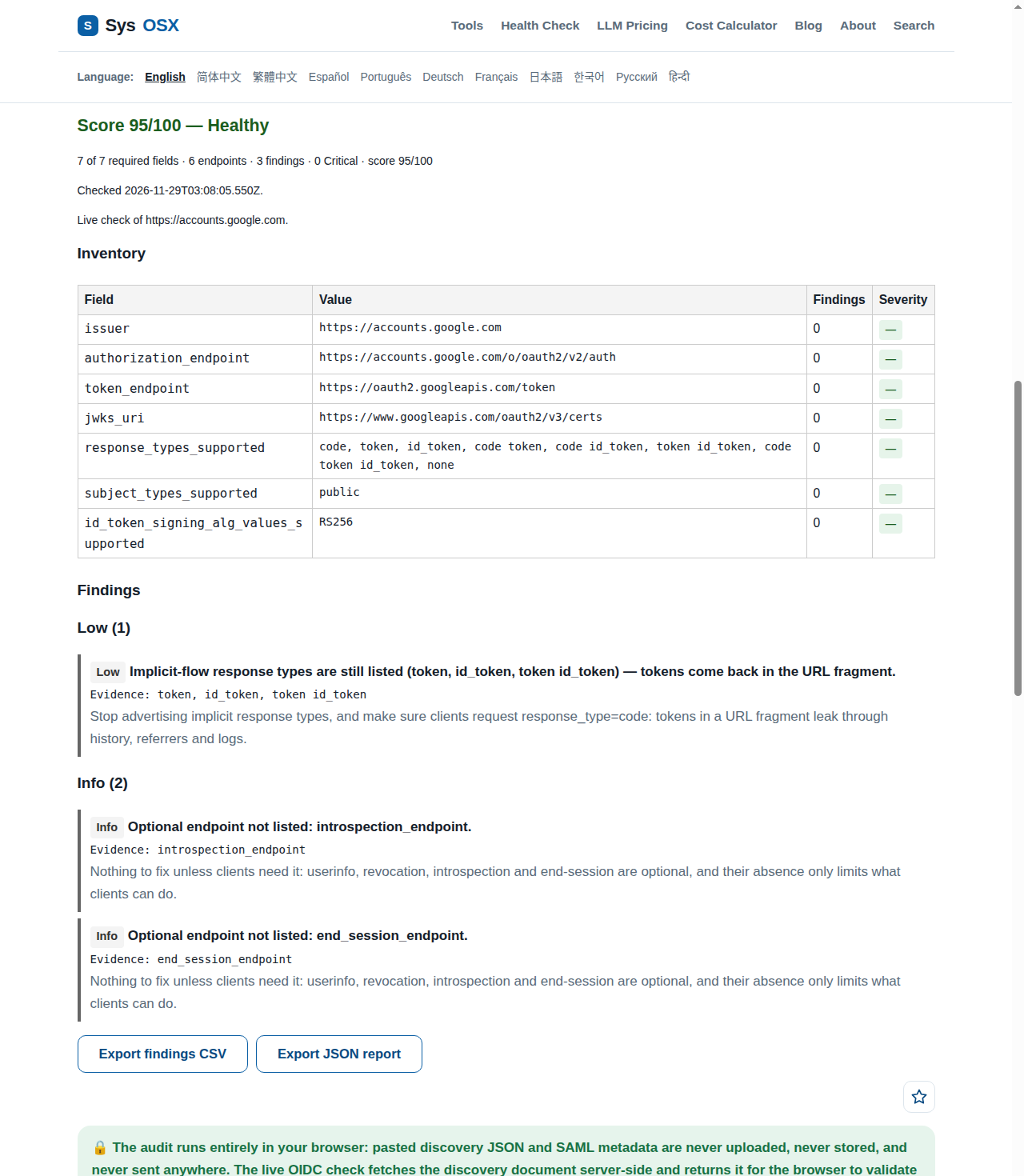
What a healthy discovery document contains in 2026
A healthy document in 2026 is boring in the right ways. Every endpoint is HTTPS. The issuer matches exactly. id_token_signing_alg_values_supported includes RS256, and none is nowhere. scopes_supported contains openid — without it the provider is not really doing OpenID Connect. code_challenge_methods_supported includes S256, so public clients can use PKCE, the mechanism that binds an authorization code to the client that requested it. Google’s own document is a good reference: it scores 95 out of 100 on the companion validator, losing its points only because it still lists the legacy implicit response types and omits the optional end-session and introspection endpoints.
Two newer features show up as information, not requirements. Pushed Authorization Requests (PAR) let a client push its authorization request to the provider first and pass back a short reference instead of a long query string — worth having, not yet universal. Rich Authorization Requests (RAR) let a client ask for fine-grained permissions in a structured way. A provider that offers either is ahead of the field; a provider that offers neither is not broken. The same judgement applies to the optional endpoints: end-session, revocation and introspection are good to have, and their absence is a note, not a failure.
SAML metadata failure modes in practice
SAML metadata fails in practice in a handful of repeatable ways, and the most common is the one nobody schedules: the signing certificate inside the metadata expires. The certificate is embedded as base64 in the document, and federation software reads its validity dates from that blob — when the date passes, signatures stop verifying and logins stop working, usually discovered by users before anyone else. The second is plain-HTTP SSO or SLO endpoints, which hand the SAML response — and the assertions inside it — to anyone on the path. The third is unsigned metadata: a document with no signature element at all, which any party could have produced.
The subtler failures are the flags. WantAuthnRequestsSigned tells service providers that the IdP expects signed authentication requests; AuthnRequestsSigned tells the IdP that the service provider will sign them. When either is absent or false, unsigned requests flow and an attacker who can inject one can start a login the user never asked for. Missing NameID formats and expired validUntil dates complete the usual list: the document is stale, or it never said clearly enough what identity it will assert. The companion validator flags all of these, and its bundled demo metadata — which scores 95, losing five points for the missing AuthnRequestsSigned flag alone — shows what one missing flag looks like.
A five-minute checklist for your own IdP
Fetch your own discovery document and read it the way a client would. First, the issuer: does the document’s issuer string match the URL you publish, exactly? Second, the endpoints: is every one of them HTTPS, with no localhost or plain-HTTP stragglers? Third, the algorithms: is RS256 listed, is none absent, and does the document support S256 code challenges? Fourth, the scopes and claims: is openid in the scope list, and are the core claims — sub, iss, aud, exp, iat — present? Each answer is a line in the document, and each wrong answer is a finding with a fix.
Then do the same for SAML. Open the metadata, check the entityID, and read the signing certificate’s expiry date — put a calendar reminder 30 days before it, not on the day it lapses. Confirm the SSO and SLO endpoints are HTTPS and the bindings are the ones your federation partners expect. Check that the metadata is signed, or at least that it came over a channel you trust, and that validUntil and cacheDuration are present and sane. Five minutes, two documents, and you will know more about your federation posture than most operators.
Check yours with the companion tool
The OIDC Discovery & SAML Metadata Validator runs both checks. Paste an issuer URL and it fetches the discovery document through the SysOSX checker and scores it 0–100, or paste the document itself and the same validation runs entirely in your browser. For SAML, paste or drop the metadata XML — it never leaves your device — and the tool reports the certificate expiry, the endpoint bindings and the signing flags, with a findings table you can export as CSV or JSON. The live demo runs against Google’s issuer; the SAML demo is a bundled synthetic document with one planted flaw. It sits alongside the GraphQL checker, which probes a live API the same way this tool probes a live identity provider.
What the score does not do matters as much as what it does. A perfect score is a structural verdict: the document is well-formed, consistent and complete. It does not prove the identity provider is secure, that tokens validate at runtime, or that a SAML signature is genuine — the tool reports a signature’s presence, it never verifies it cryptographically. Key rollover, runtime behaviour and the provider’s own operational security are outside its scope. Treat the score as the first check on the list, not the last word.
A healthy discovery document, trimmed
{
  "issuer": "https://accounts.google.com",
  "authorization_endpoint": "https://accounts.google.com/o/oauth2/v2/auth",
  "token_endpoint": "https://oauth2.googleapis.com/token",
  "userinfo_endpoint": "https://openidconnect.googleapis.com/v1/userinfo",
  "revocation_endpoint": "https://oauth2.googleapis.com/revoke",
  "jwks_uri": "https://www.googleapis.com/oauth2/v3/certs",
  "response_types_supported": ["code", "token", "id_token",
    "code token", "code id_token", "token id_token",
    "code token id_token", "none"],
  "subject_types_supported": ["public"],
  "id_token_signing_alg_values_supported": ["RS256"],
  "scopes_supported": ["openid", "email", "profile"],
  "token_endpoint_auth_methods_supported": ["client_secret_post",
    "client_secret_basic"],
  "claims_supported": ["aud", "email", "email_verified", "exp",
    "family_name", "given_name", "iat", "iss", "name", "picture",
    "sub"],
  "code_challenge_methods_supported": ["plain", "S256"],
  "grant_types_supported": ["authorization_code", "refresh_token",
    "urn:ietf:params:oauth:grant-type:device_code",
    "urn:ietf:params:oauth:grant-type:jwt-bearer"]
}