Nginx Config Audit Guide: TLS, Headers and the add_header Trap
Last updated:
An nginx config audit is a static review of an nginx.conf file — its TLS settings, headers, exposure switches and proxy rules — checked line by line against known-good practice, without running the server. The file is small, usually a few hundred lines, but it decides what your server reveals, which TLS versions it will negotiate, which headers protect your users, and which paths are public. This guide walks through the settings that matter, the one inheritance rule that silently removes your security headers, and the mistakes that show up again and again — then shows you how to run the same audit yourself with the Nginx Config Auditor.
What an nginx config audit actually checks
A config audit reads the file the way nginx reads it: as a tree. The main context sets worker behaviour, http holds the shared defaults, each server block is one site, and each location refines a URL path. Because most directives inherit from parent to child, a single line in the wrong place — or missing in the right place — changes every site on the box. An audit therefore checks both presence and placement: is the setting there, and is it where it actually takes effect?
The checks fall into four families. Transport security: which TLS versions and ciphers are offered, and whether the modern ones are on. Information exposure: what the server volunteers about itself, and what it lists for anyone who asks. Response headers: the small set of headers that protect users in the browser. And operational basics: compression, timeouts, body limits and logging — the settings whose absence is only noticed during an incident. The Nginx Config Auditor runs 30 such rules and scores the result from 0 to 100; its sibling tools do the same for sshd_config and systemd units.
The settings that decide your security posture
Four lines do most of the work. ssl_protocols should offer TLSv1.2 and TLSv1.3 only: TLSv1 and TLSv1.1 were deprecated by RFC 8996, and SSLv3 has been broken since POODLE. ssl_ciphers should contain no RC4, 3DES, NULL or export-grade ciphers — the Mozilla SSL Configuration Generator publishes the list most hardened configs copy. server_tokens off stops nginx printing its version in error pages and the Server header, where it serves as a shopping list for exploits. And autoindex off (the default, but worth stating) keeps a directory without an index file from becoming a browsable listing of everything in it — backups included.
Then come the headers, sent with add_header: Strict-Transport-Security tells browsers to only ever use HTTPS; X-Content-Type-Options: nosniff stops MIME-sniffing attacks; X-Frame-Options (or a CSP frame-ancestors) blocks clickjacking framing; Referrer-Policy keeps full URLs out of other sites’ logs. None of these is exotic, and all four are missing from a surprising share of production configs — usually not by decision, but because the config grew by copy-paste and nobody ever read it end to end. That reading is the audit. 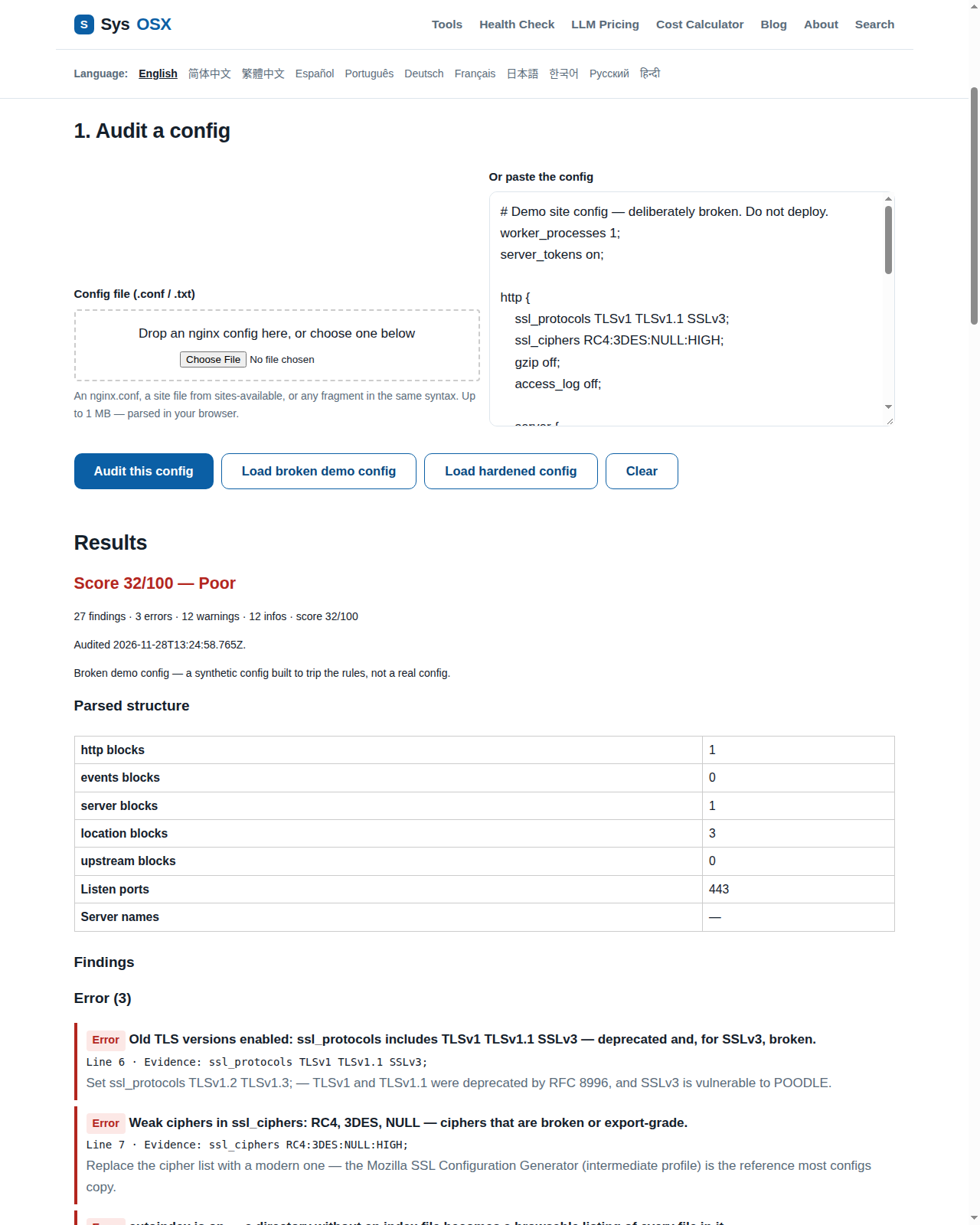
The add_header inheritance trap, explained plainly
Almost every nginx directive inherits the way you would expect: set it in http, and every server gets it; set it in a server, and every location gets it. add_header is the exception, and it is documented in one quiet sentence: add_header directives are inherited from the previous configuration level if and only if no add_header directives are defined on the current level. The moment a location adds one header of its own — say a cache header for static files — it inherits none of the parent’s headers. HSTS, nosniff, framing protection: all gone, for that path only, with no warning from nginx and no error anywhere.
This is why the trap bites real sites. The main pages are fine — the headers check out — but the one location that needed a custom header, often an upload or API path that deserves protection most, silently serves without any of them. The fixes are boring: either repeat the parent’s add_header lines inside the location, or move the location’s extra header up to the server block so the location defines none of its own. The auditor flags exactly this pattern: a location that defines add_header while a parent block also does.
Performance basics people forget
Security gets the attention, but the most common performance findings are just as plain. gzip on alone is not enough: without a gzip_types list covering text/css and application/json, your stylesheets and API responses travel uncompressed (text/html is always compressed and, confusingly, must not be listed). Without gzip_min_length, nginx spends CPU compressing responses too small to benefit. These three lines are the cheapest bandwidth a site can buy, and they are absent from most configs that were assembled from snippets.
The timeout family is the other forgotten group. Without explicit client_body_timeout and send_timeout, slow clients can hold connections open far longer than they should — the slowloris pattern. And client_max_body_size deserves a deliberate value: unset, the 1 MB default rejects legitimate uploads with confusing 413 errors; set to hundreds of megabytes everywhere, it invites body-flooding. The right answer is a small global limit and a larger one scoped to the single upload location that needs it.
The five mistakes the auditor flags most
Across real-world configs, the same five findings recur. First, old TLS: an ssl_protocols line copied from a decade-old tutorial, still offering TLSv1 to anyone who asks. Second, server_tokens left on — the default nobody turned off. Third, missing security headers, usually because they were never added rather than removed. Fourth, the add_header trap above: headers present on the homepage, absent on the one location that customised them. Fifth, proxy locations without the three forwarding headers — Host, X-Real-IP, X-Forwarded-For — so the backend logs every visitor as 127.0.0.1 and builds the wrong absolute URLs.
The demo config below manages most of them in 30 lines, plus a few extras: RC4 in the cipher list, logging switched off, an if inside a location (the documentation’s own “if is evil” warning — safe uses are essentially return and rewrite … last), an unguarded /admin, and the deprecated ssl on;. The auditor scores it 32 out of 100, band Poor, with 27 findings: 3 errors, 12 warnings and 12 infos. Its hardened twin — same shape, every finding fixed — scores 100.
What a static audit cannot see — and auditing yours in five minutes
A static audit reads text, and its limits are the limits of text. It cannot see the certificate files the config points at — an expired or mismatched certificate passes every check in this guide. It cannot see included files (include lines are noted, not followed), the modules your binary was compiled with, whether an upstream is healthy, or the firewall in front of the server. It also cannot prove the running server loaded this file at all. On the server itself, nginx -t validates and nginx -T dumps the full effective configuration — the audit is the fast, safe first pass before that, and the only pass you can run on a config someone emailed you.
To audit yours in five minutes: copy the config (or the one site file you care about), paste it into the Nginx Config Auditor — it runs entirely in your browser, and the config is never uploaded, which matters because a config names certificate paths, internal upstreams and admin allow-lists. Fix the errors first (old TLS, weak ciphers, autoindex), then the warnings, then work through the infos as a list of defaults worth setting explicitly. Export the findings CSV if you want the checklist in a ticket. Then do the same for every file your main config includes — a clean nginx.conf can include a very broken site.
The broken demo config, verbatim
# Demo site config — deliberately broken. Do not deploy.
worker_processes 1;
server_tokens on;

http {
    ssl_protocols TLSv1 TLSv1.1 SSLv3;
    ssl_ciphers RC4:3DES:NULL:HIGH;
    gzip off;
    access_log off;

    server {
        listen 443 ssl;
        ssl on;

        location / {
            proxy_pass http://127.0.0.1:3000;
            if ($request_method = POST) { return 405; }
        }

        location /files {
            autoindex on;
            root /data;
        }

        location /admin {
            proxy_pass http://127.0.0.1:3000;
        }
    }
}