Modern Protocol Check: HTTP/3, IPv6 & ECH
Last updated:
Three protocols decide whether a site speaks the modern web: HTTP/3, which moves the web from TCP to QUIC; IPv6, the address space the internet actually has room in; and Encrypted ClientHello (ECH), which encrypts the last readable part of the TLS handshake. Most sites run at least one of them by accident — a CDN turns it on by default — and most site owners have never checked any of them. This article explains what each protocol does, how the three fit together in a single DNS record, what a browser can and cannot measure about them, and how to check your own site in five minutes with the Modern Protocol Checker.
What the modern protocol stack is — and why it matters
The web runs on a stack that was designed in layers, and three of those layers have been replaced in the last decade while most site owners were looking the other way. At the transport layer, QUIC replaced TCP for the newest version of HTTP. At the network layer, IPv6 replaced IPv4 as the address space with room to grow. At the security layer, Encrypted ClientHello closes the last hole in TLS 1.3: the Server Name Indication that used to be sent in the clear. Each one is independent — a site can have IPv6 without HTTP/3, or HTTP/3 without ECH — but they are deployed together often enough that checking them together makes sense, and a single DNS record, the HTTPS record, advertises all three at once.
Why it matters is not fashion. HTTP/3 exists because TCP’s head-of-line blocking made pages slow on lossy networks — mobile, public Wi-Fi, congested links — and QUIC fixes it at the transport layer, where no amount of frontend optimisation can help. IPv6 matters because the IPv4 space is exhausted and every new network, device and cloud region is built dual-stack or IPv6-only; a site with no AAAA records is invisible to those clients. ECH matters because the SNI was the last thing an observer on the path could read about your browsing, and encrypting it is the difference between "the connection is encrypted" and "the connection is encrypted and nobody on the path knows which site it is". None of the three changes what a page looks like. All three change how it gets to the visitor.
HTTP/3 and QUIC — why the web moved to UDP
HTTP/3 is the third major version of HTTP, standardised in RFC 9114, and its defining choice is the transport: QUIC, a protocol built on UDP, instead of TCP. The reason is a flaw TCP cannot fix. TCP delivers bytes in order, so one lost packet stalls everything behind it — every image, every script, every stream on that connection waits while the lost packet is retransmitted. On a clean network that rarely matters; on a mobile network with 2% packet loss it dominates page load time. QUIC gives each stream its own ordering, so a lost packet stalls one stream and the rest keep flowing. It also folds the TLS handshake into the transport handshake, so a connection to a known server starts in a single round trip instead of the three that TCP + TLS 1.2 needed.
A server advertises HTTP/3 in two places, and both are worth reading. The first is the DNS HTTPS record: its alpn parameter lists the application protocols the host speaks, and h3 in that list is the server saying "I speak HTTP/3, try QUIC first". The second is the Alt-Svc response header: Alt-Svc: h3=":443"; ma=86400 tells a browser that already connected over HTTP/2 to upgrade to HTTP/3 next time. Browsers read the HTTPS record before connecting and the Alt-Svc header after, so a host that publishes both gives clients two chances to find the fast path. Neither is proof the server actually answers on UDP/443 — that needs a QUIC client, not a browser — but a host that advertises neither is certainly not serving HTTP/3. 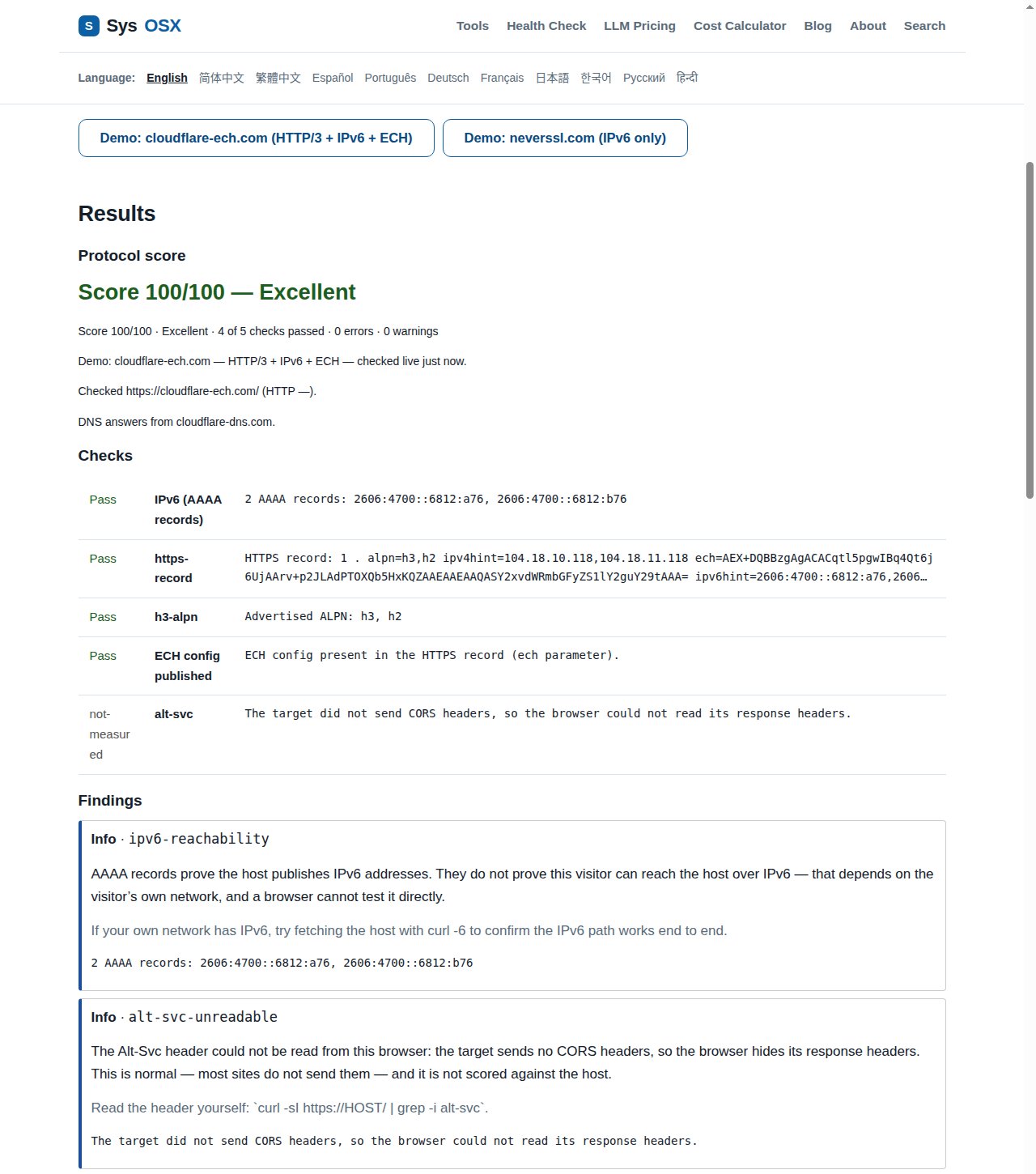
IPv6 — the address space that is not running out
IPv4 has about 4.3 billion addresses, and they ran out years ago — every address in use today is rented, shared through NAT, or both. IPv6 has 128-bit addresses: roughly 340 undecillion of them, enough that every device on earth could have a public address and the space would still be effectively empty. The practical consequence is simple: a host is reachable over IPv6 only if it publishes AAAA records, the DNS answer that maps a name to an IPv6 address, and a client can only use IPv6 if its own network has it. Most networks today are dual-stack — both protocols work — so the transition has been quiet: sites that publish AAAA records get IPv6 traffic without anyone noticing, and sites that do not simply never see it.
The check is therefore a DNS question, not a connectivity test: does the host publish AAAA records? That is what this tool asks over DNS-over-HTTPS, and it is worth 30 of the 100 points because it is the precondition for everything else IPv6. But publishing the records is only half the job. The server has to actually answer on that IPv6 address — a firewall rule, a missing listen directive, or a load balancer that only binds IPv4 will silently break the IPv6 path while the DNS looks perfect. A browser cannot test that directly either: whether an IPv6 connection works depends on the visitor’s network as much as the server’s. The honest check is two steps: AAAA records in DNS, then a fetch with curl -6 from a network that has IPv6.
ECH — the last readable part of the handshake, encrypted
TLS 1.3 encrypted almost everything about the handshake — except the ClientHello, the first message, which had to be readable so the server knew which site the client wanted. Inside it sat the Server Name Indication (SNI): the hostname, in cleartext, visible to anyone on the path — the Wi-Fi operator, the ISP, anyone watching the wire. The page was encrypted; the fact that you were visiting that particular site was not. Encrypted ClientHello, standardised in RFC 9849, fixes that by encrypting the real ClientHello inside an outer one addressed to a public name, using a public key the server publishes in DNS.
That public key is the ech parameter of the host’s HTTPS record — the same record that advertises h3. A client that supports ECH fetches the record, encrypts its ClientHello with the published key, and sends the outer ClientHello with a harmless public name; the server decrypts it with its private key and proceeds with the real hostname. An observer sees the public name and nothing else. Two honest caveats: ECH only helps when the client supports it and the server publishes a config — both are still rolling out — and ECH hides the name from observers on the path, not from the server itself, which obviously still learns which site you asked for. The check is therefore a DNS question too: does the HTTPS record carry an ech parameter? Present means the server publishes a config; absent means the SNI is sent in the clear.
What a browser can and cannot measure
This is the part most protocol checkers gloss over, so it is worth stating plainly. A browser is a deliberately limited instrument. It cannot open a raw UDP socket, so no browser tool can prove a server answers on UDP/443 — QUIC reachability is untestable from a browser, and any tool that claims to test it is guessing or testing something else. It does not expose the negotiated TLS version, so no browser tool can tell TLS 1.3 from TLS 1.2. And it only exposes response headers when the target sends CORS headers, which most sites do not — so the Alt-Svc header is unreadable for most of the web, and a tool that scores that as a failure is penalising hosts for something the browser cannot see.
What a browser can measure, honestly, is DNS and advertisements. It can query AAAA and HTTPS records over DNS-over-HTTPS — public resolvers with JSON APIs, no server of its own needed — and parse the raw HTTPS record for its alpn list and its ech parameter. It can fetch the target and read the Alt-Svc header when the target allows it. That is the whole measurement surface, and this tool is built to it: five checks, each one something the browser actually saw, a score computed only over the checks that could be measured, and info findings — never scored — for the two things that cannot be measured, each carrying the exact command to check them yourself. The score is a summary of the evidence, not a verdict on the host: a 100 means every advertisement is in place, not that QUIC works, and a 35 means only the IPv6 address is published, not that the site is broken.
How to check your own site in five minutes
Open the Modern Protocol Checker and start with the two demos. The good demo checks cloudflare-ech.com: AAAA records, an HTTPS record advertising alpn=h3,h2 with an ECH config, and an Alt-Svc header advertising h3 — score 100, every check passed. The poor demo checks neverssl.com: an IPv6 address, but no HTTPS record, no ECH and no Alt-Svc header — score 35, with the AAAA check the only pass. That pair teaches the shape of a good report in under a minute. Then enter your own hostname: the tool queries the AAAA and HTTPS records over DNS-over-HTTPS and fetches the site to read its Alt-Svc header, all in your browser.
Read the score as a summary, not a verdict. It is the earned weight over the weight of the checks that could actually be measured, scaled to 0–100: AAAA records 30, HTTPS record 10, h3 in the ALPN list 25, ECH config 20, Alt-Svc advertising h3 15 — the last only when the target lets the browser read its headers. Ninety or above is Excellent, 70–89 is Good, 50–69 Needs work, and below 50 is Poor. Fix errors first — a missing HTTPS record costs the record, the ALPN and the ECH points all at once, which is why publishing one record is the highest-leverage fix on the page — then warnings, then re-run. And finish the two checks the browser cannot do: openssl s_client -connect HOST:443 -servername HOST for the TLS version, and a curl with HTTP/3 support for UDP/443. When all five checks pass and both commands agree, the stack is real — and the next visitor on a lossy mobile network gets the fast path without ever knowing why.
Try it yourself: three commands that check what the browser cannot
# What TLS version and ALPN did the server actually negotiate?
openssl s_client -connect cloudflare-ech.com:443 -alpn h3 -servername cloudflare-ech.com </dev/null 2>/dev/null | grep -E "Protocol|ALPN"

# What does the HTTPS record advertise? (alpn + ech)
curl -s -H "Accept: application/dns-json" \
  "https://cloudflare-dns.com/dns-query?name=cloudflare-ech.com&type=65"

# What does the server send in Alt-Svc?
curl -sI https://cloudflare-ech.com/ | grep -i alt-svc