Linux sysctl Hardening Guide: The Settings That Matter
Last updated:
sysctl is the Linux kernel’s runtime configuration interface: a set of named switches, exposed as files under /proc/sys, that control everything from address-space randomisation to which packets the network stack will accept. Most of them sit at distribution defaults nobody chose. This guide covers the settings that carry most of the hardening value, the difference between what a conf file says and what a live sysctl -a dump proves, the trade-offs that make hardening a choice rather than a maximisation, and the kernel .config half of the posture — then shows how to audit your own machine in five minutes with the sysctl Hardening Auditor.
What sysctl is, in one breath
Every sysctl key is a file. kernel.randomize_va_space is /proc/sys/kernel/randomize_va_space; reading the file shows the live value, writing it (as root) changes the running kernel immediately. Distributions persist chosen values in /etc/sysctl.conf and /etc/sysctl.d/*.conf, which systemd-sysctl applies at boot in a defined order. Nothing else about the mechanism is complicated — and that simplicity is the trap: because each key is independent, nobody ever sees the whole posture at once. It accretes, one copied line at a time.
The full surface is large — a modern sysctl -a prints well over a thousand keys — but the security-relevant core is small. The Kernel Self Protection Project (KSPP) maintains the canonical recommended-settings list, and most hardening guides, including the rule set behind the sysctl Hardening Auditor, are distillations of it. You do not need to memorise a thousand keys; you need the few dozen that decide what an attacker — remote or local — gets for free.
The ten settings that carry most of the value
Start with the memory-exposure trio. kernel.randomize_va_space = 2 turns on full ASLR; at 0, exploits become reliable, which is why the auditor scores it as its only error. kernel.kptr_restrict and kernel.dmesg_restrict close the two cheapest information leaks on a multi-user machine: kernel pointers and the kernel log, both of which hand an attacker the addresses that ASLR exists to hide. Add kernel.yama.ptrace_scope and you also close the credential thief’s favourite trick — reading secrets out of a running process owned by the same user.
Then the filesystem and network pairs. fs.protected_hardlinks and fs.protected_symlinks shut down the classic /tmp races behind decades of local privilege escalations. On the wire, net.ipv4.tcp_syncookies = 1 makes SYN floods boring, net.ipv4.conf.all.rp_filter = 1 drops spoofed sources, and setting the redirect family — accept_redirects, send_redirects, accept_source_route — to 0 stops the network from politely rewriting your routing table. Finish with vm.mmap_min_addr = 65536 and the null-pointer class stays closed. Ten-ish settings, most of the value. 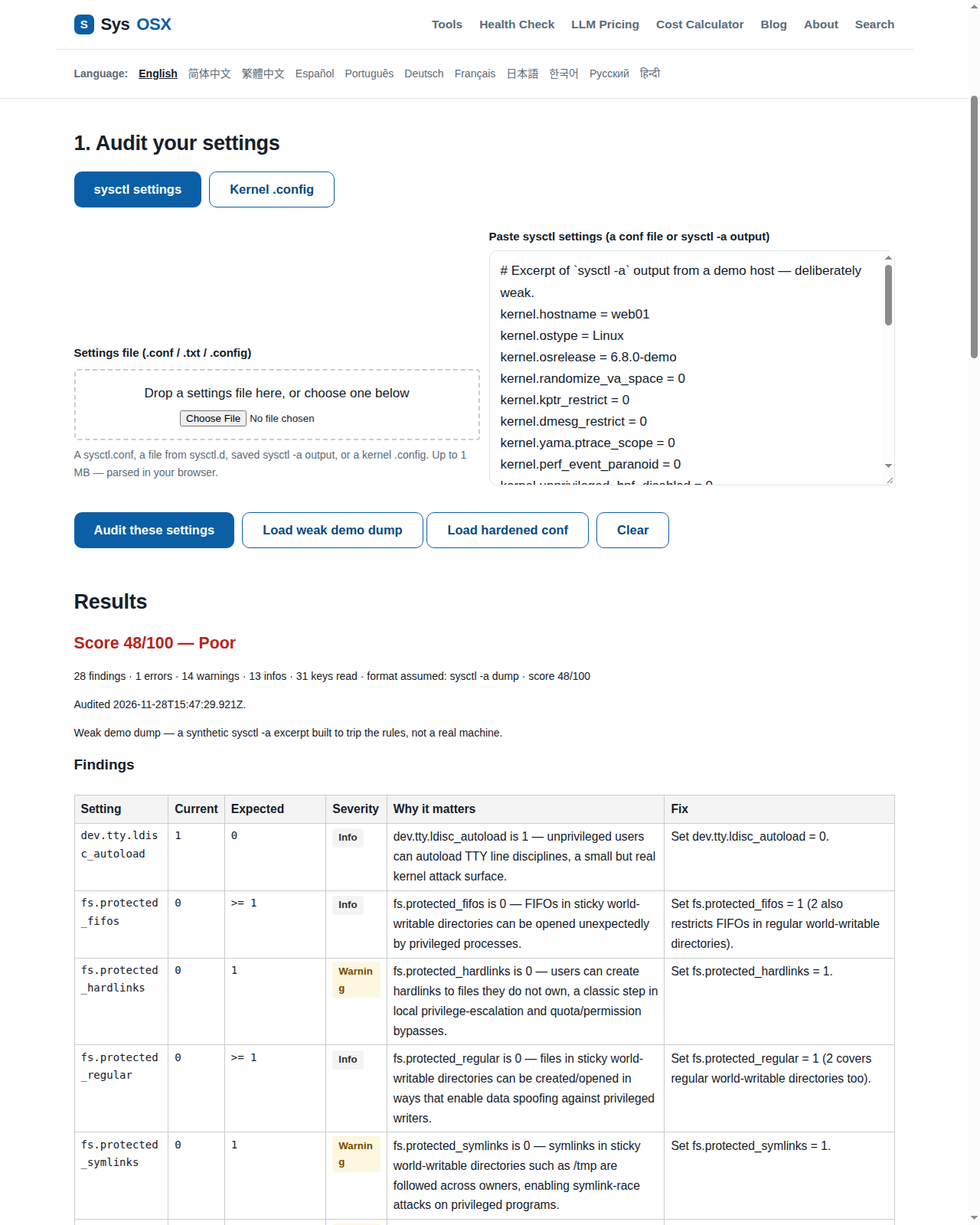
Conf file versus live dump: what’s set versus what’s true
A conf file is a statement of intent; a sysctl -a dump is evidence. The two diverge in both directions. A machine can carry a beautiful 99-hardening.conf and still run weak values because a later file in the sysctl.d order overrode them, or because someone changed the live value with sysctl -w and never persisted it — that change survives exactly until the next reboot. Conversely, a machine with no hardening file at all may still be fine on the keys its distribution defaults happen to set well.
This is why the auditor treats absence differently in the two forms. In a full dump, a missing curated key is meaningful: the feature is at its built-in default or unavailable. In a conf file, absence only means “not set here”. When you audit, audit the dump for truth and the conf for intent — and when the two disagree, believe the dump and fix the conf, because the conf is what the next reboot will believe.
Trade-offs are real: hardening is choosing, not maximising
Three settings in the rule set are deliberately reported as notes, not faults. net.ipv4.ip_forward = 1 is a defect on a workstation and a job description on a router. user.max_user_namespaces = 0 removes a genuinely large attack surface — and breaks rootless containers, some sandboxes and some browser sandboxes on the same machine. kernel.yama.ptrace_scope at 1 stops memory thieves and also stops a developer from attaching a debugger to a process they started from another terminal. None of these has a universally right answer; all of them deserve a deliberate one.
The same honesty applies to IPv6: the auditor never flags net.ipv6.conf.all.disable_ipv6 either way, because disabling a protocol family you do not use is a policy, not a vulnerability — and plenty of hardened hosts keep IPv6 on and simply set accept_ra and accept_redirects to 0. A checklist that pretends every knob has one correct position teaches people to ignore the checklist. Choose per machine, write the choice down in the conf file, and let the next admin see the reasoning.
The other half: kernel .config
sysctl can only tune what the kernel was built with. KASLR exists only if CONFIG_RANDOMIZE_BASE was set at compile time; CONFIG_FORTIFY_SOURCE adds the compile-time and runtime overflow checks no runtime switch can retrofit; CONFIG_STRICT_KERNEL_RWX, CONFIG_STACKPROTECTOR_STRONG, CONFIG_SLAB_FREELIST_HARDENED and CONFIG_INIT_ON_ALLOC are all build-time decisions. Distribution kernels get most of these right; self-built and embedded kernels are where they quietly go missing.
The config also carries its own judgement calls, mirroring the sysctl trade-offs: CONFIG_DEVMEM is a direct route to physical memory that specialised hardware tooling sometimes legitimately needs; CONFIG_KEXEC powers kdump crash analysis and, on a compromised machine, kernel replacement; CONFIG_LEGACY_TIOCSTI survives mostly for compatibility with terminal software older than its risks. Read yours at /boot/config-$(uname -r) or /proc/config.gz, and audit it with the same tool — the auditor’s second tab takes a .config directly.
Audit your own output in five minutes
Run sysctl -a > dump.txt on the machine (or copy your /etc/sysctl.d/99-hardening.conf), open the sysctl Hardening Auditor, and paste. The dump never leaves your browser — a sysctl dump is a map of your defences and should be treated like one. Read the score as a triage order: the error first (ASLR), then the warnings (pointers, dmesg, protected links, redirects, syncookies, rp_filter, mmap_min_addr), then the infos, which are mostly defaults worth making explicit.
Fix in the conf file, not with sysctl -w, so the fix survives reboot; apply with sysctl --system; re-dump and re-audit to confirm the live values moved. While you are in this corner of the system, the same static-audit habit pays off on the neighbouring files: the SSH Server Config Auditor reads your sshd_config, and the systemd Unit Auditor scores your service units — three small files that, between them, decide most of what a Linux host exposes.
The weak demo dump, in part
kernel.hostname = web01
kernel.randomize_va_space = 0
kernel.kptr_restrict = 0
kernel.dmesg_restrict = 0
fs.protected_hardlinks = 0
fs.protected_symlinks = 0
net.ipv4.conf.all.accept_redirects = 1
net.ipv4.tcp_syncookies = 0
net.ipv4.conf.all.rp_filter = 0
vm.mmap_min_addr = 4096