Kubernetes Manifest Audit Guide: Pod Security, RBAC and Secrets
Last updated:
A Kubernetes manifest audit is a static review of YAML manifests — their pod security settings, host access, images, resources, secrets and RBAC rules — checked field by field against known-good practice, without touching a cluster. Manifests are small files with outsized consequences: one boolean makes a container privileged, one binding hands over the cluster. This guide walks through the standards behind the checks, the five fields that decide most of the risk, and the quiet catastrophe hiding in RBAC — then shows you how to run the same audit yourself with the Kubernetes Manifest Auditor.
What a manifest audit actually checks
A manifest audit reads the YAML the way the API server will: as a set of objects that only make full sense together. A Deployment's pod template decides how the workload runs; Roles and Bindings decide what its service account may do; Secrets and ConfigMaps decide what it knows. Auditing one file at a time misses exactly the dangerous combinations — a harmless-looking pod template bound to a powerful account — so the audit reads the whole pasted set at once, the same set kubectl apply would send.
The checks fall into five families. Pod security: the securityContext fields, host namespaces and host mounts. Identity: RBAC rules, bindings and service-account tokens. Supply chain: which images, pinned how. Hygiene: secrets written as literals, in Secret objects or plain env values. And survivability: resource requests and limits, probes, replicas and network policy. The Kubernetes Manifest Auditor runs 33 such rules and scores the set from 0 to 100; its siblings do the same for a Dockerfile and a GitHub Actions workflow.
Pod Security Standards, in plain words
Kubernetes publishes its own answer to “how locked down should a pod be?”: the Pod Security Standards, with two profiles that matter here. Baseline is the floor — it blocks the known privilege-escalation paths: no privileged containers, no host namespaces, no hostPath mounts of sensitive paths, no adding dangerous capabilities like SYS_ADMIN. A workload that fails baseline is not “less hardened”; it has a documented way out of its sandbox.
Restricted is the locked-down end, and what production workloads should aim at: run as non-root, drop ALL capabilities and add back none or few, forbid privilege escalation, use the RuntimeDefault seccomp profile, and make the root filesystem read-only. The gap between the two profiles is exactly the gap between this auditor's errors and its infos — errors track baseline breaks, infos track the restricted polish. Admission controllers can enforce these profiles per namespace, which is the cluster-side twin of this static check. 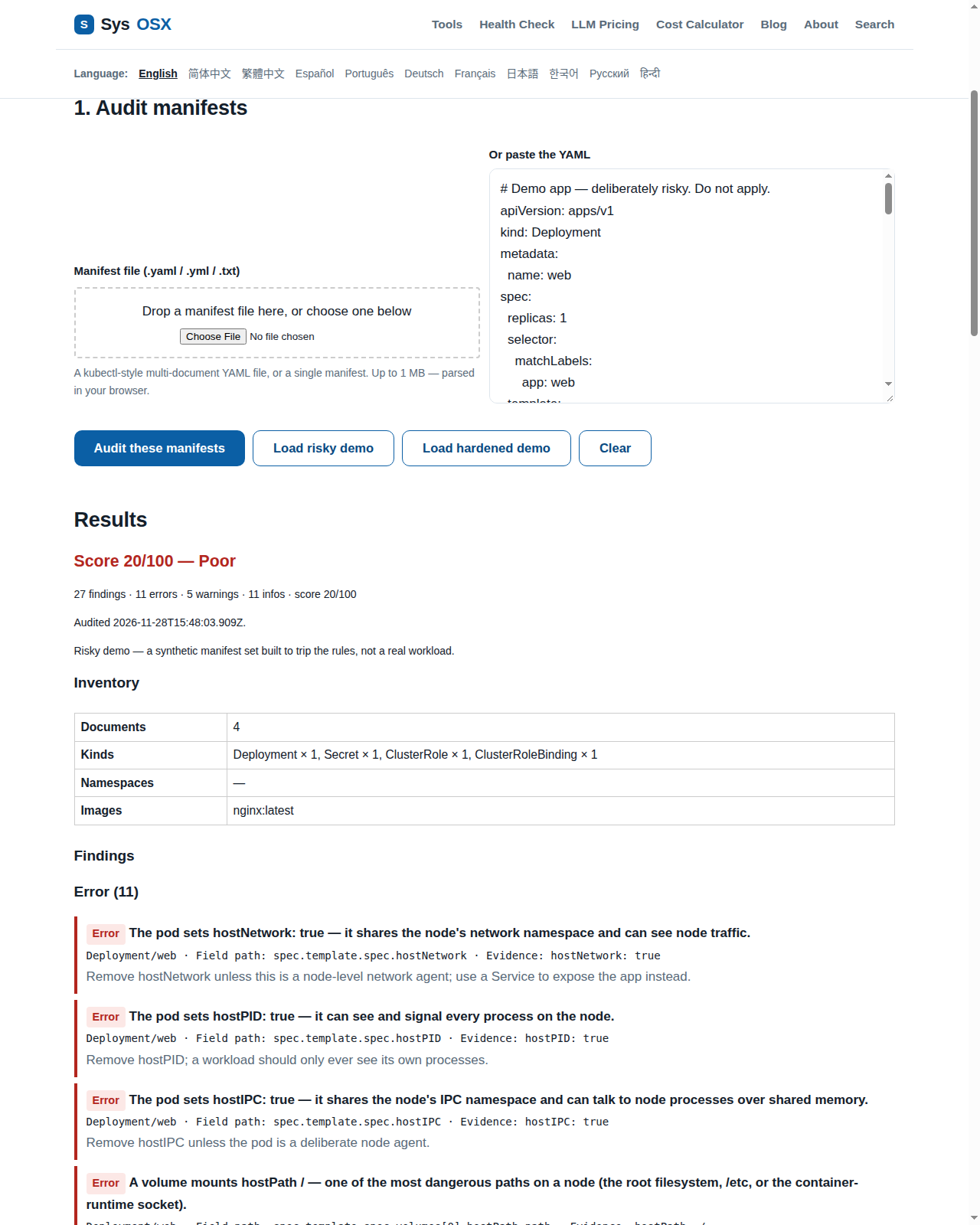
The five fields that decide most of the risk
First, privileged: true hands the container nearly all host capabilities and device access — the sandbox is effectively gone. Second, allowPrivilegeEscalation: unset, it defaults to true whenever it matters most, letting setuid binaries and file capabilities raise privileges; restricted pods set it to false. Third, runAsNonRoot (with runAsUser never 0): a root container turns every application bug into a root bug, one step from the node.
Fourth, capabilities: the default set is broader than most apps need, SYS_ADMIN is close to root in practice, and the restricted pattern — drop: [ALL], then add back the one or two you can name — is cheap to adopt. Fifth, hostPath: a volume that mounts the node itself. Mounting /, /etc or the container-runtime socket hands node-level file access to anything that escapes, which is why the auditor treats those paths as errors and lesser hostPath mounts as warnings.
RBAC is the quiet catastrophe
Pod security failures are loud in comparison. RBAC failures are silent: a Role with verbs: ["*"] or resources: ["*"] looks like a shortcut in a code review and behaves like a master key in an incident. The extreme case is a binding to cluster-admin, the built-in role that grants every action on every resource — whoever holds that token owns the cluster, including every Secret in every namespace and the ability to create new privileged pods anywhere.
The subtler version is scope. Secrets access granted through a ClusterRoleBinding is cluster-wide: one token reads Secrets in all namespaces. The fix is boring and total: list the exact verbs and resources each workload needs, bind with RoleBindings inside one namespace, give each workload its own service account, and set automountServiceAccountToken: false for pods that never call the API. None of this shows up in a running pod's behaviour — which is why it belongs in a static audit, where the YAML says it plainly.
Images and secrets: the basics people get wrong
An image reference without a tag means :latest, and :latest means “whatever the registry serves today”. The manifest you reviewed can deploy different code next week with no change in git — audits, rollbacks and incident timelines all quietly rot. Pin an exact version tag, or better a digest (image@sha256:…), and the manifest again means one specific thing. Pairing a pinned image with imagePullPolicy: Always is the mirror-image mistake: the pin is re-pulled on every start for no benefit.
Secrets fail more simply. A Secret object's data is base64-encoded, not encrypted — anyone with the file, the repo history or an etcd backup has the plaintext. The same applies to a password written as a plain env value next to the container that uses it. Keep secret values out of manifests entirely: reference them with valueFrom.secretKeyRef, source them from an external manager, and rotate anything that was ever committed — deleting the line does not unpublish the history.
What a static audit cannot see — and auditing yours in five minutes
A static audit reads text, and three important things are not in the text. Admission decisions: a Pod Security admission controller or policy engine may reject or mutate what you apply, so a failing manifest may never run — and a passing one may be changed. Runtime behaviour: what the container actually does, which syscalls it makes, who it talks to. And the API server's own configuration, plus the drift between your manifests and what is actually running. A clean audit is a good starting state, not a description of a live cluster.
The five-minute version: take the exact YAML you are about to apply — all of it, one paste — and drop it into the Kubernetes Manifest Auditor. Fix the errors first (privileged, host access, wildcard RBAC, cluster-admin bindings, plaintext secrets), then the warnings (images, limits, probes), and treat the infos as the restricted-profile checklist. It runs in your browser, so the manifests — secrets and all — never leave your machine.
Sample: the risky demo manifest set
# Demo app — deliberately risky. Do not apply.
apiVersion: apps/v1
kind: Deployment
metadata:
  name: web
spec:
  replicas: 1
  selector:
    matchLabels:
      app: web
  template:
    metadata:
      labels:
        app: web
    spec:
      hostNetwork: true
      hostPID: true
      hostIPC: true
      automountServiceAccountToken: true
      containers:
        - name: web
          image: nginx:latest
          env:
            - name: DB_PASSWORD
              value: hunter2-demo-only
          securityContext:
            privileged: true
            allowPrivilegeEscalation: true
            runAsUser: 0
            capabilities:
              add:
                - SYS_ADMIN
                - NET_ADMIN
      volumes:
        - name: host-root
          hostPath:
            path: /
---
apiVersion: v1
kind: Secret
metadata:
  name: web-secret
stringData:
  password: hunter2-demo-only
---
apiVersion: rbac.authorization.k8s.io/v1
kind: ClusterRole
metadata:
  name: wildcard-admin
rules:
  - apiGroups: ["*"]
    resources: ["*"]
    verbs: ["*"]
---
apiVersion: rbac.authorization.k8s.io/v1
kind: ClusterRoleBinding
metadata:
  name: web-binding
roleRef:
  apiGroup: rbac.authorization.k8s.io
  kind: ClusterRole
  name: cluster-admin
subjects:
  - kind: ServiceAccount
    name: web
    namespace: default