HTTP Cache Headers: The Four Headers That Decide Whether Your Site Is Fast
Last updated:
HTTP caching is the mechanism by which a browser or a CDN stores a response and reuses it for later requests instead of downloading it again — and it is governed entirely by a handful of response headers. Get those headers right and repeat visits become nearly free: no download, or a tiny 304 revalidation. Get them wrong — or omit them, which is the most common failure — and every visitor pays the full download on every page, while your origin serves bytes a cache could have served. This article covers the four headers that decide almost everything, how CDNs add a reporting layer of their own, the sane defaults for HTML versus fingerprinted static assets, the five mistakes that quietly disable caching, and how to audit your own site in two minutes with the Cache & CDN Headers Auditor.
What HTTP caching is — and why headers decide it
Every response a server sends can carry instructions for the caches between it and the visitor: the visitor’s browser, any shared proxy, and the CDN edge. Those instructions are headers, and they answer three questions. May this response be stored at all? For how long is it fresh — reusable without asking the origin? And when it is no longer fresh, how can a cache check cheaply whether it changed? A cache that has a fresh response serves it without touching your origin at all; a cache with a stale one can still save the download if a validator proves the bytes are unchanged.
The stakes are asymmetric. Caching is the only performance optimisation that removes work entirely — no faster server, no smaller file, just no request. It is also the easiest to lose silently: a framework default, a cookie set by middleware, a CDN rule nobody remembers writing, and a site that was cached for years stops being cached overnight, with no error anywhere. That is why the headers deserve an audit rather than an assumption: they are the whole policy, written in plain text, on every response.
The four headers that decide almost everything
Cache-Control is the policy itself. max-age sets the freshness lifetime in seconds; s-maxage overrides it for shared caches; no-store forbids storage; no-cache forces revalidation before reuse; private and public say who may store; immutable promises the body never changes during its lifetime; stale-while-revalidate trades a little staleness for speed. ETag and Last-Modified are the validators — the values a cache sends back as If-None-Match and If-Modified-Since so the origin can answer 304 Not Modified, a header-only response, instead of the full body. Together these three headers cover storage, freshness and revalidation: the complete lifecycle of a cached response.
The fourth is Age: the number of seconds a response has already spent inside a cache, reported by the cache itself. Age is the audit header — subtract it from the freshness lifetime and you know how much life a cached copy has left, and if Age exceeds the lifetime, a cache has served something past its own expiry. CDNs then add reporting of their own: CF-Cache-Status and X-Cache say whether the edge served a HIT or went back to the origin with a MISS, Via names the intermediaries, and CDN-Cache-Control or Surrogate-Control can give the CDN instructions that differ from the ones browsers see. None of those change the policy; they are how you verify the policy is doing what you think. 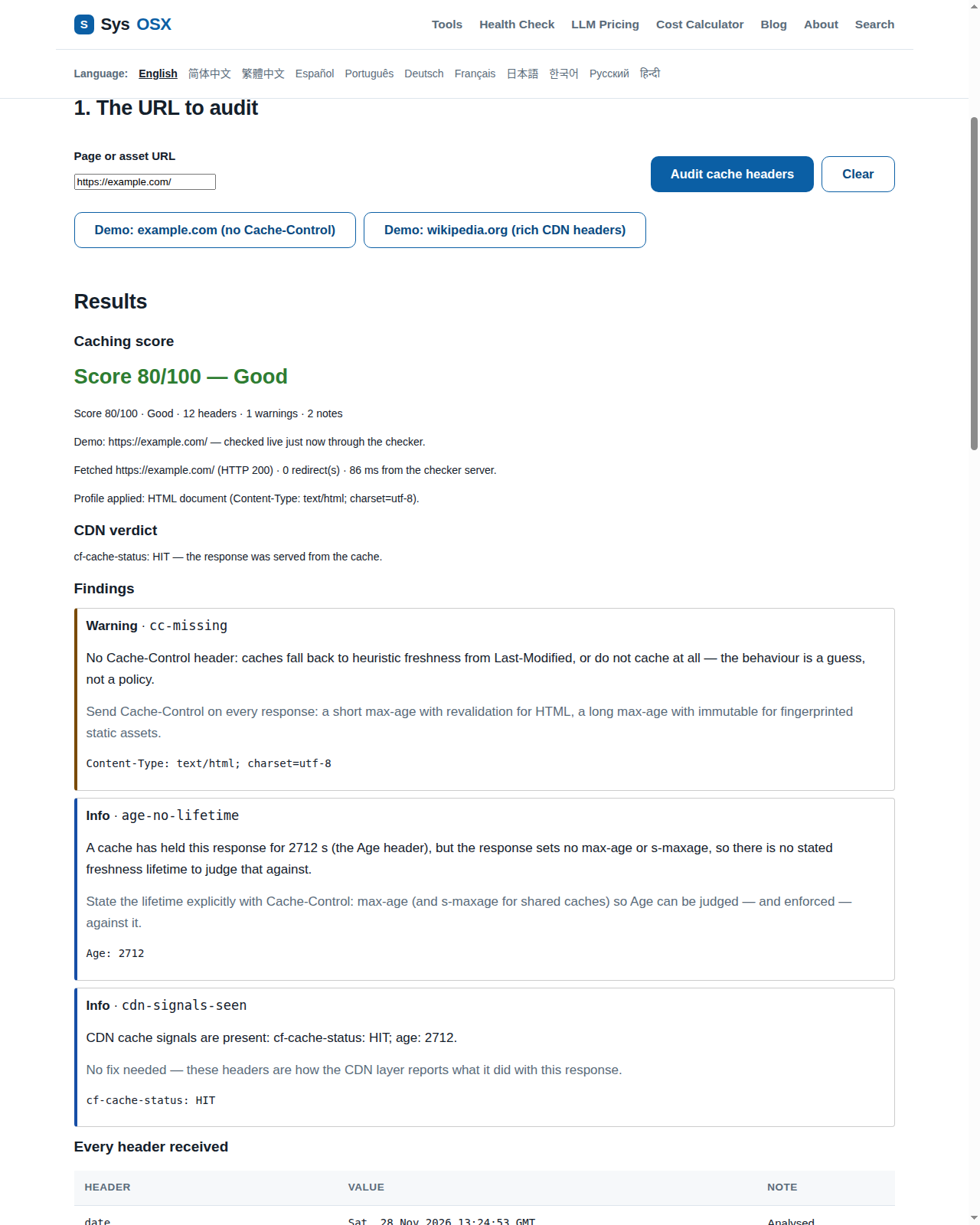
Sane defaults: HTML one way, fingerprinted assets the other
HTML documents are the entry point to everything else, and their content is what changes when you publish. The sane default is therefore a short lifetime with cheap revalidation: Cache-Control: no-cache (or max-age=0) together with an ETag. The document is never reused blindly, so edits go live immediately — but a repeat visit costs a conditional request and a 304, not a full download. Sites that can tolerate a minute of staleness can use a small max-age with stale-while-revalidate and get most visits served straight from cache; what HTML should almost never get is a long max-age, because the document points at everything else and a stale document means stale everything.
Static assets are the opposite case — provided their URLs are fingerprinted. When the file’s version is in its name (app.a1b2c3.js, logo.9f2e.svg), the URL itself is the cache-buster: new content means a new URL, so the old one can be cached forever. The sane default is Cache-Control: public, max-age=31536000, immutable — a year, the maximum anyone uses in practice, with no revalidation during it. The condition is non-negotiable: immutable on an unfingerprinted URL means visitors keep the old bytes until the year expires, with no way to call them back. Fingerprint first, then cache hard.
The five mistakes that quietly disable caching
First, no Cache-Control at all — the most common state of the web’s long tail. Caches fall back to heuristic freshness, usually a fraction of the time since Last-Modified, so behaviour varies by browser and by file age: a policy nobody chose. Second, a long max-age on HTML — a year of immutable applied to the document as well as the assets, usually by a server-wide rule — which strands visitors on stale pages and makes deploys feel haunted. Third, Vary: *, which tells caches the response varies on something they cannot key on; in practice nothing is ever reused. Each of these is a one-line fix once it is seen — the problem is that nothing breaks visibly, so nobody looks.
Fourth, cookies on public assets: middleware that sets a session cookie on every response, images included, makes those responses uncacheable at any shared cache, because a cache must never serve one visitor’s cookies to another. Fifth, Expires fighting Cache-Control: an old configuration sets Expires a year out while a newer one sets max-age to an hour, and different clients honour different headers, so the site caches differently depending on who is asking — modern caches obey max-age and ignore Expires entirely. The fix for all five is the same habit: read the headers a response actually carries, which is what an audit does.
What this audit cannot tell you
An audit of one response is a sample of one. CDN caches are per-edge and per-moment: the checker’s request lands on one edge, in one state — a MISS may mean nothing more than “first request since this copy expired”, and the same URL requested a second later may HIT. A single audit also cannot see your configuration: the cache rules in a CDN dashboard that did not match this request, the behaviour keyed to cookies or countries the checker does not send, or what a second, third or hundredth response looks like. It judges the headers of the response it received, and no more.
It also cannot judge intent. no-store on a banking page is correct; no-store on a logo is a waste — the headers are identical and only you know which resource deserved which. The auditor applies an HTML or static profile heuristically, from the content type and the file extension, and says which profile it used; when the guess is wrong, a finding can be wrong with it. Read the score as a prompt to look, not as a verdict: the findings, with the actual header values quoted as evidence, are the part worth acting on.
Audit your own site in two minutes
Open the Cache & CDN Headers Auditor and start with the demos: example.com shows the minimal case — no Cache-Control at all, a Last-Modified validator, and a Cloudflare edge reporting its cache status — while wikipedia.org shows a rich CDN response with s-maxage, an ETag and Varnish X-Cache headers. Then audit your own homepage, and after it one static asset — a CSS or JavaScript file — because the two profiles expect opposite things and a site is usually right about one and wrong about the other. Compare the findings against the Security Headers Checker on the same URL if you want the other half of the header story, and against the Page Performance Audit to see what the caching behaviour costs in load time.
Read the score as a summary of the deductions, which the tool states openly. It starts at 100: no Cache-Control costs 20; missing validators cost 10; Vary: * costs 10; an Age beyond the freshness lifetime costs 10; Set-Cookie on a publicly cacheable response costs 10; a static asset that forbids caching or sets max-age=0 costs 10; Expires disagreeing with max-age costs 5 — and total deductions are capped at 60, so a fetched response cannot score below 40. Ninety or above is Excellent, 70–89 Good, 50–69 Needs work, below 50 Poor. Fix the missing Cache-Control first if you have one: it is the single header that turns caching from a guess into a policy.
Try it yourself: the two sane defaults as nginx rules
# HTML documents: revalidate every time, so edits go live at once
# (pair with an ETag and repeat visits cost a small 304).
location / {
    add_header Cache-Control "no-cache" always;
}

# Fingerprinted assets (app.a1b2c3.js): cache for a year, never
# revalidate — the version in the URL is the cache-buster.
location /assets/ {
    add_header Cache-Control "public, max-age=31536000, immutable" always;
}