Audit Your GraphQL API Before Attackers Map It
Last updated:
GraphQL introspection is a built-in query that asks a GraphQL server to describe its own schema — every type, every field, every query and mutation it offers. It exists so developer tools can autocomplete queries and draw schema explorers, and in development it is invaluable. In production it is a map of your entire API handed to anyone who asks: field names that reveal internal data, mutations that change state, and type definitions that tell an attacker exactly what to try next. This article explains what introspection is, what an exposed schema hands an attacker, how deep and expensive queries can take an API down, how to check an endpoint with the GraphQL Introspection & Security Checker, and how to harden it — starting with turning introspection off in production.
What GraphQL introspection is — and why it leaks your schema
A GraphQL API has a single endpoint and a schema: a typed description of everything the API can do. Introspection is the part of the GraphQL specification that lets a client ask the server about that schema, using the same query language as everything else. The special meta-fields __schema and __type answer questions such as “what types exist?”, “what fields does User have?” and “what arguments does search take?” — and a single POST to the endpoint with an introspection query returns the whole schema at once: every type, every field, every argument, every description, every deprecation note. Tools you use every day depend on it: GraphiQL and Apollo Studio run an introspection query the moment you point them at an endpoint, and use the answer to power autocomplete, documentation panels and code generation.
That is exactly why it leaks. The schema is the blueprint of your backend: it names the data you hold, the operations you support, and the shape of every response. With a REST API an attacker has to discover endpoints one by one, guessing paths and reading error messages; with GraphQL introspection enabled, one request lists everything, in a machine-readable format, including the field descriptions your own developers wrote for each other. Most server libraries leave introspection on by default, because it makes development pleasant — and nothing warns you when the same default ships to production, where the person asking is no longer on your team.
What an exposed schema hands an attacker
Start with what the schema itself reveals. An attacker who can read it knows every query and mutation name, what arguments each one takes, and which fields return sensitive data — email addresses, tokens, internal IDs, admin flags, billing details. They can find the operations your own client never calls: admin-only mutations such as deleteUser or grantRole, deprecated endpoints that are still live, debug fields left over from development. Instead of guessing, they write valid queries on the first try, and they know exactly which fields are worth probing for broken access control — the fields that look like they return something valuable.
The second half of the problem is that introspection usually answers without authentication at all. If the endpoint accepts an introspection query from an anonymous caller, anyone on the internet can map your API before they even try to log in. And even behind authentication, any low-privilege account can read the whole schema — including the admin mutations it cannot call yet — and use it to plan the next step. The schema-explorer UIs are the same exposure with a friendlier face: GraphiQL, Playground and Apollo Sandbox left mounted on a production endpoint hand a visitor a clickable map of everything the API can do. Disabling introspection is defence in depth, not access control — the schema alone exposes no data, and a field that is properly guarded stays guarded whether or not its name is public — but there is no reason to hand an attacker the map for free. 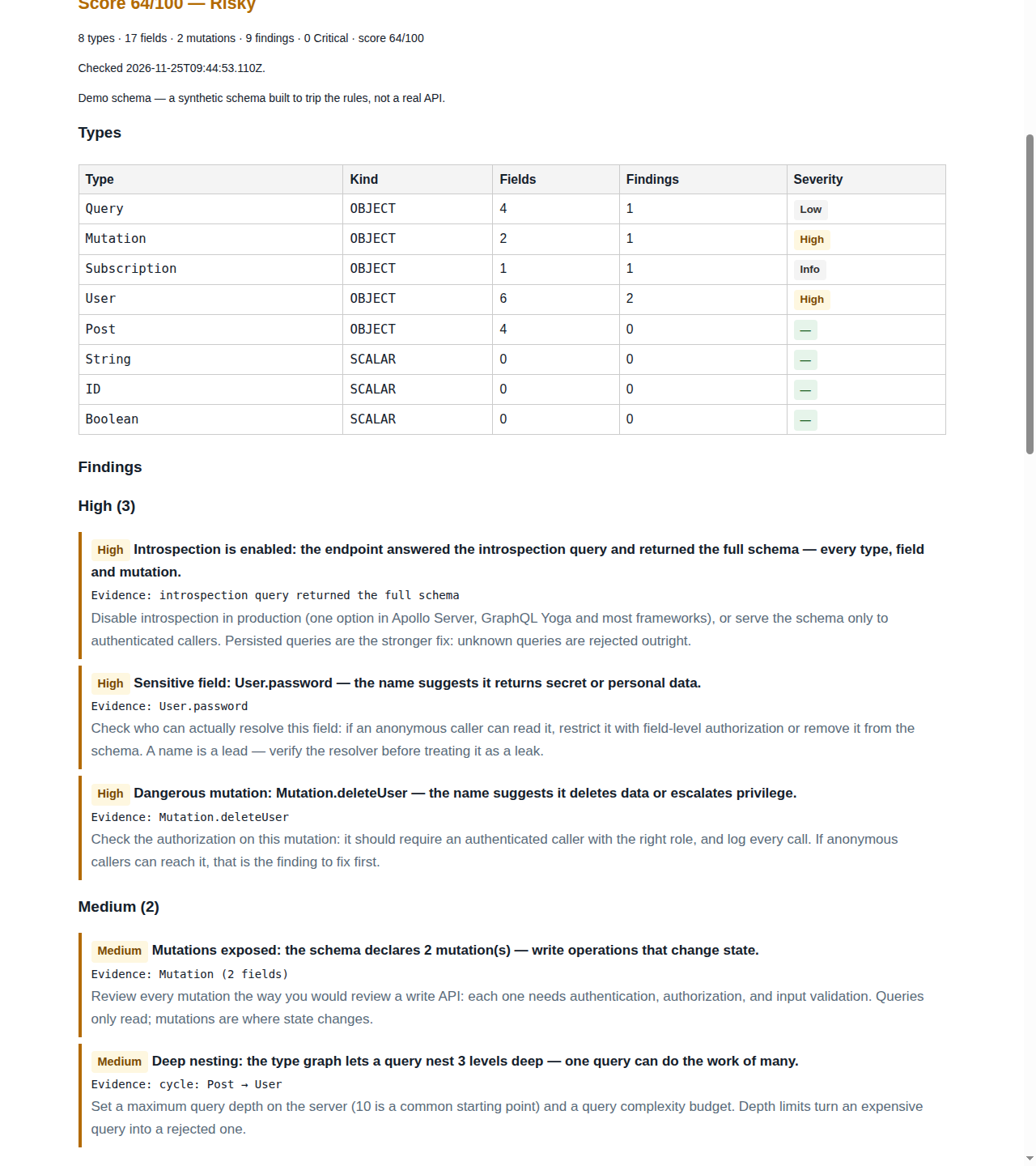
Depth, complexity and batching: one query can take the API down
Introspection is not the only GraphQL risk the schema makes worse. GraphQL lets a client ask for nested data in a single query, and nothing in the specification limits how deep that nesting goes or how much comes back. A query that asks for a user, then their friends, then their friends’ friends, then their friends’ friends’ friends, can explode into thousands of resolver calls and database lookups — and a query that asks for the first 99,999,999 items of a list can return an enormous payload. One malicious query, from one client, can exhaust CPU, memory and database connections. It is a denial of service that needs no botnet, and the schema tells the attacker exactly which nested fields to chain together to make it expensive.
Batching multiplies the damage: a single HTTP request can carry many operations at once, so rate limiting by request count does not help — ten cheap-looking requests can hide a hundred expensive operations. The fixes live on the server side, and the OWASP GraphQL cheat sheet lists them plainly: limit query depth, limit the amount any one field can return, enforce pagination, add timeouts, and analyse the cost of a query before running it, rejecting anything over a maximum. None of these is part of GraphQL itself — each one is a validation rule or a plugin the server has to add — which is why they are so often missing, and why a checker that probes depth and complexity handling earns its keep.
How to check an endpoint with the companion tool
Paste your endpoint URL into the GraphQL Introspection & Security Checker and it sends the introspection query from this article to your endpoint, then reports what came back. The first thing to read is whether introspection answered at all — and whether it answered without authentication, which is the wider exposure. Then read the inventory: the queries, mutations and fields the schema lists, with sensitive-looking fields and dangerous mutations flagged — fields that return credentials or personal data, mutations that delete, reset or grant. Finally, look at the depth and complexity probe: whether the endpoint accepts deeply nested or very large queries without pushing back.
Read the report in that order — introspection enabled, then unauthenticated, then what the schema exposes, then depth — and fix in the same order, because each layer makes the next one easier for an attacker. A clean report means the endpoint did not answer the introspection query, not that the API is safe: a mutation the checker never saw can still be unguarded, and a server that rejects introspection can still accept a ruinously expensive query. The checker only sees what the endpoint answers from the outside; it cannot read your server configuration, and it cannot test whether a field is properly authorised — that needs a look at the resolvers. Re-check after every deploy that touches the API, because a schema change can reopen a hole a previous check closed.
How to fix it: turn introspection off in production
The fix is one configuration change, applied per environment: introspection stays on in development and staging, where your team needs it, and off in production, where strangers can reach it. In Apollo Server it is the introspection option — introspection: process.env.NODE_ENV !== 'production' — so the setting follows the environment instead of being hard-coded. In graphql-js directly, add the NoSchemaIntrospectionCustomRule validation rule to every document validation pass. GraphQL Yoga has a first-class plugin, useDisableIntrospection, that rejects introspection queries before they run. Other stacks have the same switch under a different name; whatever you run, make the production value explicit rather than relying on a framework default, and add a pre-deploy test that sends an introspection query at your production configuration and expects it to fail.
Turning it off costs your team nothing if you replace it with the right tool. Register the schema with a schema registry such as Apollo Studio and your developers can browse the current schema, track how it changes over time, and explore production data in the Explorer — all without the production endpoint answering introspection to the world. Public APIs need a different answer: their schema is documentation, so publish it as API reference pages instead of leaving introspection on. And disabling introspection breaks no client: clients send queries, they never need the schema at runtime, and code generation runs against a development schema or the registry, not against production.
Hardening beyond the switch: auth, field-level checks, persisted queries
Disabling introspection is the first step, not the whole job — Apollo’s own guidance says so plainly, and so does OWASP: introspection is security by obscurity, and it must never substitute for proper access control. Anyone who guesses a field name can still call it, so every field needs its own authorisation check at the resolver: validate that the requester is allowed to see or change the data they asked for, on every field, not just at the top of the query. Check authorisation on both edges and nodes — a connection that is guarded while the node it points at is not is still a hole — and never assume that possessing an object’s ID means the caller should have access to it. That assumption is broken object-level authorisation, the most common GraphQL access-control failure.
Then add the limits that stop expensive queries from running at all. Cap query depth — a small number such as five or seven levels is enough for most clients — and cap the cost of a query with complexity analysis, rejecting anything over a maximum before a resolver runs. Enforce pagination with a maximum page size, add timeouts at the application layer, and rate-limit by query cost rather than by request count, so a batched request pays for every operation inside it. The strongest control is persisted queries: the server keeps an allowlist of pre-registered query hashes and only runs those, so an attacker cannot invent a new query in the first place. Layer them: each control covers what the others miss, and a schema that is no longer public is only the outermost layer.
Try it yourself: the introspection query the checker sends
query IntrospectionQuery {
  __schema {
    queryType { name }
    mutationType { name }
    types {
      name
      kind
      fields {
        name
        args { name type { name kind } }
        type { name kind }
      }
    }
  }
}