Dockerfile & Compose Audit Guide: Pins, Root and Baked-In Secrets
Last updated:
A Dockerfile audit is a static review of a Dockerfile — and, when one exists, its docker-compose.yml — checked instruction by instruction against known-good container practice, without building or running anything. Two small files decide who your container runs as, what secrets ship inside the image, and how much of the host a compromised container can reach. This guide walks through the checks that matter — pinning, root, baked-in secrets, compose privilege — and the mistakes that show up again and again, then shows you how to run the same audit yourself with the Dockerfile & Compose Auditor.
What a Dockerfile audit actually checks
A Dockerfile audit reads the two files that define a container before any daemon does. The Dockerfile is read as a sequence of layers and stages: each FROM opens a stage, each RUN, COPY and ADD adds a layer, and ENV, ARG, USER, EXPOSE and CMD set the metadata the runtime will honour. The compose file is read as the runtime contract for the same image: which ports are published, which volumes are mounted, which environment is injected, and how much privilege the service gets. Checking both matters, because they are audited by different people at different times and the dangerous lines hide in whichever one nobody re-read.
The checks fall into four families. Reproducibility: is the base image pinned, and are package installs repeatable? Identity and privilege: does the final stage drop root, and does compose hand back capabilities, host networking or the daemon socket? Secrets: does any literal credential live in ENV, ARG or a compose environment block? And hygiene: layer cleanup, health checks, restart policies and resource limits. The Dockerfile & Compose Auditor runs 30 such rules and scores the pair from 0 to 100; its sibling tools do the same for nginx configs and other server configuration.
Why unpinned bases and root containers cause real incidents
An unpinned base image is a supply-chain bet placed silently. FROM ubuntu means ubuntu:latest, and :latest changes whenever the publisher pushes — so the image you audited in March is not the image the same Dockerfile builds in June. When a base image is compromised or simply broken, unpinned builds absorb the change with no diff to review and no moment where anyone decided anything. Pinning by tag narrows the bet; pinning by @sha256: digest closes it: the build then either gets exactly the image you reviewed or fails loudly. The same logic applies one level down — an apt-get install with no versions installs whatever the mirror serves that day.
Running as root is the other classic. With no USER instruction, the container process is UID 0, and while namespaces and capability dropping blunt that, the incident reports keep rhyming: an application flaw gives code execution, the process is root, a kernel or runtime flaw — or a mis-mounted socket or host path — turns container root into host root. The fix costs one line: most official images already ship an unprivileged account (node, nginx, www-data), and ending the final stage with USER naming it means a compromised app starts its escape attempt unprivileged, with most of the easy paths already closed.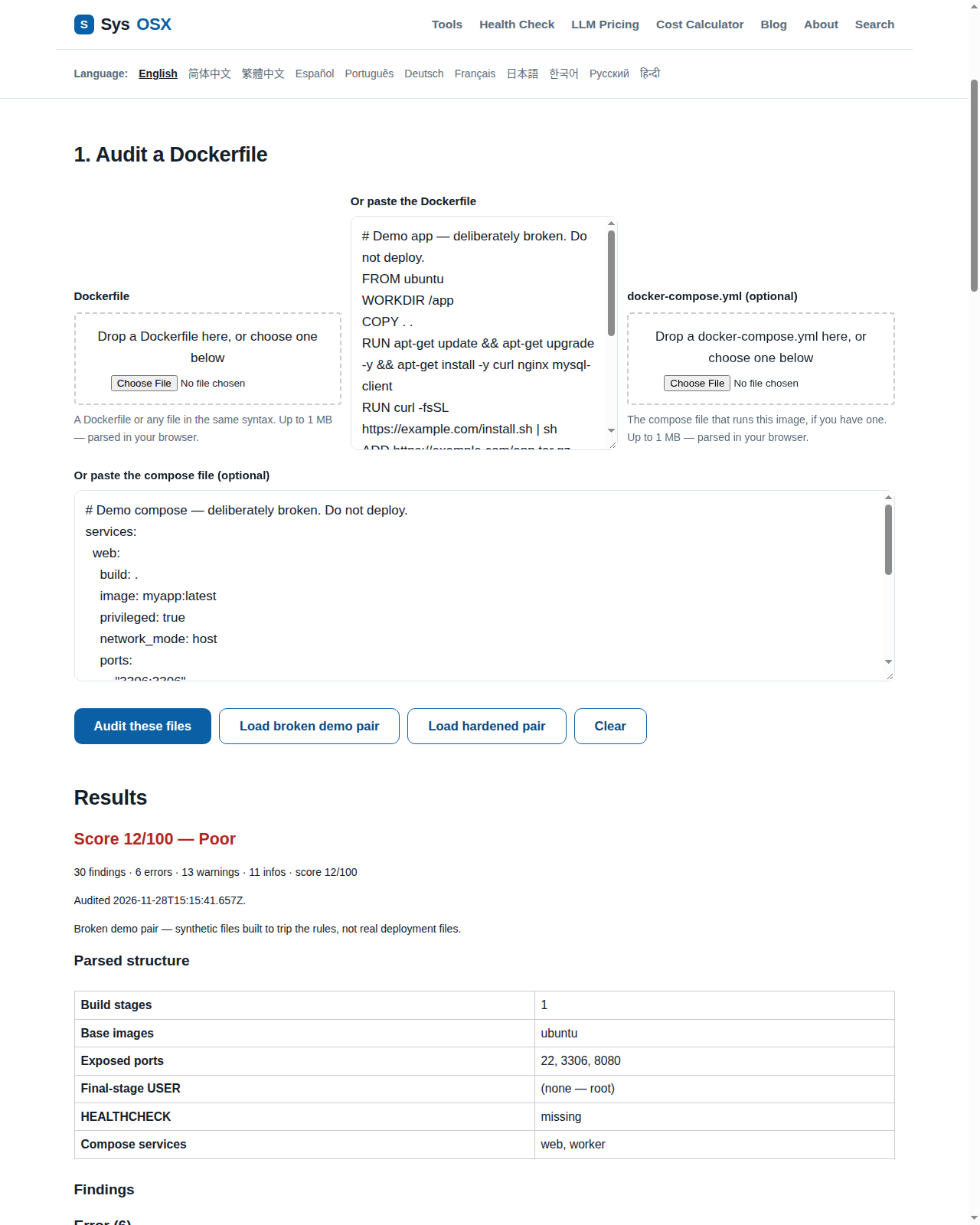
Secrets in ENV and ARG, and how image history leaks them
The most consequential Dockerfile mistake is also the most innocent-looking: ENV API_KEY=… or ARG DB_PASSWORD=… with a real value. An image is not a private artifact — it is pushed to registries, pulled by CI runners, cached on developer laptops and mirrored by teammates. Its metadata travels with it: docker inspect prints the environment, and docker history shows the instruction that created every layer, ARG values included. Anyone who can pull the image can read the secret, and “anyone” includes every system the image was ever pushed through.
Two properties make this worse than a secret in a config file. First, deletion does not help: removing the ENV line, or deleting the file that held the secret, in a later layer leaves the earlier layer — and its value — fully intact in the image; the layer stack is append-only history. Second, rotation is the only remedy once an image has been pushed: the credential must be treated as published, because it was. The safe patterns leave no trace in the file at all — runtime secrets from the orchestrator’s secret store or compose secrets, build-time secrets via BuildKit’s --secret mounts, which are available during the build and absent from every layer and from history.
Compose is production too: privileged, sockets and host networking
Teams review Dockerfiles and then undo them in compose. privileged: true gives the container nearly every host capability and device access — it exists for building container runtimes and almost nothing else, yet it appears in production compose files because a tutorial used it to make a permission error go away. cap_add: [SYS_ADMIN] is its quieter sibling: not full privileged, but close enough in practice that it deserves the same scrutiny. And network_mode: host dissolves port isolation entirely — the service binds the host’s interfaces directly, and every published-port decision you thought you made stops applying.
The single most dangerous compose line is a volume: /var/run/docker.sock mounted into a container. The Docker socket is the daemon’s control plane, and the daemon runs as root — a process that can talk to the socket can ask the daemon to start a new container, privileged, with the host’s root filesystem mounted, and the game is over. Mounting the host’s / is the same ending by a shorter path. Neither is ever needed by an application container; the legitimate monitoring use case belongs behind a socket proxy that exposes a read-only subset of the API. If your compose file contains either mount, that line — not the Dockerfile — is your security posture.
Layer hygiene, and the five mistakes flagged most
Layer hygiene is the unglamorous third of the audit. A layer is forever: bytes written in one RUN ship in the image even if the next instruction deletes them, which is why apt-get install and rm -rf /var/lib/apt/lists/* belong in the same instruction, why apk add wants --no-cache, and why apt-get upgrade has no place in a build at all — it makes the image a function of the calendar. The broad COPY . . is the hygiene mistake with security teeth: it copies the whole build context, and whatever your .dockerignore forgot — a local .env, a .git directory with its history, a developer’s key file — becomes part of the published image.
Across real-world files, the same five findings recur. First, the untagged or :latest base image. Second, no USER — the final stage runs as root by default and by silence. Third, a literal secret in ENV or ARG, usually added “temporarily” during debugging. Fourth, a remote install piped to a shell — curl … | sh — which executes whatever a URL serves on the day of the build, unverified. Fifth, on the compose side, a database port published on 0.0.0.0 — MySQL or Postgres reachable from the whole network because the mapping was copied from a development setup. The demo pair below collects most of them in two short files, and the auditor scores it 12 out of 100, band Poor, with 30 findings: 6 errors, 13 warnings and 11 infos. Its hardened twin — same shape, every finding fixed — scores 100.
What a static audit cannot see — and auditing yours in five minutes
A static audit reads text, and its limits are the limits of text. Above all, it cannot see vulnerabilities: a perfectly pinned, rootless, secret-free Dockerfile can still build on a base image carrying a critical CVE, because knowing that takes a vulnerability database and the image’s actual package inventory — a scanner’s job, and the reason tools like the SBOM Vulnerability Scanner exist. The audit also cannot see your .dockerignore (it is not part of the pasted files, so a broad COPY is flagged as a risk, never as a proven leak), the runtime flags and network policy a container is actually deployed with, or whether the running container was built from this file at all. The CIS Docker Benchmark covers the host and daemon side of that larger picture; this audit covers the two files developers actually write.
To audit yours in five minutes: paste the Dockerfile — and the compose file, if the service has one — into the Dockerfile & Compose Auditor. It runs entirely in your browser and the files are never uploaded, which matters because these files name internal images, host paths and sometimes the very secrets being hunted. Fix the errors first (baked-in secrets, root, privileged, socket mounts), then the warnings (pinning, published database ports, missing cleanup), then the infos as a checklist of defaults worth setting deliberately. Export the findings CSV if you want the list in a ticket. Five minutes, no build, no daemon — and the next build of that image is one you can describe.
The broken demo Dockerfile, verbatim
# Demo app — deliberately broken. Do not deploy.
FROM ubuntu
WORKDIR /app
COPY . .
RUN apt-get update && apt-get upgrade -y && apt-get install -y curl nginx mysql-client
RUN curl -fsSL https://example.com/install.sh | sh
ADD https://example.com/app.tar.gz /opt/
ADD app.py /app/
ENV API_KEY=abcd1234secret
ARG DB_PASSWORD=hunter2
EXPOSE 22 3306 8080
CMD python app.py
CMD ["python", "app.py"]