Bulk URL Health Checks: Is Every URL on Your List Still Alive?
Last updated:
A bulk URL health check is the practice of fetching a whole list of URLs at once — rather than clicking them one by one — and recording, for each, the final URL after redirects, the HTTP status, the response time and the size, so that a list you depend on can be verified in a single run. Lists of URLs are everywhere in operations work: the redirect map from a migration, the links in a documentation set, the URLs in a sitemap, the bookmarks a team shares. Every one of those lists rots quietly — pages move, sites restructure, certificates and servers fail — and nobody notices until a customer does. This article explains when you need a bulk check, how to read the results like an operator, why a keyword makes the check a smoke test and not just a ping, what a one-off check cannot promise, and how to run one on your own list in two minutes with the Bulk URL Health & Content Checker.
What a bulk URL health check is — and where the lists come from
The check itself is simple: take N URLs, fetch each one, follow its redirects, and write down what came back — the final URL, the final status, how long it took, how much data arrived. The value is not in any single fetch; it is in doing all of them the same way, at the same moment, into one table you can sort, filter and diff against the next run. A URL you click in a browser tells you about that URL, from your network, right now. A bulk check tells you about the list, from one vantage point, as a set — and the set is what you maintain.
The lists come from the work itself. A site migration produces a redirect map — hundreds of old URLs that must each land on a living new page. A documentation set accumulates links to other products, other versions, other companies’ sites. A marketing team keeps a spreadsheet of campaign URLs; a support team keeps the links it pastes into replies; an SEO audit exports every URL a crawler found. Each list was correct the day it was written. The question a bulk check answers is whether it still is.
When you need it: migrations, redirect maps, link rot and launches
The sharpest case is post-migration verification. You moved the site, the platform or the domain; the redirect map was reviewed, deployed and spot-checked — three URLs clicked, all fine. A bulk check runs the whole map: every old URL, its final landing page, its final status. The failures it finds are specific and fixable — the section of the map that pointed at a path the new platform renamed, the handful of URLs whose redirects chain into a 404, the one rule that loops. Spot-checking finds the failures you guessed at; a bulk check finds the ones you did not.
The slower cases matter just as much. Redirect-map validation is the same run repeated whenever the map changes. Documentation and link-rot sweeps are the quarterly version: paste every outbound link from the docs and find the ones that now 404, moved to a different product, or take nine seconds to answer. And pre-launch checks are the list you are about to publish — the campaign URLs, the press-release links, the QR-code targets — verified the day before they go out, not the day after someone screenshots the 404.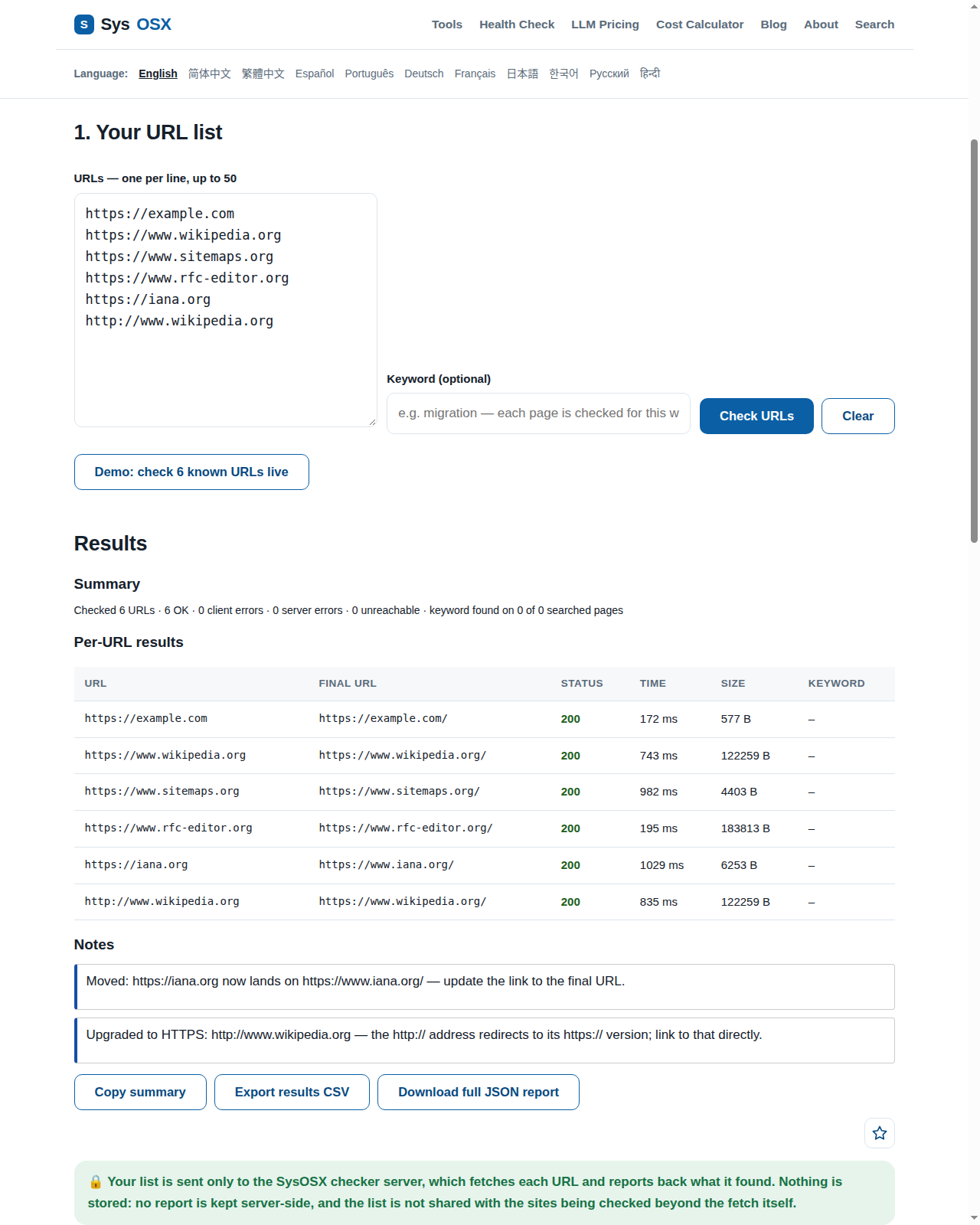
Reading results like an operator: final URL, chains and slow tails
Start with the final URL column, not the status column. A 200 whose final URL differs from the URL you entered means the address moved — the page lives somewhere else now, and your link should point there directly. Redirects are not free: each hop adds a round trip for every visitor, and a chain of two or three hops is usually an accident of history — an http→https upgrade stacked on a www change stacked on a move — that nobody designed. When the final URL is a different page entirely (the classic case: everything redirects to the homepage), the 200 is lying to you in the way that matters: the content you linked to is gone, and the status cannot tell you.
Then read the status classes the way an operator triages. Client errors (4xx) are your list’s problem — fix or remove the link. Server errors (5xx) are their site’s problem — note them, re-check later, and only act if they persist. Unreachable is the mixed bucket: DNS failures, refused connections, timeouts and entries that were never valid URLs at all, so read the per-URL error before concluding a site is down. Finally, look at the slow tail, not the average: the median URL answering in 300 ms hides the three that took over three seconds, and those three are the ones your readers will feel.
The keyword smoke test: the right page, not just a page
A status code proves a page answered. It does not prove the page is the one you meant. Migrations fail this way in practice: the old product URL redirects to the new platform, returns a cheerful 200 — and shows the new homepage, a generic landing page, or the wrong product entirely, because the path mapping silently fell back to a default. Every status-based check passes; the link is still broken in every way a reader cares about. A keyword closes that hole: give the check a word that must be on the target page — the product name, the article’s title, the heading of the section — and each result says whether the fetched body actually contains it.
Treat the keyword as a smoke test, with a smoke test’s limits. It searches the raw HTML the server sends, in the first 256 KB, case-insensitively: a word injected later by JavaScript will not be found even though visitors see it, and a word buried in navigation or a footer proves presence, not prominence. Choose the keyword like an operator: specific enough that the wrong page would not have it (not “home”, not your company name, which is on every page), present in the server-rendered HTML (view source if you are not sure), and stable enough that a copy edit does not break the check. One good keyword per list turns a liveness check into a correctness check.
The limits: snapshots, vantage points and the page you cannot see
A bulk check is a snapshot from one vantage point. The checker fetches from its own server, on its own network, in its own geography — and sites answer differently depending on who asks. Bot protection may refuse the checker while serving your customers; a geo-gate may show it another country’s catalogue; a CDN may route it to a healthy edge while your visitors’ edge is broken. Read a refusal as “the checker was refused”, confirm surprises from your own browser, and never let a single run be the only evidence for an irreversible decision like deleting a list of links.
The checker also sees the page as the server sends it, not as the browser builds it: JavaScript-rendered content is absent, login-gated pages answer with their gate, and POST-only endpoints refuse a plain GET — none of which means the page is broken for real users. And a snapshot ages: a clean run on Monday says nothing about Friday. Bulk checks earn their keep as a repeatable habit — after every migration, every deploy that touches URLs, every quarter for the lists you publish — not as a certificate framed on the wall.
Check your list in two minutes
Open the Bulk URL Health & Content Checker and try the demo first: six stable, public URLs checked live, including one that upgrades from http to https, so you can see the summary counts, the per-URL table and the notes working on results nobody staged. Then paste your own list — one URL per line, up to 50, bare domains are fine because https:// is added for you — add a keyword if the list has one word that proves the right pages came back, and run it. Anything past 50 lines is listed as skipped, never silently dropped; split longer lists into batches.
Read the run in the operator’s order: summary counts first (how many OK, client errors, server errors, unreachable), then the final-URL notes (what moved — update those links to their final URLs), then the 4xx rows (fix or remove), then the slow tail (anything over three seconds). Export the table to CSV if the list belongs to a team — the CSV carries the per-URL error and a truncated flag for bodies the 256 KB cap cut — and keep it next to the list, so the next run has something to diff against. There is deliberately no score: a list is not healthy or unhealthy as a whole, it has specific rows that need specific fixes, and the table is the to-do list. If instead you have one page and want its links checked, that is the Broken Link Checker; if you have domains rather than URLs, the Bulk Domain Checker answers their registration and certificate questions.
An example list: a post-migration check
https://example.com/
https://example.com/pricing
example.org/docs/getting-started
https://example.com/old-page
http://example.com/legacy