Audit Your GitHub Actions Workflows Before Attackers Do
Last updated:
A GitHub Actions workflow file is a small YAML file that can run any code, with your secrets, every time a pull request opens. It lives in .github/workflows/, it is triggered by events such as a push or a pull request, and the runner that executes it holds a token that can read and write your repository — plus every secret you have given the workflow. Because a workflow can run code written by a stranger who opened a pull request, it is one of the most attacked surfaces in open source. This article explains what a workflow file actually is, why unpinned actions are a supply-chain risk, how pull_request_target and script injection hand attackers your secrets, why the token should hold the least privilege that lets the job run, and how to read the auditor’s report. To skip the hand-reading, paste your workflow into the GitHub Actions Workflow Auditor — it checks the file in your browser and never uploads it.
What a workflow file actually is — and why attackers love it
A workflow file is a YAML file in .github/workflows/ that describes a job for GitHub’s runners. The on: block says when it runs — on a push, on a pull request, on a schedule, or by hand. The jobs: block says what runs: each job picks a runner (runs-on: ubuntu-latest, for example), and each step either runs a reusable action (uses: actions/checkout@v4) or runs shell commands (run: npm test). Every run gets a GITHUB_TOKEN that can talk to the GitHub API on the repository’s behalf, and any secret the workflow references is handed to the runner too. The file is usually only a few dozen lines long, and it is checked into the same repository it acts on.
That combination is what makes workflows a target: they execute automatically, they run code that can come from outside the repository, and they hold credentials. A workflow that triggers on pull requests from forks will run code a stranger wrote — the pull request author controls the branch, the commit messages, the title, and the body, and all of those can reach a run: step. The workflow also holds the two things an attacker wants most: a token with write access and secrets that can reach production. There have been public cases of a compromised action running malicious code in every workflow that used it, which is why the file deserves the same review as any other code that runs with credentials — and why the review should be automatic, not a glance before merging.
Unpinned actions: a floating tag is a supply-chain risk
Walk the demo workflow the auditor ships with, starting at the top of its steps. It uses actions/checkout@v4 and actions/setup-node@v4 — both floating tags, not fixed versions. A tag such as @v4 is a moving pointer: the maintainer can repoint it at a new release at any time, and your workflow will pick up that release on its next run with no review, no diff, and no warning. If the action’s repository is compromised, or a maintainer’s account is taken over, the malicious release lands in every workflow that references the tag. A tag such as @main is worse still, because it follows the newest commit on the default branch, including commits nobody has reviewed yet. The demo workflow pins nothing, so both of its actions are whatever their tags point at today.
The fix is to pin every action to the full-length commit SHA of the release you reviewed, and to keep the version readable with a comment: uses: actions/checkout@11bd71901bbe5b1630ceea73d27597364c9af683 # v4.2.2. A SHA cannot be repointed — the code it names is the code that runs, forever — and if the action is ever compromised, your workflow keeps running the version you checked. Pin third-party actions first, because they are the ones you did not write, then pin the first-party ones too; GitHub’s own hardening guide recommends SHA pinning for all actions. The cost is maintenance: a pinned SHA does not move on its own, so let Dependabot or Renovate open pull requests that update the pins, and review those pull requests the way you would review any dependency update. 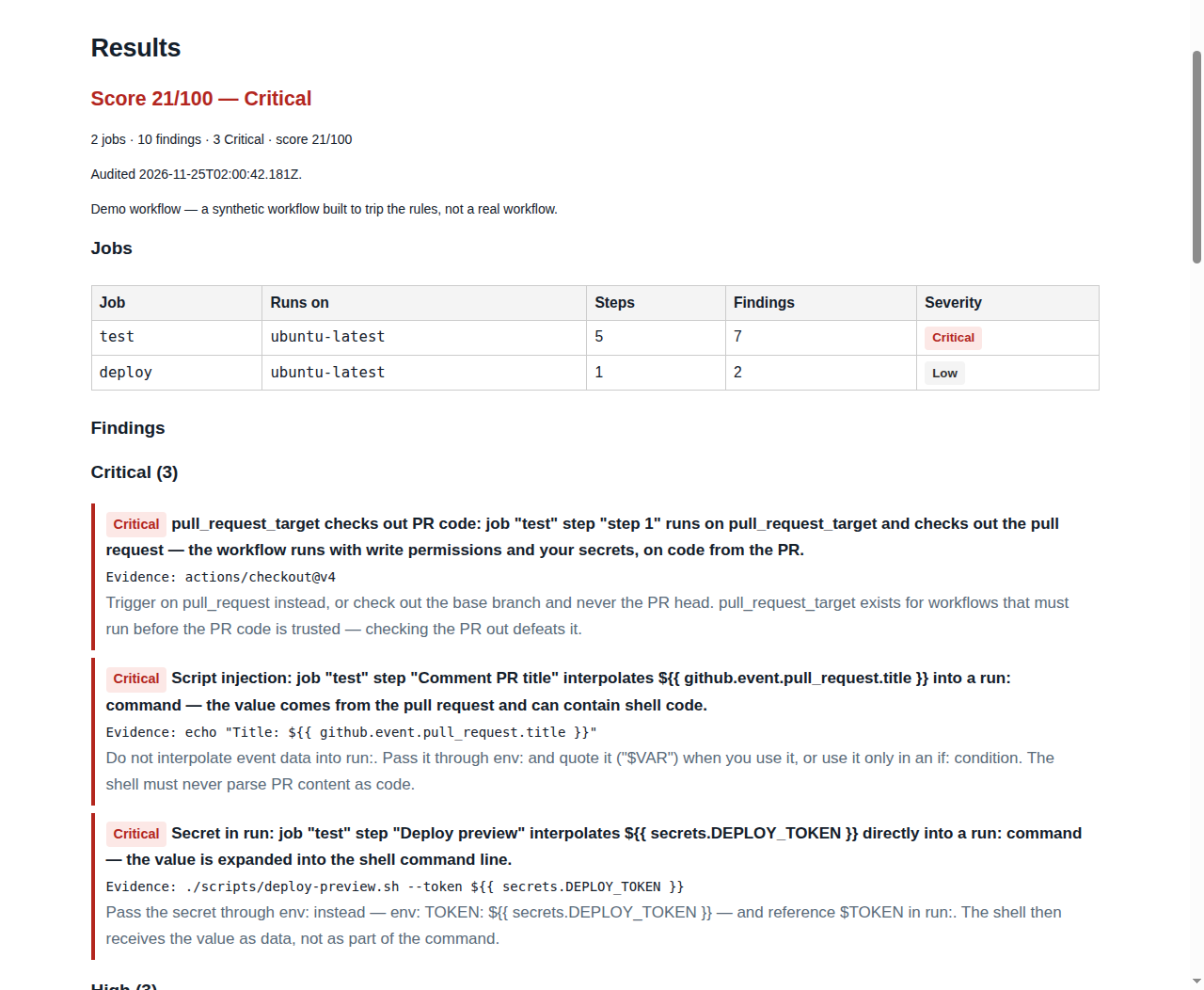
pull_request_target, secrets in run:, and script injection
The demo workflow’s trigger is the most dangerous line in the file: on: pull_request_target. That event runs the workflow in the context of the base repository, with the repository’s secrets and a write-capable token — and the very next step checks out the pull request’s code with actions/checkout@v4. The combination is the classic privilege-escalation pattern: code from a fork, which anyone on the internet can open, runs with the secrets and write access of the trusted repository. A pull request that only changes a comment in the workflow can still execute arbitrary commands on the runner, read the secrets handed to it, and push back to the repository. Use on: pull_request instead wherever you can: it runs in the context of the merge commit, with a read-only token and no secrets, which is enough for building and testing a contribution.
The second half of the same problem is script injection, and the demo has a clear example. The Comment PR title step runs echo "Title: ${{ github.event.pull_request.title }}" — the pull request title is interpolated straight into a shell command, so a title crafted with shell metacharacters executes as code on the runner. And the Deploy preview step passes ${{ secrets.DEPLOY_TOKEN }} directly on a run: command line, where it can end up in logs, in error output, or in a child process’s environment. The fix for both is the same: never interpolate a GitHub context into run:. Pass the value through env: instead — env: PR_TITLE: ${{ github.event.pull_request.title }}, then run: echo "Reviewing $PR_TITLE" — and pass secrets through env: the same way, so the shell never sees the literal value. GitHub redacts secrets it knows about from logs, but it can only redact the ones it was told to, so never print a secret, and rotate any secret that ever appeared in a run: line.
Permissions: give the token the least it needs
The demo workflow’s permissions: write-all hands the GITHUB_TOKEN every scope at once — read and write on contents, pull requests, issues, packages, everything. A job that only runs tests does not need any of that, and a workflow that holds write-all turns every other mistake in the file into a worse one: a script injection that would only have read the repository can now push to it, and a compromised action can now publish a release. The fix is to start from nothing and add only what the job uses: set permissions: {} or permissions: contents: read at the top of the file, then grant a job the single scope it needs — pull-requests: write only for a job that comments on pull requests, contents: write only for a job that publishes a release. If a workflow sets no permissions block at all, the token gets whatever the repository or organisation default is, which may be broader than the job needs, so the auditor flags a missing block too.
Two scopes deserve a second look whenever they appear. id-token: write is the scope that lets a job request an OIDC identity token from GitHub, which is the right way to let a workflow authenticate to a cloud provider without a long-lived secret — but it should appear only on the job that actually talks to the cloud. And actions/checkout without persist-credentials: false leaves the token in the local git configuration on the runner, where a later step — including a compromised action — can reuse it to push. Set persist-credentials: false on every checkout that does not need to push, and treat any write scope the same way you would treat a password: grant it for one job, for one reason, and nowhere else.
Timeouts, concurrency, and deprecated actions
Neither of the demo workflow’s two jobs sets timeout-minutes, so a hung step can run until GitHub’s default limit — six hours — burning paid minutes on a hosted runner, or occupying a self-hosted runner that other jobs are waiting for. A stuck test suite, a network call that never returns, or a malicious step that sleeps forever all look the same from the outside: a job that never finishes. Give every job a timeout that matches what it should take — ten or twenty minutes for a typical CI job — so a hang fails loudly instead of draining the queue. The auditor flags a missing timeout as a low finding, not a critical one, because it costs money and capacity rather than handing over secrets — but on a busy repository the cost is real.
Two more findings live in the same part of the file. The demo’s deploy job declares environment: production but sets no concurrency:, so two runs can deploy at the same time and a slow run that started first can finish last and put stale code into production; a workflow that deploys should set concurrency: — one named group, with cancel-in-progress: true. And old actions are a risk of their own: actions/checkout@v2, actions/setup-node@v1, and actions/cache@v2 run on deprecated Node runtimes and no longer receive fixes, and the set-output and save-state commands were replaced by the $GITHUB_OUTPUT and $GITHUB_ENV files. Bump deprecated actions to a current major version, pinned to its SHA, and replace the old commands — a workflow that still uses them is a workflow nobody has reviewed in a long time.
How to audit a workflow with the companion tool
Paste your workflow into the GitHub Actions Workflow Auditor and you get a score from 0 to 100, a list of findings ranked by severity, and a table of the jobs and steps the file defines, with a findings CSV you can export. Read it in order: Critical first — pull_request_target combined with a checkout of pull request code, secrets interpolated into run:, and script injection — then High — unpinned actions and overly broad permissions — then the rest. The demo workflow scores 21/100, a Critical verdict, because it was written to contain the mistakes this article walks through; fix them one at a time and re-audit until the score is clean. A clean report means no known pattern matched, not that the workflow is safe — a pinned action can still be malicious, and a workflow with no findings can still deploy the wrong thing.
What the auditor does not do is just as important. It cannot tell whether a pinned SHA points at code you would trust — that needs a look at the action’s repository, which a browser-local checker will not make for you. It cannot check whether a secret has already leaked, or whether the repository and organisation defaults are permissive — those live outside the workflow file. And it does not fix the workflow for you: the fixes happen in the file, by you, after the audit tells you what to fix. The workflow is the evidence. The auditor only makes it readable — and because it runs entirely in your browser, you can paste a workflow full of secrets into it without handing those secrets to a server.
Try it yourself: the demo workflow the auditor ships with
name: CI
on:
  pull_request_target:
    types: [opened, synchronize]
  push:
    branches: [main]

permissions: write-all

jobs:
  test:
    runs-on: ubuntu-latest
    steps:
      - uses: actions/checkout@v4
      - uses: actions/setup-node@v4
        with:
          node-version: 20
      - name: Run tests
        run: npm ci && npm test
      - name: Comment PR title
        run: 'echo "Title: ${{ github.event.pull_request.title }}"'
      - name: Deploy preview
        run: ./scripts/deploy-preview.sh --token ${{ secrets.DEPLOY_TOKEN }}

  deploy:
    runs-on: ubuntu-latest
    needs: test
    environment: production
    steps:
      - name: Deploy
        run: ./scripts/deploy.sh