ComfyUI は、ワークフローに対する柔軟性と制御を提供する、AI 駆動の画像生成のための強力なツールです。この記事では、Windows マシンへの ComfyUIのインストール手順を、システム要件、インストール手順、トラブルシューティングのヒントとともに説明します。
目次
システム要件
インストール プロセスを開始する前に、システムが次のハードウェアとソフトウェアの前提条件を満たしていることを確認してください:
ハードウェア要件
- プロセッサ:最新のマルチコア CPU(Intel i5/i7 または AMD Ryzen を推奨)。
- GPU:CUDA に対応した NVIDIA GPU(最低6GB VRAM、ただし8GB+ VRAMが理想的です)。例:
- NVIDIA GTX 1660 以上
- NVIDIA RTX 3060/3070/3080/40 シリーズ/50 シリーズ GPU
- NVIDIA A シリーズ、Tesla シリーズ GPU
ソフトウェア要件
- オペレーティング システム:Windows 10 または Windows 11(64 ビット)。
- Python のバージョン:Python 3.10 以降。
- NVIDIA ドライバー:CUDA 互換性のため、最新のドライバーがインストールされていることを確認してください。
- ダウンロード元:NVIDIA ドライバーのダウンロード.
- NVIDIA CUDA をインストール:
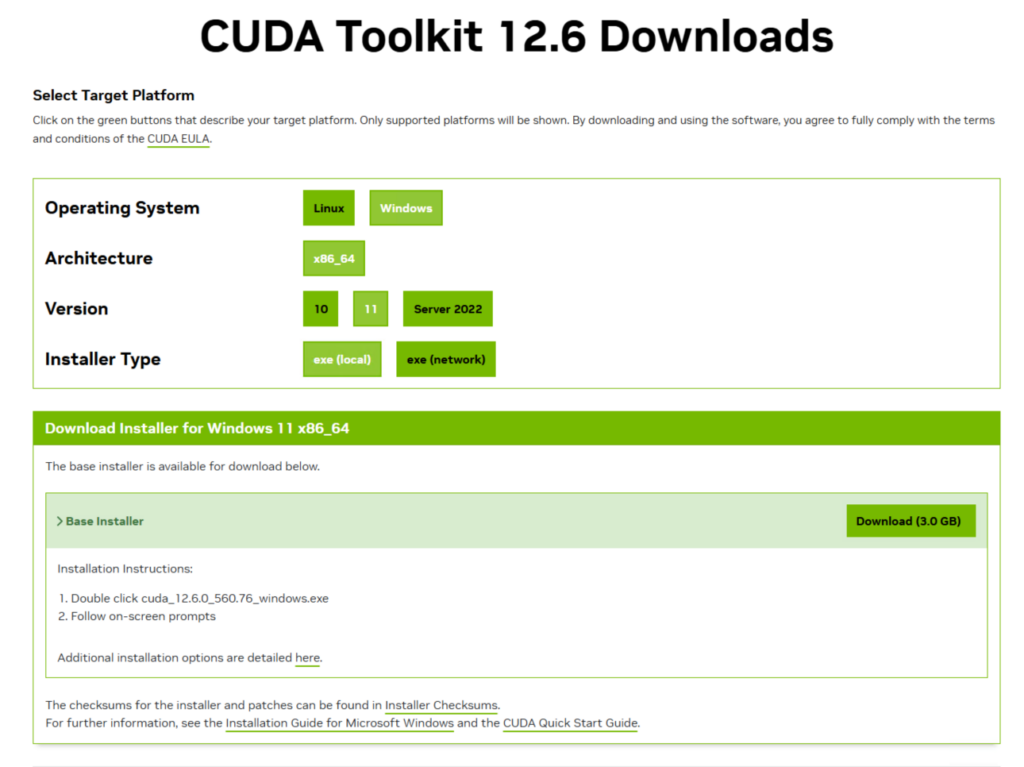
- Git:リポジトリをクローンするには Git をインストールする必要があります。
- ダウンロード元:Git for Windows.

Windows に ComfyUI をインストールするステップバイステップ ガイド
次の手順に従って、Windows マシンに ComfyUI をインストールします:
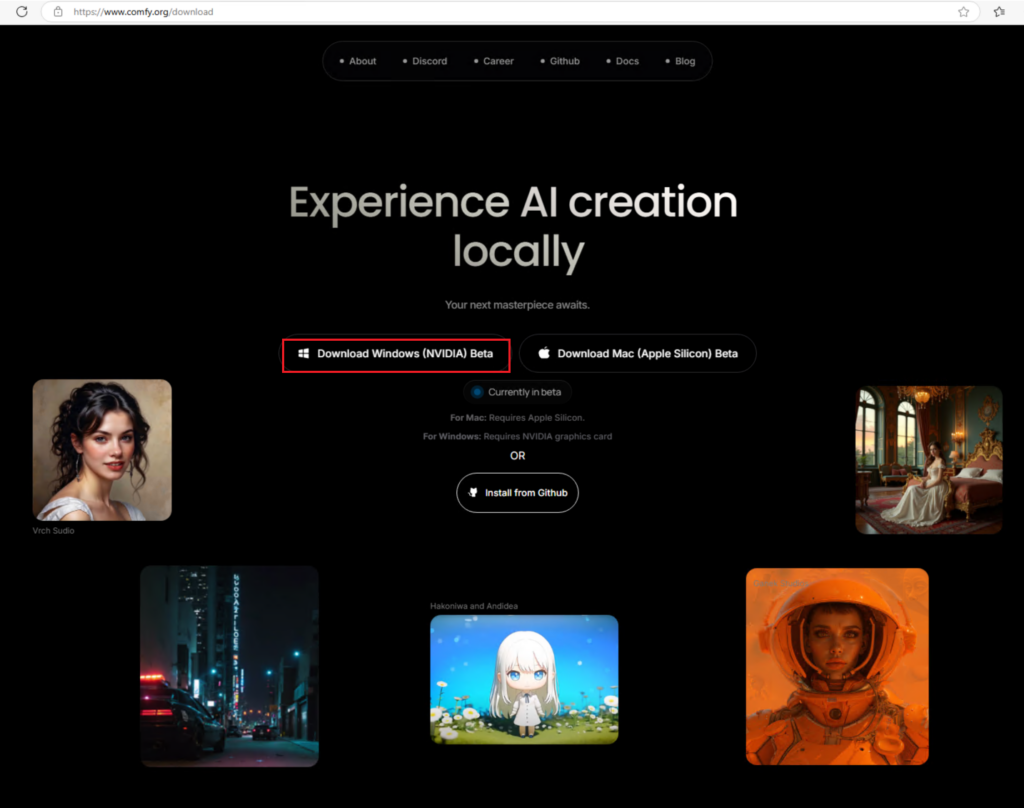
ステップ 1: ComfyUI デスクトップ版をダウンロードする
Windows/Mac 用 ComfyUI をダウンロードする
ステップ 2: Git をインストールする
- Git を次のリンクからダウンロードします:Git for Windows.
- インストール手順に従い、Git がシステムの PATH に追加されていることを確認します。
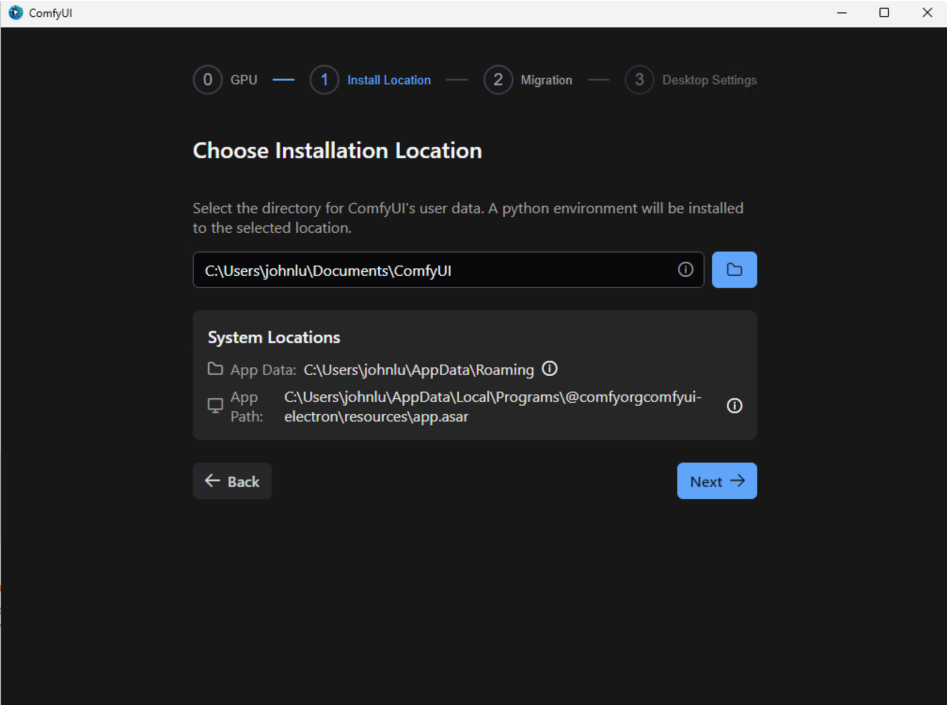
ステップ 3: デスクトップ版のインストールを開始する
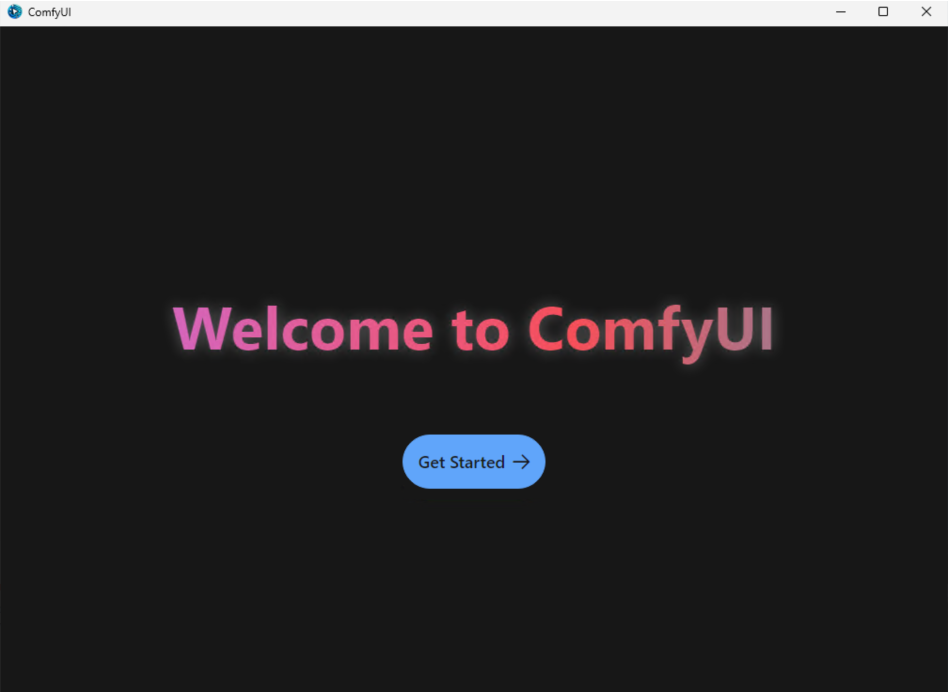
- ダウンロードしたバージョンをダブルクリックして、ComfyUI のインストールを開始します。
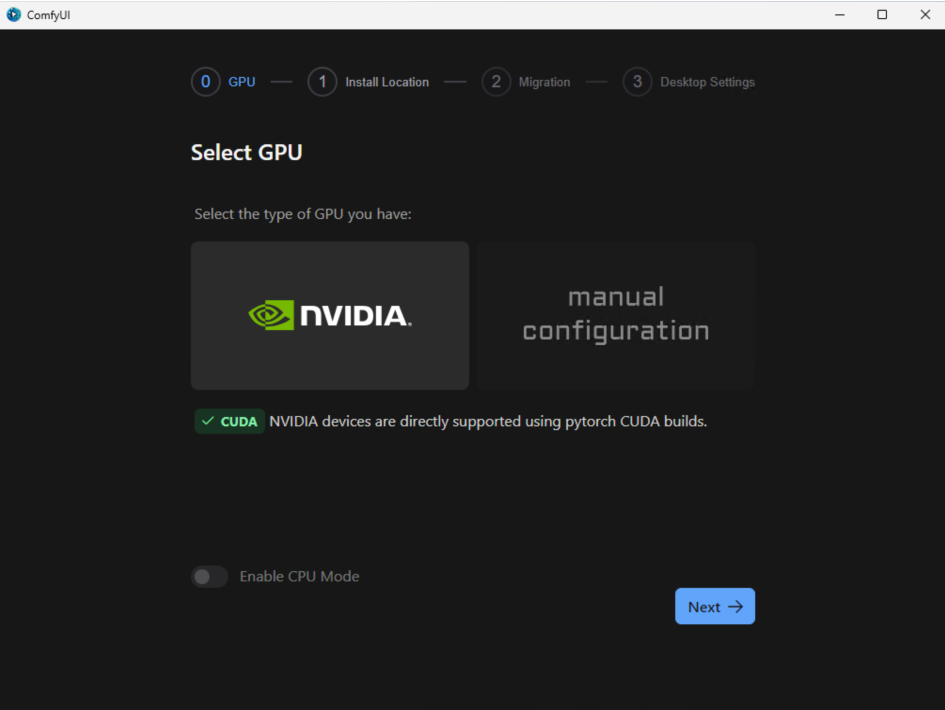
GPU バージョンを選択する
インストール場所を選択します:
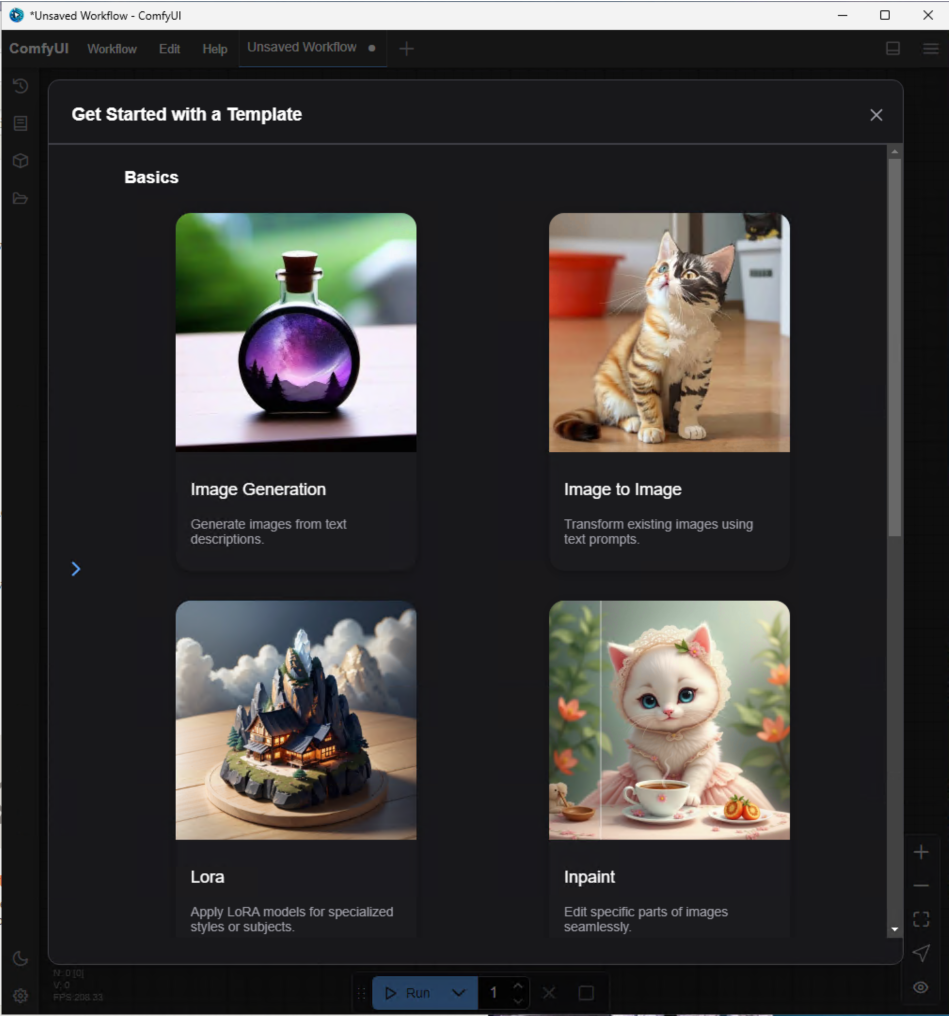
テンプレートを使ってみる
不足しているモジュール:

ダウンロードをクリックすることで直接ダウンロードできます。
ステップ 4: ComfyUI を実行する
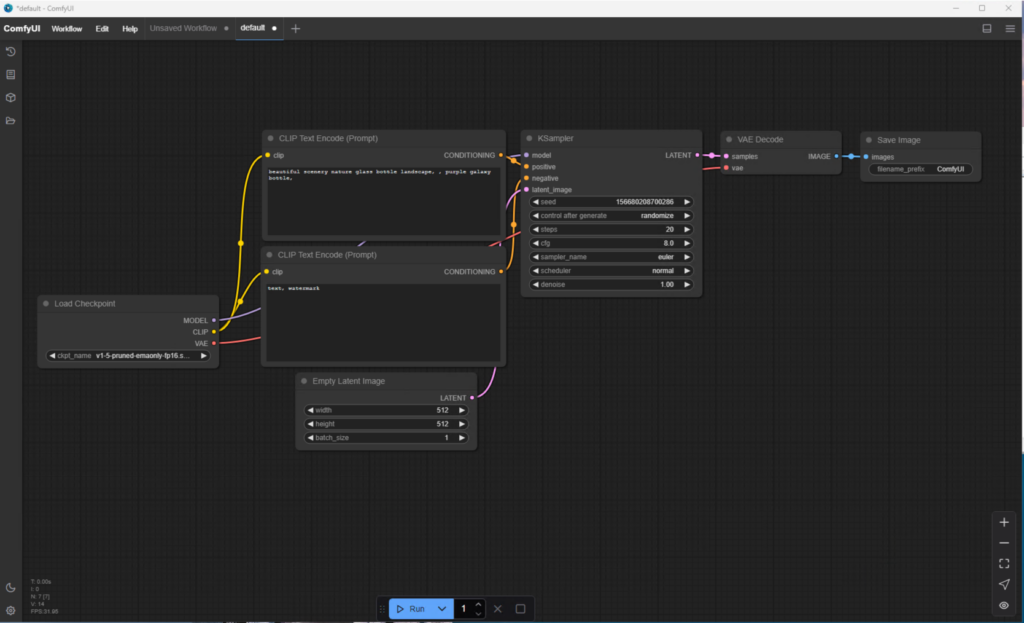
ステップ 5: 既定のプロンプトと既定のモデルを使用して画像を生成してみる
実行をクリックすると、エラーが表示されます。
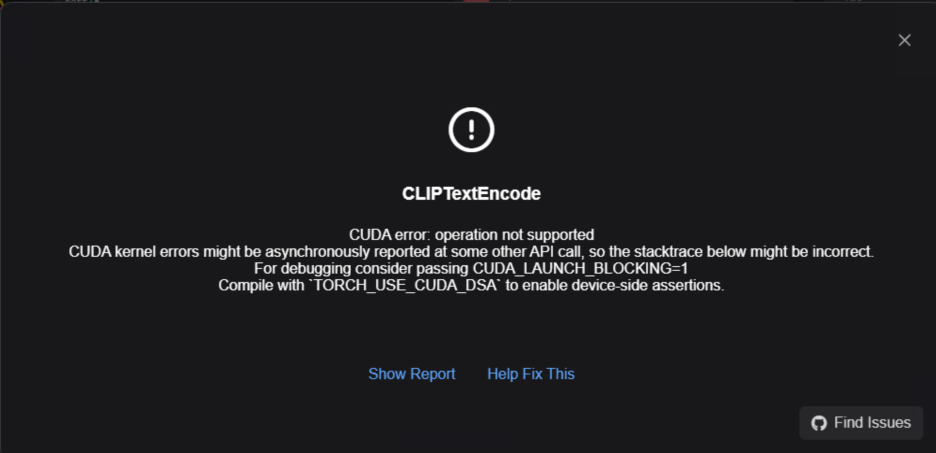
完全なエラーは次のとおりです:
ComfyUI エラー レポート
エラーの詳細
- ノード ID: 7
- ノード タイプ: CLIPTextEncode
- 例外の種類: RuntimeError
- 例外メッセージ: CUDA error: operation not supported
CUDA kernel errors might be asynchronously reported at some other API call, so the stacktrace below might be incorrect.
For debugging consider passing CUDA_LAUNCH_BLOCKING=1
Compile withTORCH_USE_CUDA_DSAto enable device-side assertions.
スタック トレース
  File "C:\Users\johnlu\AppData\Local\Programs\@comfyorgcomfyui-electron\resources\ComfyUI\execution.py", line 327, in execute
    output_data, output_ui, has_subgraph = get_output_data(obj, input_data_all, execution_block_cb=execution_block_cb, pre_execute_cb=pre_execute_cb)
                                           ^^^^^^^^^^^^^^^^^^^^^^^^^^^^^^^^^^^^^^^^^^^^^^^^^^^^^^^^^^^^^^^^^^^^^^^^^^^^^^^^^^^^^^^^^^^^^^^^^^^^^^^^^^

  File "C:\Users\johnlu\AppData\Local\Programs\@comfyorgcomfyui-electron\resources\ComfyUI\execution.py", line 202, in get_output_data
    return_values = _map_node_over_list(obj, input_data_all, obj.FUNCTION, allow_interrupt=True, execution_block_cb=execution_block_cb, pre_execute_cb=pre_execute_cb)
                    ^^^^^^^^^^^^^^^^^^^^^^^^^^^^^^^^^^^^^^^^^^^^^^^^^^^^^^^^^^^^^^^^^^^^^^^^^^^^^^^^^^^^^^^^^^^^^^^^^^^^^^^^^^^^^^^^^^^^^^^^^^^^^^^^^^^^^^^^^^^^^^^^^^

  File "C:\Users\johnlu\AppData\Local\Programs\@comfyorgcomfyui-electron\resources\ComfyUI\execution.py", line 174, in _map_node_over_list
    process_inputs(input_dict, i)

  File "C:\Users\johnlu\AppData\Local\Programs\@comfyorgcomfyui-electron\resources\ComfyUI\execution.py", line 163, in process_inputs
    results.append(getattr(obj, func)(**inputs))
                   ^^^^^^^^^^^^^^^^^^^^^^^^^^^^

  File "C:\Users\johnlu\AppData\Local\Programs\@comfyorgcomfyui-electron\resources\ComfyUI\nodes.py", line 69, in encode
    return (clip.encode_from_tokens_scheduled(tokens), )
            ^^^^^^^^^^^^^^^^^^^^^^^^^^^^^^^^^^^^^^^^^

  File "C:\Users\johnlu\AppData\Local\Programs\@comfyorgcomfyui-electron\resources\ComfyUI\comfy\sd.py", line 153, in encode_from_tokens_scheduled
    pooled_dict = self.encode_from_tokens(tokens, return_pooled=return_pooled, return_dict=True)
                  ^^^^^^^^^^^^^^^^^^^^^^^^^^^^^^^^^^^^^^^^^^^^^^^^^^^^^^^^^^^^^^^^^^^^^^^^^^^^^^

  File "C:\Users\johnlu\AppData\Local\Programs\@comfyorgcomfyui-electron\resources\ComfyUI\comfy\sd.py", line 214, in encode_from_tokens
    self.load_model()

  File "C:\Users\johnlu\AppData\Local\Programs\@comfyorgcomfyui-electron\resources\ComfyUI\comfy\sd.py", line 247, in load_model
    model_management.load_model_gpu(self.patcher)

  File "C:\Users\johnlu\AppData\Local\Programs\@comfyorgcomfyui-electron\resources\ComfyUI\comfy\model_management.py", line 604, in load_model_gpu
    return load_models_gpu([model])
           ^^^^^^^^^^^^^^^^^^^^^^^^

  File "C:\Users\johnlu\AppData\Local\Programs\@comfyorgcomfyui-electron\resources\ComfyUI\comfy\model_management.py", line 599, in load_models_gpu
    loaded_model.model_load(lowvram_model_memory, force_patch_weights=force_patch_weights)

  File "C:\Users\johnlu\AppData\Local\Programs\@comfyorgcomfyui-electron\resources\ComfyUI\comfy\model_management.py", line 418, in model_load
    self.model_use_more_vram(use_more_vram, force_patch_weights=force_patch_weights)

  File "C:\Users\johnlu\AppData\Local\Programs\@comfyorgcomfyui-electron\resources\ComfyUI\comfy\model_management.py", line 447, in model_use_more_vram
    return self.model.partially_load(self.device, extra_memory, force_patch_weights=force_patch_weights)
           ^^^^^^^^^^^^^^^^^^^^^^^^^^^^^^^^^^^^^^^^^^^^^^^^^^^^^^^^^^^^^^^^^^^^^^^^^^^^^^^^^^^^^^^^^^^^^

  File "C:\Users\johnlu\AppData\Local\Programs\@comfyorgcomfyui-electron\resources\ComfyUI\comfy\model_patcher.py", line 832, in partially_load
    raise e

  File "C:\Users\johnlu\AppData\Local\Programs\@comfyorgcomfyui-electron\resources\ComfyUI\comfy\model_patcher.py", line 829, in partially_load
    self.load(device_to, lowvram_model_memory=current_used + extra_memory, force_patch_weights=force_patch_weights, full_load=full_load)

  File "C:\Users\johnlu\AppData\Local\Programs\@comfyorgcomfyui-electron\resources\ComfyUI\comfy\model_patcher.py", line 670, in load
    x[2].to(device_to)

  File "C:\Users\johnlu\Documents\ComfyUI\.venv\Lib\site-packages\torch\nn\modules\module.py", line 1343, in to
    return self._apply(convert)
           ^^^^^^^^^^^^^^^^^^^^

  File "C:\Users\johnlu\Documents\ComfyUI\.venv\Lib\site-packages\torch\nn\modules\module.py", line 930, in _apply
    param_applied = fn(param)
                    ^^^^^^^^^

  File "C:\Users\johnlu\Documents\ComfyUI\.venv\Lib\site-packages\torch\nn\modules\module.py", line 1329, in convert
    return t.to(
           ^^^^^
システム情報
- ComfyUI のバージョン: 0.3.27
- 引数: C:\Users\johnlu\AppData\Local\Programs\@comfyorgcomfyui-electron\resources\ComfyUI\main.py –user-directory C:\Users\johnlu\Documents\ComfyUI\user –input-directory C:\Users\johnlu\Documents\ComfyUI\input –output-directory C:\Users\johnlu\Documents\ComfyUI\output –front-end-root C:\Users\johnlu\AppData\Local\Programs\@comfyorgcomfyui-electron\resources\ComfyUI\web_custom_versions\desktop_app –base-directory C:\Users\johnlu\Documents\ComfyUI –extra-model-paths-config C:\Users\johnlu\AppData\Roaming\ComfyUI\extra_models_config.yaml –log-stdout –listen 127.0.0.1 –port 8000 –cuda-malloc
- OS: nt
- Python のバージョン: 3.12.9 (main, Feb 12 2025, 14:52:31) [MSC v.1942 64 bit (AMD64)]
- 組み込み Python: false
- PyTorch のバージョン: 2.6.0+cu126
デバイス
- 名前: cuda:0 Tesla T4 : cudaMallocAsync
- 種類: cuda
- VRAM 合計: 16998400000
- 空き VRAM: 16883515392
- Torch VRAM 合計: 0
- 空き Torch VRAM: 0
ログ
2025-04-08T15:48:17.454346 - Adding extra search path custom_nodes C:\Users\johnlu\Documents\ComfyUI\custom_nodes
2025-04-08T15:48:17.454346 - Adding extra search path download_model_base C:\Users\johnlu\Documents\ComfyUI\models
2025-04-08T15:48:17.454346 - Adding extra search path custom_nodes C:\Users\johnlu\AppData\Local\Programs\@comfyorgcomfyui-electron\resources\ComfyUI\custom_nodes
2025-04-08T15:48:17.454346 - Setting output directory to: C:\Users\johnlu\Documents\ComfyUI\output
2025-04-08T15:48:17.454346 - Setting input directory to: C:\Users\johnlu\Documents\ComfyUI\input
2025-04-08T15:48:17.454346 - Setting user directory to: C:\Users\johnlu\Documents\ComfyUI\user
2025-04-08T15:48:18.475926 - [START] Security scan2025-04-08T15:48:18.475926 -
2025-04-08T15:48:20.110481 - [DONE] Security scan2025-04-08T15:48:20.110481 -
2025-04-08T15:48:20.282310 - ## ComfyUI-Manager: installing dependencies done.2025-04-08T15:48:20.282310 -
2025-04-08T15:48:20.282310 - ** ComfyUI startup time:2025-04-08T15:48:20.283408 -  2025-04-08T15:48:20.283408 - 2025-04-08 15:48:20.2822025-04-08T15:48:20.283408 -
2025-04-08T15:48:20.283408 - ** Platform:2025-04-08T15:48:20.283408 -  2025-04-08T15:48:20.283408 - Windows2025-04-08T15:48:20.283408 -
2025-04-08T15:48:20.283408 - ** Python version:2025-04-08T15:48:20.283408 -  2025-04-08T15:48:20.283408 - 3.12.9 (main, Feb 12 2025, 14:52:31) [MSC v.1942 64 bit (AMD64)]2025-04-08T15:48:20.283408 -
2025-04-08T15:48:20.283408 - ** Python executable:2025-04-08T15:48:20.283408 -  2025-04-08T15:48:20.283408 - C:\Users\johnlu\Documents\ComfyUI\.venv\Scripts\python.exe2025-04-08T15:48:20.283408 -
2025-04-08T15:48:20.283408 - ** ComfyUI Path:2025-04-08T15:48:20.283408 -  2025-04-08T15:48:20.283408 - C:\Users\johnlu\AppData\Local\Programs\@comfyorgcomfyui-electron\resources\ComfyUI2025-04-08T15:48:20.283408 -
2025-04-08T15:48:20.283408 - ** ComfyUI Base Folder Path:2025-04-08T15:48:20.283408 -  2025-04-08T15:48:20.283408 - C:\Users\johnlu\AppData\Local\Programs\@comfyorgcomfyui-electron\resources\ComfyUI2025-04-08T15:48:20.283408 -
2025-04-08T15:48:20.284409 - ** User directory:2025-04-08T15:48:20.284409 -  2025-04-08T15:48:20.284409 - C:\Users\johnlu\Documents\ComfyUI\user2025-04-08T15:48:20.284409 -
2025-04-08T15:48:20.284409 - ** ComfyUI-Manager config path:2025-04-08T15:48:20.284409 -  2025-04-08T15:48:20.284409 - C:\Users\johnlu\Documents\ComfyUI\user\default\ComfyUI-Manager\config.ini2025-04-08T15:48:20.284409 -
2025-04-08T15:48:20.284409 - ** Log path:2025-04-08T15:48:20.284409 -  2025-04-08T15:48:20.284409 - C:\Users\johnlu\Documents\ComfyUI\user\comfyui.log2025-04-08T15:48:20.284409 -
2025-04-08T15:48:21.487359 - [ComfyUI-Manager] Failed to restore comfyui-frontend-package
2025-04-08T15:48:21.488359 - expected str, bytes or os.PathLike object, not NoneType
2025-04-08T15:48:21.488359 -
Prestartup times for custom nodes:
2025-04-08T15:48:21.488359 -    4.0 seconds: C:\Users\johnlu\AppData\Local\Programs\@comfyorgcomfyui-electron\resources\ComfyUI\custom_nodes\ComfyUI-Manager
2025-04-08T15:48:21.488359 -
2025-04-08T15:48:24.067518 - Checkpoint files will always be loaded safely.
2025-04-08T15:48:24.334030 - Total VRAM 16211 MB, total RAM 28621 MB
2025-04-08T15:48:24.334030 - pytorch version: 2.6.0+cu126
2025-04-08T15:48:24.335032 - Set vram state to: NORMAL_VRAM
2025-04-08T15:48:24.335032 - Device: cuda:0 Tesla T4 : cudaMallocAsync
2025-04-08T15:48:26.143597 - Using pytorch attention
2025-04-08T15:48:40.382150 - ComfyUI version: 0.3.27
2025-04-08T15:48:40.411434 - [Prompt Server] web root: C:\Users\johnlu\AppData\Local\Programs\@comfyorgcomfyui-electron\resources\ComfyUI\web_custom_versions\desktop_app
2025-04-08T15:48:40.961457 - ### Loading: ComfyUI-Manager (V3.30.4)
2025-04-08T15:48:40.962576 - [ComfyUI-Manager] network_mode: public
2025-04-08T15:48:40.962576 - ### ComfyUI Revision: UNKNOWN (The currently installed ComfyUI is not a Git repository)
2025-04-08T15:48:40.969744 -
Import times for custom nodes:
2025-04-08T15:48:40.970746 -    0.0 seconds: C:\Users\johnlu\AppData\Local\Programs\@comfyorgcomfyui-electron\resources\ComfyUI\custom_nodes\websocket_image_save.py
2025-04-08T15:48:40.970746 -    0.0 seconds: C:\Users\johnlu\AppData\Local\Programs\@comfyorgcomfyui-electron\resources\ComfyUI\custom_nodes\ComfyUI-Manager
2025-04-08T15:48:40.970746 -
2025-04-08T15:48:40.983759 - Starting server

2025-04-08T15:48:40.983759 - To see the GUI go to: http://127.0.0.1:8000
2025-04-08T15:48:41.021278 - [ComfyUI-Manager] default cache updated: https://raw.githubusercontent.com/ltdrdata/ComfyUI-Manager/main/alter-list.json
2025-04-08T15:48:41.072414 - [ComfyUI-Manager] default cache updated: https://raw.githubusercontent.com/ltdrdata/ComfyUI-Manager/main/custom-node-list.json
2025-04-08T15:48:41.083425 - [ComfyUI-Manager] default cache updated: https://raw.githubusercontent.com/ltdrdata/ComfyUI-Manager/main/model-list.json
2025-04-08T15:48:41.251921 - [ComfyUI-Manager] default cache updated: https://raw.githubusercontent.com/ltdrdata/ComfyUI-Manager/main/extension-node-map.json
2025-04-08T15:48:41.278533 - [ComfyUI-Manager] default cache updated: https://raw.githubusercontent.com/ltdrdata/ComfyUI-Manager/main/github-stats.json
2025-04-08T15:48:45.322464 - FETCH ComfyRegistry Data: 5/812025-04-08T15:48:45.322464 -
2025-04-08T15:48:46.865258 - got prompt
2025-04-08T15:48:48.766125 - model weight dtype torch.float16, manual cast: None
2025-04-08T15:48:48.768124 - model_type EPS
2025-04-08T15:48:49.127022 - Using pytorch attention in VAE
2025-04-08T15:48:49.129024 - Using pytorch attention in VAE
2025-04-08T15:48:49.181575 - VAE load device: cuda:0, offload device: cpu, dtype: torch.float32
2025-04-08T15:48:49.331280 - CLIP/text encoder model load device: cuda:0, offload device: cpu, current: cpu, dtype: torch.float16
2025-04-08T15:48:49.375641 - Requested to load SD1ClipModel
2025-04-08T15:48:49.383639 - !!! Exception during processing !!! CUDA error: operation not supported
CUDA kernel errors might be asynchronously reported at some other API call, so the stacktrace below might be incorrect.
For debugging consider passing CUDA_LAUNCH_BLOCKING=1
Compile with `TORCH_USE_CUDA_DSA` to enable device-side assertions.

2025-04-08T15:48:49.496959 - Traceback (most recent call last):
  File "C:\Users\johnlu\AppData\Local\Programs\@comfyorgcomfyui-electron\resources\ComfyUI\execution.py", line 327, in execute
    output_data, output_ui, has_subgraph = get_output_data(obj, input_data_all, execution_block_cb=execution_block_cb, pre_execute_cb=pre_execute_cb)
                                           ^^^^^^^^^^^^^^^^^^^^^^^^^^^^^^^^^^^^^^^^^^^^^^^^^^^^^^^^^^^^^^^^^^^^^^^^^^^^^^^^^^^^^^^^^^^^^^^^^^^^^^^^^^
  File "C:\Users\johnlu\AppData\Local\Programs\@comfyorgcomfyui-electron\resources\ComfyUI\execution.py", line 202, in get_output_data
    return_values = _map_node_over_list(obj, input_data_all, obj.FUNCTION, allow_interrupt=True, execution_block_cb=execution_block_cb, pre_execute_cb=pre_execute_cb)
                    ^^^^^^^^^^^^^^^^^^^^^^^^^^^^^^^^^^^^^^^^^^^^^^^^^^^^^^^^^^^^^^^^^^^^^^^^^^^^^^^^^^^^^^^^^^^^^^^^^^^^^^^^^^^^^^^^^^^^^^^^^^^^^^^^^^^^^^^^^^^^^^^^^^
  File "C:\Users\johnlu\AppData\Local\Programs\@comfyorgcomfyui-electron\resources\ComfyUI\execution.py", line 174, in _map_node_over_list
    process_inputs(input_dict, i)
  File "C:\Users\johnlu\AppData\Local\Programs\@comfyorgcomfyui-electron\resources\ComfyUI\execution.py", line 163, in process_inputs
    results.append(getattr(obj, func)(**inputs))
                   ^^^^^^^^^^^^^^^^^^^^^^^^^^^^
  File "C:\Users\johnlu\AppData\Local\Programs\@comfyorgcomfyui-electron\resources\ComfyUI\nodes.py", line 69, in encode
    return (clip.encode_from_tokens_scheduled(tokens), )
            ^^^^^^^^^^^^^^^^^^^^^^^^^^^^^^^^^^^^^^^^^
  File "C:\Users\johnlu\AppData\Local\Programs\@comfyorgcomfyui-electron\resources\ComfyUI\comfy\sd.py", line 153, in encode_from_tokens_scheduled
    pooled_dict = self.encode_from_tokens(tokens, return_pooled=return_pooled, return_dict=True)
                  ^^^^^^^^^^^^^^^^^^^^^^^^^^^^^^^^^^^^^^^^^^^^^^^^^^^^^^^^^^^^^^^^^^^^^^^^^^^^^^
  File "C:\Users\johnlu\AppData\Local\Programs\@comfyorgcomfyui-electron\resources\ComfyUI\comfy\sd.py", line 214, in encode_from_tokens
    self.load_model()
  File "C:\Users\johnlu\AppData\Local\Programs\@comfyorgcomfyui-electron\resources\ComfyUI\comfy\sd.py", line 247, in load_model
    model_management.load_model_gpu(self.patcher)
  File "C:\Users\johnlu\AppData\Local\Programs\@comfyorgcomfyui-electron\resources\ComfyUI\comfy\model_management.py", line 604, in load_model_gpu
    return load_models_gpu([model])
           ^^^^^^^^^^^^^^^^^^^^^^^^
  File "C:\Users\johnlu\AppData\Local\Programs\@comfyorgcomfyui-electron\resources\ComfyUI\comfy\model_management.py", line 599, in load_models_gpu
    loaded_model.model_load(lowvram_model_memory, force_patch_weights=force_patch_weights)
  File "C:\Users\johnlu\AppData\Local\Programs\@comfyorgcomfyui-electron\resources\ComfyUI\comfy\model_management.py", line 418, in model_load
    self.model_use_more_vram(use_more_vram, force_patch_weights=force_patch_weights)
  File "C:\Users\johnlu\AppData\Local\Programs\@comfyorgcomfyui-electron\resources\ComfyUI\comfy\model_management.py", line 447, in model_use_more_vram
    return self.model.partially_load(self.device, extra_memory, force_patch_weights=force_patch_weights)
           ^^^^^^^^^^^^^^^^^^^^^^^^^^^^^^^^^^^^^^^^^^^^^^^^^^^^^^^^^^^^^^^^^^^^^^^^^^^^^^^^^^^^^^^^^^^^^
  File "C:\Users\johnlu\AppData\Local\Programs\@comfyorgcomfyui-electron\resources\ComfyUI\comfy\model_patcher.py", line 832, in partially_load
    raise e
  File "C:\Users\johnlu\AppData\Local\Programs\@comfyorgcomfyui-electron\resources\ComfyUI\comfy\model_patcher.py", line 829, in partially_load
    self.load(device_to, lowvram_model_memory=current_used + extra_memory, force_patch_weights=force_patch_weights, full_load=full_load)
  File "C:\Users\johnlu\AppData\Local\Programs\@comfyorgcomfyui-electron\resources\ComfyUI\comfy\model_patcher.py", line 670, in load
    x[2].to(device_to)
  File "C:\Users\johnlu\Documents\ComfyUI\.venv\Lib\site-packages\torch\nn\modules\module.py", line 1343, in to
    return self._apply(convert)
           ^^^^^^^^^^^^^^^^^^^^
  File "C:\Users\johnlu\Documents\ComfyUI\.venv\Lib\site-packages\torch\nn\modules\module.py", line 930, in _apply
    param_applied = fn(param)
                    ^^^^^^^^^
  File "C:\Users\johnlu\Documents\ComfyUI\.venv\Lib\site-packages\torch\nn\modules\module.py", line 1329, in convert
    return t.to(
           ^^^^^
RuntimeError: CUDA error: operation not supported
CUDA kernel errors might be asynchronously reported at some other API call, so the stacktrace below might be incorrect.
For debugging consider passing CUDA_LAUNCH_BLOCKING=1
Compile with `TORCH_USE_CUDA_DSA` to enable device-side assertions.


2025-04-08T15:48:49.499967 - Prompt executed in 2.63 seconds
添付されたワークフロー
ワークフローに API キーやパスワードなどの機密情報が含まれていないことを確認してください。
{"id":"1c97d1fb-9290-4010-b7ba-774ce8c5025d","revision":0,"last_node_id":10,"last_link_id":11,"nodes":[{"id":8,"type":"VAEDecode","pos":[1209,188],"size":[210,46],"flags":{},"order":5,"mode":0,"inputs":[{"localized_name":"samples","name":"samples","type":"LATENT","link":7},{"localized_name":"vae","name":"vae","type":"VAE","link":8}],"outputs":[{"localized_name":"IMAGE","name":"IMAGE","type":"IMAGE","slot_index":0,"links":[9]}],"properties":{"cnr_id":"comfy-core","ver":"0.3.27","Node name for S&R":"VAEDecode"},"widgets_values":[]},{"id":3,"type":"KSampler","pos":[863,186],"size":[315,262],"flags":{},"order":4,"mode":0,"inputs":[{"localized_name":"model","name":"model","type":"MODEL","link":1},{"localized_name":"positive","name":"positive","type":"CONDITIONING","link":4},{"localized_name":"negative","name":"negative","type":"CONDITIONING","link":6},{"localized_name":"latent_image","name":"latent_image","type":"LATENT","link":2}],"outputs":[{"localized_name":"LATENT","name":"LATENT","type":"LATENT","slot_index":0,"links":[7]}],"properties":{"cnr_id":"comfy-core","ver":"0.3.27","Node name for S&R":"KSampler"},"widgets_values":[139106886374201,"randomize",20,8,"euler","normal",1]},{"id":9,"type":"SaveImage","pos":[1443.2308349609375,194.8274383544922],"size":[210,270],"flags":{},"order":6,"mode":0,"inputs":[{"localized_name":"images","name":"images","type":"IMAGE","link":9}],"outputs":[],"properties":{"cnr_id":"comfy-core","ver":"0.3.27"},"widgets_values":["ComfyUI"]},{"id":5,"type":"EmptyLatentImage","pos":[519.6195068359375,635.2233276367188],"size":[315,106],"flags":{},"order":0,"mode":0,"inputs":[],"outputs":[{"localized_name":"LATENT","name":"LATENT","type":"LATENT","slot_index":0,"links":[2]}],"properties":{"cnr_id":"comfy-core","ver":"0.3.27","Node name for S&R":"EmptyLatentImage"},"widgets_values":[512,512,1]},{"id":4,"type":"CheckpointLoaderSimple","pos":[32.79865264892578,180.68646240234375],"size":[315,98],"flags":{},"order":1,"mode":0,"inputs":[],"outputs":[{"localized_name":"MODEL","name":"MODEL","type":"MODEL","slot_index":0,"links":[1]},{"localized_name":"CLIP","name":"CLIP","type":"CLIP","slot_index":1,"links":[5,10]},{"localized_name":"VAE","name":"VAE","type":"VAE","slot_index":2,"links":[8]}],"properties":{"cnr_id":"comfy-core","ver":"0.3.27","Node name for S&R":"CheckpointLoaderSimple"},"widgets_values":["v1-5-pruned-emaonly.ckpt"]},{"id":7,"type":"CLIPTextEncode","pos":[413,389],"size":[425.27801513671875,180.6060791015625],"flags":{},"order":2,"mode":0,"inputs":[{"localized_name":"clip","name":"clip","type":"CLIP","link":5}],"outputs":[{"localized_name":"CONDITIONING","name":"CONDITIONING","type":"CONDITIONING","slot_index":0,"links":[6]}],"properties":{"cnr_id":"comfy-core","ver":"0.3.27","Node name for S&R":"CLIPTextEncode"},"widgets_values":["text, watermark"]},{"id":6,"type":"CLIPTextEncode","pos":[412.3878479003906,172.93951416015625],"size":[422.84503173828125,164.31304931640625],"flags":{},"order":3,"mode":0,"inputs":[{"localized_name":"clip","name":"clip","type":"CLIP","link":10}],"outputs":[{"localized_name":"CONDITIONING","name":"CONDITIONING","type":"CONDITIONING","slot_index":0,"links":[4]}],"properties":{"cnr_id":"comfy-core","ver":"0.3.27","Node name for S&R":"CLIPTextEncode"},"widgets_values":["beautiful scenery nature glass bottle landscape, , purple galaxy bottle,"]}],"links":[[1,4,0,3,0,"MODEL"],[2,5,0,3,3,"LATENT"],[4,6,0,3,1,"CONDITIONING"],[5,4,1,7,0,"CLIP"],[6,7,0,3,2,"CONDITIONING"],[7,3,0,8,0,"LATENT"],[8,4,2,8,1,"VAE"],[9,8,0,9,0,"IMAGE"],[10,4,1,6,0,"CLIP"]],"groups":[],"config":{},"extra":{"ds":{"scale":1.0296149546827795,"offset":[-17.644182606615267,7.129192296914338]}},"version":0.4}
調査の結果、この問題は GitHub で言及されていることがわかりました:
デスクトップ版 ComfyUI (Windows) の実行ファイルがコマンドライン パラメーターを受け付けない · Issue #7087 · comfyanonymous/ComfyUI
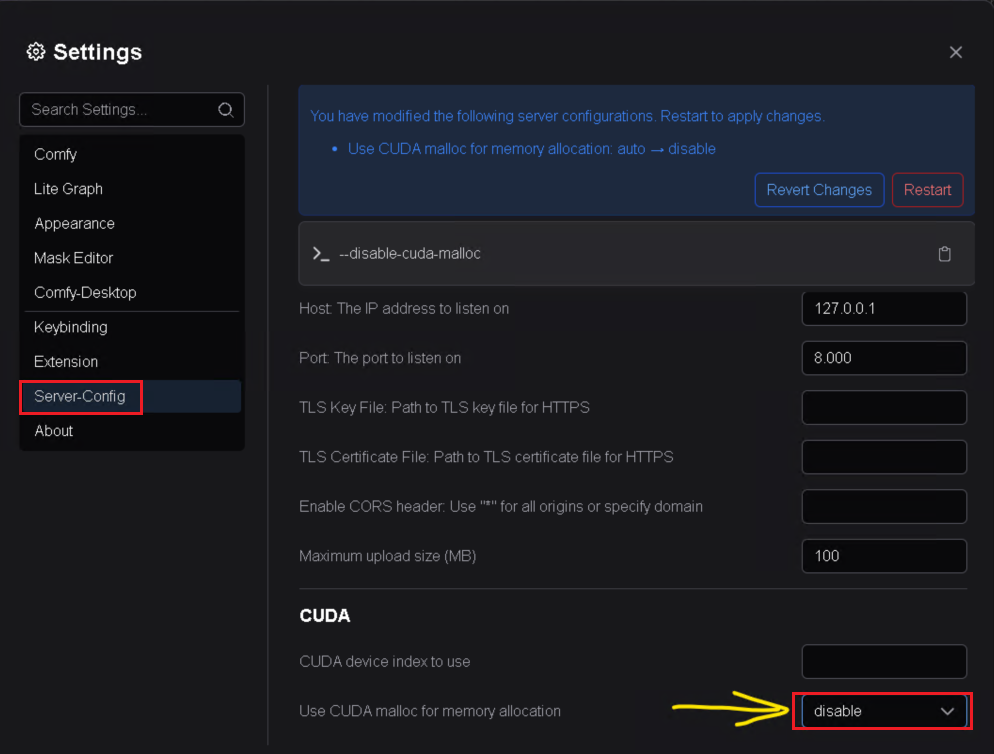
回避策:
回避策は「Use CUDA malloc for memory allocation」を無効 .
ステップ 6: 画像を生成する
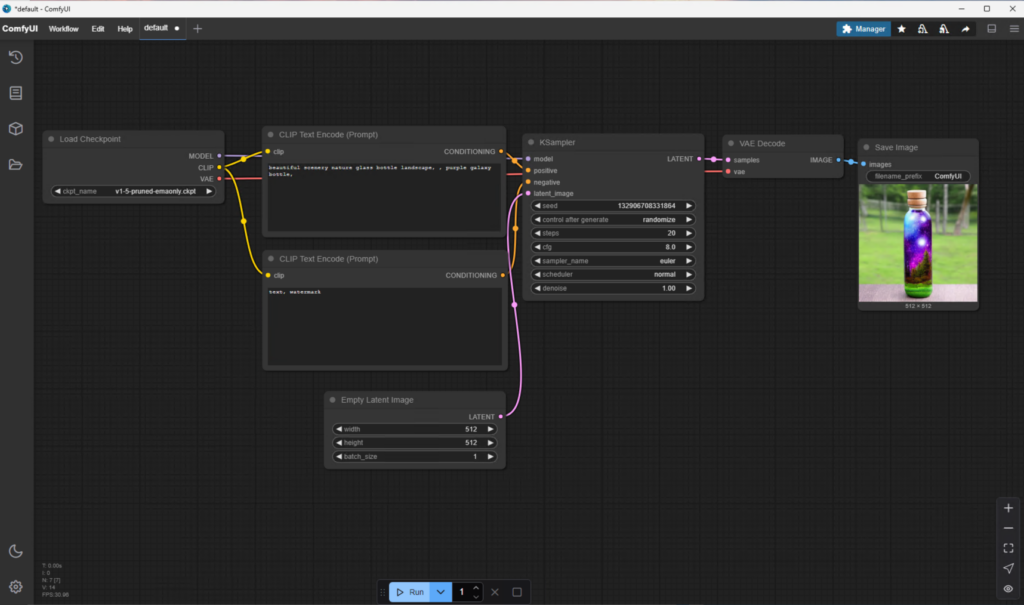
問題を解決して再度実行をクリックすると、ようやく画像を生成できました。
インストールの確認
ComfyUI が正しくインストールされ、動作していることを確認するには:
- サンプル画像を生成して、基本的なワークフローをテストします。
- GPU 使用率を確認するには、次のツールを使用します:タスク マネージャーまたはNVIDIA-SMIで GPU アクセラレーションが有効であることを確認します。
一般的な問題のトラブルシューティング
問題 1: Python が認識されない
- インストール中に Python が PATH に追加されていることを確認します。
- そうでない場合は、次の設定から Python ディレクトリを PATH に手動で追加してください:環境変数.
問題 2: CUDA 互換性エラー
- NVIDIA ドライバーと CUDA ツールキットが最新であることを確認します。
- GPU とインストールされている CUDA バージョンの互換性を確認します。
まとめ
このガイドに従うことで、Windows マシンに ComfyUI が正常にインストールされ、実行できるようになっているはずです。直感的なインターフェースと強力な機能により、AI 駆動の画像生成ワークフローを探索する準備が整いました。
次の記事
次の記事では、ComfyUI のインターフェースを一緒に見ていきましょう。ショートカットや操作方法を調べ、プラットフォームに慣れ、その可能性を最大限に引き出すお手伝いをします。お楽しみに!
2 thoughts on “C02: Setting Up ComfyUI on Windows: A Step-by-Step Guide”